B.I. don't find camera stream

Woody70

Getting the hang of it
Jun 9, 2020
207
40
Hemet California
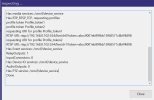
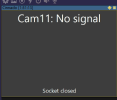
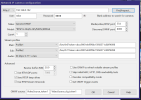
I have this Cinnado Model D1 camera. It is a very cheap camera so I don't need to be told that. I got it brand new for free and it is not something I really need.I have looked it up and it says it does work with B.I. But the thing is I am at a complete loss why Blue Iris will not find the video stream. It finds the camera immediately when putting in the IP and find and inspect.
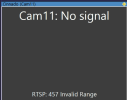
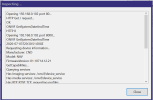
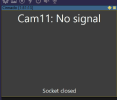
Then it comes up with this error: 457 invalid range, and the camera is right next to the router.I have tried many different rtsp streams to no avail, they do come up with different errors though. I have two routers on two different subnets running to two different NICs and have tried it with both and get the same results.Any thoughts on what could be wrong. I will post some of the screenshots.Thanks for any help.
 

Attachments

  • 1.Cinnado BI finds.png
    1.Cinnado BI finds.png
    25.3 KB · Views: 6
  • 2. General.png
    2. General.png
    578.8 KB · Views: 6
  • 3.BI Error-457 Invalid Range.png
    3.BI Error-457 Invalid Range.png
    14.1 KB · Views: 6
Assuming you know the camera username, password and IP address, try the following URL with VLC running on a PC that is on the same subnet as the camera and get back to us. You may also have to use a network scanner such as Fing or Angry IP to see if port 554 is, in fact, the RTSP port for that camera.

  • rtsp:/Camera-IP:554/ch0
  • or
  • rtsp:/Camera-IP:554/ch1
NOTE: be sure to place 2 "/" after "rtsp:" as the forum won't allow 2 to be displayed consecutively
 
  • Like
Reactions: VorlonFrog
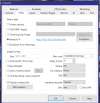
Also, how about a screenshot of the "Camera settings" => "Video" => "Configure" tab
 
Thank you for your reply. The camera app shows the RTSP and the Onvif ports for the camera and they are, RTSP:554 and onvif you can make from 8000 to 8999 and they are both set correctly in B.I. Also the camera has the option to use onvif password or not, and I have tried it with both and get the same results. I did try those RTSPs placing 2 "/" in VLC like many other ones they did not work, I assume that is what you meant, was to put them in the VLC program media stream and see if it came up. I have tried so many RTSPs and nothing seems to work. What is dumbfounding to me is, All the cameras that I have installed in B.I. that find and inspect finds, all have worked right then, except this one, and B.I. found this one faster than any it has before. I will get back with the screenshots you ask for. Also I have tried it with passwords from the app also with admin, admin and blank and nothing I try works.
 

Attachments

  • Video.png
    Video.png
    69.4 KB · Views: 5
  • Config..png
    Config..png
    145.3 KB · Views: 4
Last edited:
  • Like
Reactions: TonyR
Did you perform a hard reset of the camera when you got it (if it has that option) ?
 
Thank you for your reply. The camera app shows the RTSP and the Onvif ports for the camera and they are, RTSP:554 and onvif you can make from 8000 to 8999 and they are both set correctly in B.I. Also the camera has the option to use onvif password or not, and I have tried it with both and get the same results. I did try those RTSPs placing 2 "/" in VLC like many other ones they did not work, I assume that is what you meant, was to put them in the VLC program media stream and see if it came up. I have tried so many RTSPs and nothing seems to work. What is dumbfounding to me is, All the cameras that I have installed in B.I. that find and inspect finds, all have worked right then, except this one, and B.I. found this one faster than any it has before. I will get back with the screenshots you ask for. Also I have tried it with passwords from the app also with admin, admin and blank and nothing I try works.
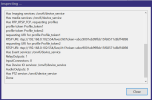
Perhaps you could post the results of the find/inspect window, it might give some insight as to a possible solution?
Does the camera have a web interface or do you have to use some sort of app to change settings on the camera?
 
Perhaps you could post the results of the find/inspect window, it might give some insight as to a possible solution?
Does the camera have a web interface or do you have to use some sort of app to change settings on the camera?
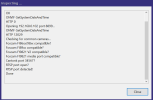
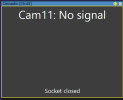
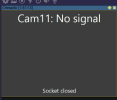
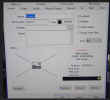
Here is the find and inspect window and the result from putting those URLs in the stream boxes.
 

Attachments

  • Find and Inspect.png
    Find and Inspect.png
    30.6 KB · Views: 3
  • Result.png
    Result.png
    12.9 KB · Views: 3
Thank you for your reply. The camera app shows the RTSP and the Onvif ports for the camera and they are, RTSP:554 and onvif you can make from 8000 to 8999 and they are both set correctly in B.I. Also the camera has the option to use onvif password or not, and I have tried it with both and get the same results. I did try those RTSPs placing 2 "/" in VLC like many other ones they did not work, I assume that is what you meant, was to put them in the VLC program media stream and see if it came up. I have tried so many RTSPs and nothing seems to work. What is dumbfounding to me is, All the cameras that I have installed in B.I. that find and inspect finds, all have worked right then, except this one, and B.I. found this one faster than any it has before. I will get back with the screenshots you ask for. Also I have tried it with passwords from the app also with admin, admin and blank and nothing I try works.
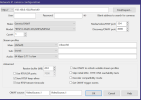
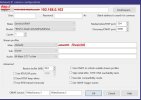
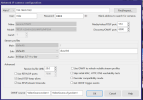
I don't know that this is the problem, but it would definitely be a problem: In your Network IP camera configuration window in Blue Iris (2nd screenshot in the attached image on the quoted post), erase everything except for the IP address in the first text box (after the "http://" dropdown). It should simply read "192.168.0.102". Take out the extra "/" at the beginning of the Main textbox (that's an invalid URL). If it still doesn't work, try turning off Use RTSP/stream timecode. If it still doesn't work, try copying the rest of the URL shown in the Inspector (i.e. the token) and see if that makes it work.