
Automated way for the 54IR Day and Night profile to change?
- Thread starter 105437
- Start date

You are using an out of date browser. It may not display this or other websites correctly.
You should upgrade or use an alternative browser.
You should upgrade or use an alternative browser.
tmxv4128
Getting comfortable
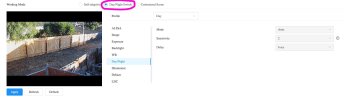
I use the day/night switch on my 54IR's.How are you guys getting the profile change from Day to Night happening?


Looksee
Getting comfortable
Select Customized Scene >
Day > configure settings > Apply
Night>configure settings> Apply
Select Day/Night Switch > Apply
Timer settings can be set further down from the settings shown in the image in the previous post
See revisions in post #21
Last edited:
When I first bought these and set them up I was using that way, but for a reason I can't remember, I stopped. I'll give it another try. ThanksI use the day/night switch on my 54IR's.View attachment 246111
What do you mean when you say Select Day/Night Switch > Apply, editing the Time Plan Settings?I "force" my Day/Night:
Select Customized Scene >
Day > configure settings > Apply
Night>configure settings> Apply
Select Day/Night Switch > Apply
Timer settings can be set further down from the settings shown in the image in the previous post
Looksee
Getting comfortable
After you have set the Customized Scene settings, you must apply them for use in Day /Night Switch.
You can then use Time Plan Settings to set a time based schedule, if you choose
edit: When you click on Day/Night Switch, double check that your Day/Night settings that you set under Customized Scene are the same, then click Apply.
You can then use Time Plan Settings to set a time based schedule, if you choose
edit: When you click on Day/Night Switch, double check that your Day/Night settings that you set under Customized Scene are the same, then click Apply.
Last edited:

bigredfish
Known around here
I thought day/night relied strictly on the light sensor?
I use Customized Scene
I use Customized Scene
Alaska Country
Getting comfortable
Have been using a LUX sensor to trigger a Dahua API to change day/night modes on a BI system for all cams. While time around sunrise/sunset works, LUX takes into account cloudy vs sunny conditions and switches modes based on light levels vs a preset time.
The mode change is only active during a window based on calculated local sunrise/sunset. The mode changes when a preset LUX value is reached. Works on both Web 4 and Web 5 Dahua cams.
The mode change is only active during a window based on calculated local sunrise/sunset. The mode changes when a preset LUX value is reached. Works on both Web 4 and Web 5 Dahua cams.
amdpowered
Getting the hang of it
What sensor have you been using?Have been using a LUX sensor to trigger a Dahua API to change day/night modes on a BI system for all cams. While time around sunrise/sunset works, LUX takes into account cloudy vs sunny conditions and switches modes based on light levels vs a preset time.
The mode change is only active during a window based on calculated local sunrise/sunset. The mode changes when a preset LUX value is reached. Works on both Web 4 and Web 5 Dahua cams.
What's the syntax to call the API for Day and Night. I could definitely do this. It's too bad the old Day/Night app doesn't work for the 54IRs. I used to use it and it was great for automating changing profiles.Have been using a LUX sensor to trigger a Dahua API to change day/night modes on a BI system for all cams. While time around sunrise/sunset works, LUX takes into account cloudy vs sunny conditions and switches modes based on light levels vs a preset time.
The mode change is only active during a window based on calculated local sunrise/sunset. The mode changes when a preset LUX value is reached. Works on both Web 4 and Web 5 Dahua cams.
Alaska Country
Getting comfortable
SeeWhat's the syntax to call the API for Day and Night. I could definitely do this. It's too bad the old Day/Night app doesn't work for the 54IRs. I used to use it and it was great for automating changing profiles.
Post number 52.
Alaska Country
Getting comfortable
For use with Hubitat the Zooz ZSE 11 works well for LUX data.What sensor have you been using?
All, I ended up using the Day/Night Switch mode for handling the Day, Night profile changes. It’s working pretty well, but I do have a couple of cameras that are slow to change to color in the morning.
I’m assuming it’s because of shade at their locations. Is there a way to adjust the sensor setting so even on a shady morning, those two cameras use the Day profile? Thanks!
I’m assuming it’s because of shade at their locations. Is there a way to adjust the sensor setting so even on a shady morning, those two cameras use the Day profile? Thanks!

You can't adjust the actual sensor per say, but changing settings like shutter speed will have a big impact on the timing of the switching. The slower the shutter, the faster it will go to color and the faster the shutter, the quicker it goes to B/W.

bigredfish
Known around here
I’m using manual shutter 0-4 for my Day profile these two cameras. They have a view of the road where vehicles are going up to 40 mph.
Which isn’t accessible it seems.Cameras have their own sensitivity settings for that under their own day/night setting
bigredfish
Known around here
I’ll give that a try later today and see how it works. That would be great if it would work like that. Thanks
That worked! I appreciate the tip.I’ll give that a try later today and see how it works. That would be great if it would work like that. Thanks