I have about 50- 4G each videos of my garage being built, and I plan on making a time lapse video. The Dahua produced H.265 @7fps .bvr. I've been fiddling with time lapse functions, but I'm not quite sure how the setting interact. I'm exporting to H.264. My speed multiplier is 60 and Playback fps is 7. If I were to increase my fps to 30, would BI create a faster playback or would it stuff extra duplicate frames into the 7 that are already recorded. If the latter then I should just keep 7, but if the former then it seems that BI would produce a faster and smoother video if I use 30. Also on the encoder configuration, I don't understand the Target key frame interval (GOP), which goes from 10 to who knows what. I thought perhaps I should be using 7 to match my fps, but since it starts at 10, I opted for 14 so that it stays in sync with 7. Am I totally missing what the frame interval is?
Hmm. It's not helping me that mediainfo reports my same media file is 7fps and Shutter Encoder says it's 30fps.
The 60x time lapse export came out 1:26min video is 1.13G @ 7fps 3840x2160, data rate 113157kbs
To compare The H.265 mp4 export is 6:41min video is 307M@ 7fps 3840x2160, data rate 6398kbs
Not sure what is pushing on that data rate? The time lapse is six time shorter but three time larger file size.
Update: I'll have to run some tests, but I took a 4G .bvr and exported at:
speed multiplier 1.0
Playback fps: 30.0 this was upscaled from original 7fps
encoder configuration, Target Key frame interval GOP: 14
End result was a 60G file H.264@14fps that played at the same speed as the original. I would have thought that instead of stuffing duplicate frames during export BI would have simply adjusted the time scale and the playback would have doubled. Do I need to explicitly set both fps and multiple to be in harmony? If I do that will BI make use of all the information or will it be duplicating frames, and why did I end up with 14fps and not 30fps?
Update: Upon further investigation, Mediainfo and shutter Encoder both report at 30fps and keyframe GOP of 14. But it seems Windows 11 explorer window is reporting the frame rate as 14 fps
This site has some good info on key frame rates that I'm just learning: What is a Keyframe Interval? Choosing the Right One
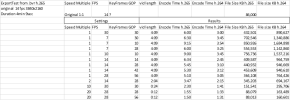
Update: I was wrong. I guess my .bvr file was originally 14 fps. I did some encoding trials on an I7-9700T, just FYI if anyone's interested.
Hmm. It's not helping me that mediainfo reports my same media file is 7fps and Shutter Encoder says it's 30fps.
The 60x time lapse export came out 1:26min video is 1.13G @ 7fps 3840x2160, data rate 113157kbs
To compare The H.265 mp4 export is 6:41min video is 307M@ 7fps 3840x2160, data rate 6398kbs
Not sure what is pushing on that data rate? The time lapse is six time shorter but three time larger file size.
Update: I'll have to run some tests, but I took a 4G .bvr and exported at:
speed multiplier 1.0
Playback fps: 30.0 this was upscaled from original 7fps
encoder configuration, Target Key frame interval GOP: 14
End result was a 60G file H.264@14fps that played at the same speed as the original. I would have thought that instead of stuffing duplicate frames during export BI would have simply adjusted the time scale and the playback would have doubled. Do I need to explicitly set both fps and multiple to be in harmony? If I do that will BI make use of all the information or will it be duplicating frames, and why did I end up with 14fps and not 30fps?
Update: Upon further investigation, Mediainfo and shutter Encoder both report at 30fps and keyframe GOP of 14. But it seems Windows 11 explorer window is reporting the frame rate as 14 fps
This site has some good info on key frame rates that I'm just learning: What is a Keyframe Interval? Choosing the Right One
Update: I was wrong. I guess my .bvr file was originally 14 fps. I did some encoding trials on an I7-9700T, just FYI if anyone's interested.
Last edited: