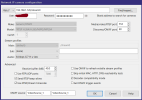
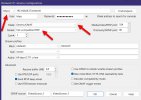
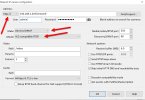
Anyone get Blue Iris working with Wyze 3 Beta Firmware that adds RTSP Support?

Did you follow all the instructions they provided? The stream path in your screenshot does not even match what they said to use (although further down in their instructions they do omit the trailing / themselves so it is probably fine)
 
Did you follow all the instructions they provided? The stream path in your screenshot does not even match what they said to use (although further down in their instructions they do omit the trailing / themselves so it is probably fine)
Sorry, Yes I tried with both, I just removed it in this example when I continued to test it.
 
I strarted with Wyze cameras 7 years ago but once I found BI and POE cameras, I dumped them an never looked back.
Here are the setting that I used in Blue Iris back then. They worked fair but I had lots of signal loss via WIFI.
Wyze44.jpg
 
I don't know what firmware I have but I have one from a few years ago as well and I had the same config settings as Broachoski minus the check for "Skip initial HTTP....".

I also agree that I had lots of WIFI singal loss Wyze. I also had issues where sometimes it wouldn't reconnect until I unplugged it, waited a minute, and then plugged it back in again. I finally gave on it and gave on them.

I also use POE now for anything critical but I do have a few WIFI cameras just to keep track of my cat and dog. Here are the ones I have (and still use today) if you want to return and try something different.

Tapo are similar to WYZE:

Tapo TP-Link C110

Tapo 2K QHD C120

Amcrest and EmpireTech are larger with Pan/Tilt:

Amcrest 841W (Little more expensive)

EmpireTech H4C (most expensive)

(edit) One more thing I will add. If just recording (not using motion triggers) the Wyze and Tapo are OK but if you are using Motion triggers in BI then they aren't the best because the I-frames don't match the FPS. In the Amcrest and EmpireTech you can configure those.
 
Last edited:
  • Like
Reactions: Broachoski
Yeah Tapo c120's is amazing outside the bloody 2.4ghz limit again and I use it also. Just wanted to recycle these old Wyze v3's as they came out with RTSP support in the new beta firmware i linked.

Sadly everyone here using the unofficial firmware it seems from the community, where I was hoping someone was using the new beta ones from the devs.

Thanks for everyone's advice though :)
 
  • Like
Reactions: AlwaysSomething
Just wanted to say they released this now for beta so you don't need to use a sdcard, etc to access the camera's to add rtsp support. Crazy enough I can load up it fine in VLC, but not blue iris 6.0.013 or whatever the new one was 2 days ago... Was hoping once went into normal beta it would work but nothing....

 
I've got the same problem. Just a few days ago I loaded up the new firmware that enables RTSP on the v3 cams, and I'm having the same problem adding one into Blue Iris. Changing the protocol to RTSP doesn't make a difference; changing the URL to match what the camera tells me in the WYZE app doesn't work, either. I'm still working on it, and will try to come back and update this if/when I get it working.
 
Amcrest ASH-21 cameras are cheap, have both Wifi and Ethernet, Pan and Tilt, and work fine with BI.
 
Just wanted to say they released this now for beta so you don't need to use a sdcard, etc to access the camera's to add rtsp support. Crazy enough I can load up it fine in VLC, but not blue iris 6.0.013 or whatever the new one was 2 days ago... Was hoping once went into normal beta it would work but nothing....
The official instructions from Wyze still point to the How to flash your Wyze Cam firmware manually page, which still says it requires an SD card:

It requires additional knowledge and devices, including a microSD card, microSD card adapter, and a computer with an SD card slot.
Did you find a way to install that does not require an SD card?
 
I finally got it working. This required:
  1. Turning off RTSPS in the v3 camera:
    1. BlueIris doesn't support RTSPS, and Claude reports that Wyze's RTSPS implementation is broken anyway. I couldn't even connect via VLC. And Ken says RTSPS support is not currently high on his priority list.
    2. When you turn off RTSPS in the Wyze app, on some phones (like my iPhone 15 Pro), the Accept button is not visible, and there's no way to scroll to it. The workaround is to install the Wyze app on an iPad, with a screen large enough for the Accept button to display.
    3. But don't click it yet!!!!! If you click Accept right away you'll get a "could not save RTSP settings" error, and it will stay with RTSPS. You must wait a minute or two before clicking Accept, and then RTSPS will turn off and leave with you vanilla RTSP.
    4. Test in VLC.
  2. These are my settings in BlueIris:
    1. 1785540227091.png
  3. I also had to reboot the camera. Although I could VLC into it from my work computer, the BI computer could not, which Claude was guessing might be an IP lockout because BI had been retrying so frequently. Dunno if that's true, but restarting the camera did fix it, and now I have my v3 camera working in Blue Iris, without Docker-Wyze-Bridge, and with the garage door opener accessory also working via the Wyze app.
 
And Audio must be enabled in the camera settings. Per Claude:
when audio is enabled, Blue Iris sets up both tracks and the camera streams fine. When audio is off, Blue Iris only sets up video — and this particular firmware refuses to send any media (video included) unless every track declared in the SDP gets set up. It's a real firmware compliance quirk (RTSP normally allows video-only setup), but it's completely avoidable.

Fix: in Blue Iris, open the camera's settings → Audio tab → enable audio
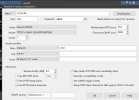
I now have 3 of these working at 2 different locations.
 
All 3 cameras are v3 hardware, running 4.36.16.7064. Multiple cameras restarts required, so keep trying! And/or put Claude AI on the case to troubleshoot.