Any tips for adding camera to travel router at remote location?

Bad1Billy

n3wb
Dec 11, 2020
7
21
COS, CO
Hey, loooong time lurker here. Searched for this but couldn't find it.

First off, thank you all for contributing to this forum. I've learned so much here and love my BI system. I have 5 5442 cams around the house with an Asus router running OpenVPN . This forum has helped me dial it all in even though I am a noob in so many ways still. I know enough to be dangerous and screw things up regularly when I tinker (sad but true). No way could I have done this without the generous comments, suggestions and ideas from this community.

We have a condo near the grandkids where I installed a travel router (GL.inet) so I could stream my cable feed and not buy another subscription. So far so good. I thought I could just plug a camera into it and it would be seen on my home network (I mentioned I'm a noob) and I could add it to BI. WRONG. It seems I have to adjust my settings on the home router's OpenVPN setup and the travel router to allow traffic flow both ways. Haven't gotten to do the travel router as it's a few hours away.

Here's my confusion. Once I do enable 2 way traffic on the travel router, I add the camera on the travel router network if I understand correctly? What should that look like? The "native" address is 192.168.8.1 which I used to make it an OpenVPN client. Will it be 192.168.8.xxx? I'd like to get this straight so I can dial it in the next time I go. I bought a 54PRO cam from Andy and am anxious to install.

Thanks for any help you can provide...
 
It can be confusing because there are so many different network segments at play, but to connect the remote camera to your home BI setup, you would use the actual IP address of the camera when you are setting it up in BI. For example, if the local network has an IP address range of 192.168.1.1/24 and the condo network has an IP address range of 192.168.8.1/24 and the actual camera located at the condo has an IP address of 192.168.8.10, then 192.168.8.10 is the address you would type into the BI settings for that camera. The "tunnel" IP address needs to be unique (ie not on the same network address range as either the local or condo networks - 192.168.1.X or 192.168.8.x in this example), but it isn't used anywhere outside of the actual tunnel connections. It's not an address you need to remember or use to connect devices at either end of the tunnel.
 
  • Like
Reactions: bp2008
I really appreciate you getting back to me. I'll give it a shot. I recently used DMSS for a 2 cam setup for my daughter but I already have BI and it makes sense to just add another camera there.
 
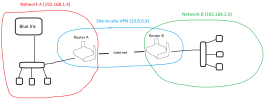
A diagram might help. Please forgive my 8-year-old mspaint drawing skills.

You will end up with 3 distinct networks. Although one of them is just the VPN network which is entirely software-defined and consists only of the two routers.


1772313938032.png

In my example:
Network A is just the LAN at location A, and it uses the IPv4 subnet 192.168.1.0 - 192.168.1.255.
Network B is just the LAN at location B, and it uses the IPv4 subnet 192.168.2.0 - 192.168.2.255.
The "Site-to-site VPN" network is the software-defined network you end up with when you run a VPN server in Router A and a VPN client in router B. In my diagram I assigned the VPN the IPv4 subnet 10.8.0.0 - 10.8.0.255. This is because Router A and Router B will each have a VPN network interface, and they each need an IP address (for example Router A could use 10.8.0.1 for its VPN interface and Router B could use 10.8.0.2.

The exact subnets (IP address ranges) you use for each of the 3 networks do not matter as long as each network has a different non-overlapping IP address range. And you should not use any publicly routable IP address ranges for these private networks. Typically it is safest to just use 192.168.X.X and/or 10.X.X.X stuff as those are the most easily recognized private IP address ranges that are reserved for use in private networks.

Anyway assuming you set it all up correctly, the two routers will know how to route traffic between them such that devices in Network A and Network B can talk to each other seamlessly. If you have a camera within Network B with the address 192.168.2.110, then you can have Blue Iris connect to it by entering 192.168.2.110 in the IP address field in Blue Iris. Do not assign the Blue Iris machine its own IP address in the 192.168.2.X network. Nothing in Network A should be assigned an IP address that belongs to Network B's subnet, and vice-versa.

I've pretty much glossed over subnet masks so far. In my example all subnet masks are 255.255.255.0 which is also commonly written as /24 at the end of a regular IP address. E.g. 10.8.0.1/24 is shorthand that describes the address 10.8.0.1 in the IPv4 subnet 10.8.0.0 - 10.8.0.255. I mention this because you might see that notation like /24 or /30 or something in one of the router's web interfaces.
 
Last edited:
Hey, loooong time lurker here. Searched for this but couldn't find it.

First off, thank you all for contributing to this forum. I've learned so much here and love my BI system. I have 5 5442 cams around the house with an Asus router running OpenVPN . This forum has helped me dial it all in even though I am a noob in so many ways still. I know enough to be dangerous and screw things up regularly when I tinker (sad but true). No way could I have done this without the generous comments, suggestions and ideas from this community.

We have a condo near the grandkids where I installed a travel router (GL.inet) so I could stream my cable feed and not buy another subscription. So far so good. I thought I could just plug a camera into it and it would be seen on my home network (I mentioned I'm a noob) and I could add it to BI. WRONG. It seems I have to adjust my settings on the home router's OpenVPN setup and the travel router to allow traffic flow both ways. Haven't gotten to do the travel router as it's a few hours away.

Here's my confusion. Once I do enable 2 way traffic on the travel router, I add the camera on the travel router network if I understand correctly? What should that look like? The "native" address is 192.168.8.1 which I used to make it an OpenVPN client. Will it be 192.168.8.xxx? I'd like to get this straight so I can dial it in the next time I go. I bought a 54PRO cam from Andy and am anxious to install.

Thanks for any help you can provide...
You are close, the camera does not get a home network address, it stays on the travel router subnet. Think of the travel router as just another remote LAN joined by VPN, not merged into your main DHCP pool. So if the GL.iNet side is 192.168.8.1, the camera should be something like 192.168.8.20 with that router as gateway. The key step is making sure your OpenVPN config allows bidirectional routing between 192.168.1.x at home and 192.168.8.x at the condo, plus adding a static route on the Asus so it knows that 192.168.8.0 network lives across the tunnel. Once that is in place, Blue Iris should add the camera using the 192.168.8.x address directly, no port forwarding, no NAT, just routed traffic over the VPN. If you try to force it into the 192.168.1.x space it will fight you the whole way.