Can someone explain me what exactly the 3 options mean in the AI Alert confirmation settings, specifically the motion required options:
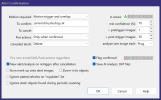
There are 3 options:
I am not sure what overlap is meant here? And if Motion required is "No", how would AI then be triggered?
I want to let motion detection detect a motion and create a trigger. This trigger would then invoke the AI to confirm it.
There are 3 options:
- No
- Motion trigger and overlap
- Motion overlap only
I am not sure what overlap is meant here? And if Motion required is "No", how would AI then be triggered?
I want to let motion detection detect a motion and create a trigger. This trigger would then invoke the AI to confirm it.