

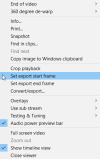
I should have posted this sooner. As of update 6.0.4.9, Ken added a new feature that allows you to easily grab the actual clip offset values from Set export start frame and Set export stop frame icons in playback mode.
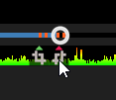
To access this feature in playback mode, simply Ctrl-Right click on the start/end frame clip icons.
The comma-separate offset pair will be loaded into the Windows clipboard, like
NOTE: This works only if you manually Set export start frame and Set export stop frame via the dialog in the first screenshot.
This feature is similar to using the Ctrl-right-click on any item in the Clips list, which loads the database locator to the Windows clipboard (post).
To access this feature in playback mode, simply Ctrl-Right click on the start/end frame clip icons.
The comma-separate offset pair will be loaded into the Windows clipboard, like
651100,674433.NOTE: This works only if you manually Set export start frame and Set export stop frame via the dialog in the first screenshot.
This feature is similar to using the Ctrl-right-click on any item in the Clips list, which loads the database locator to the Windows clipboard (post).
Last edited:
