32 Channel NVR with 16 POE not working

D!ngo

Young grasshopper
Feb 12, 2016
46
14
I have an LTS LTN8932-P16, which is essentially a Hikvision with 16 built-in POE. I had 16 cameras connected to all the POE ports.

Last year, the built-in POE stopped working, so I got a 48-channel switch and transferred all 16 cameras to it, and plugged the uplink from the switch to the NVR. The NVR automatically assigned them to channels 17 to 32 with new IPs. The original 1 to 16 IP information is still there.

Now I wanted to add more cameras to it, but the NVR says it's full. I tried to delete the non-working POE, but it says "does not support delete operation".

I tried erasing the IP from each channel, but couldn't.

Is there a way to delete the non-working channels or remove the POE ports from the NVR? Any workaround to add more cameras? It still thinks there are cameras connected to its POEs.
 
Now I wanted to add more cameras to it, but the NVR says it's full. I tried to delete the non-working POE, but it says "does not support delete operation".
NVR PoE channels can't be added to or removed, but they can be re-assigned to use a LAN-connected camera instead of one connected to the on-NVR PoE port.
Depending on the firmware version, this can be done by either a menu choice in the NVR web GUI, or by changing the channel mode to Manual instead of Plug&Play and specifying the LAN IP address of the camera.

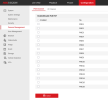
This Hikvision NVR has all its PoE ports assigned to LAN-connected cameras on an external PoE switch via the enable / disable tickbox :

1763806461933.png
 
Last year, the built-in POE stopped working
Just a thought - did you check if the power supply is still providing the 48v that the PoE circuitry needs?
If the 48v is missing, that won't stop the rest of the NVR working.

Also - the PoE channels each have several 'transient protection devices' designed to absorb or self-sacrifice if / when the cabling presents an overvoltage to the port. This would only affect individual ports if it occurs.
The 48v supply rail also has over-voltage protection, which if it goes short, as designed, would take out all PoE channels.

Either way, an electronics-savvy person should be able to explore that possibility.

However - you've already established the workaround, so not that relevant, but posted in case someone else is in a similar position.
 
  • Like
Reactions: D!ngo and looney2ns
Just a thought - did you check if the power supply is still providing the 48v that the PoE circuitry needs?
If the 48v is missing, that won't stop the rest of the NVR working.

Also - the PoE channels each have several 'transient protection devices' designed to absorb or self-sacrifice if / when the cabling presents an overvoltage to the port. This would only affect individual ports if it occurs.
The 48v supply rail also has over-voltage protection, which if it goes short, as designed, would take out all PoE channels.

Either way, an electronics-savvy person should be able to explore that possibility.

However - you've already established the workaround, so not that relevant, but posted in case someone else is in a similar position.

alastairstevenson,​

Thank you for your reply and sorry for the late response.

This is the result of my findings in case someone searches for the same problems as me.

I removed the NVR to test the power going to the POE side. There is voltage going into the POE board, but no voltage on the output. I do see a few capacitors with bulging tops, which I think is the culprit. There were about 5 or 6 different sizes. I had a difficult time trying to remove them, and also trying to find the exact size for each one took more time than I thought, so I gave up.

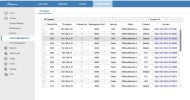
Also, I could not get the POE disabled because there are no options for me to do that in the web interface. Selecting the individual cameras, then clicking on Modify, then changing from PnP to Manual didn't do anything either. Because my NVR/camera system was bought from a reseller member, named Frankie, here on ipcamtalk about 7-8 years ago, I couldn't get LTS to do a software update without going through him, and he didn't respond to my request the last time I contacted him.
Capture.JPG

So I don't want to deal with LTS and its reseller's lack of customer service. I bought a Hikvision DS-7732NI-M4 from Planet Security in Florida on a Black Friday sale for $599. They are an authorized Hikvision reseller/installer, and they confirmed that the NVR is an English version. They have an excellent 4.9 rating and an A+ on BBB. From what I gathered, this NVR is miles better than the LTS I have.

Thanks again and Happy Holidays!!!
 
Last edited:
There is voltage going into the POE board, but no voltage on the output.
PoE ports won't show much of a steady voltage on them - the PoE handshake needs to happen before the 48v is asserted.

I do see a few capacitors with bulging tops, which I think is the culprit.
That's not good! Depending on where in the circuit they are, that could certainly cause a fault condition.

However, I couldn't find the exact size for the different ones that I see bulging.
A bit larger capacitance, and at least the same rated voltage, would be fine. Generally they don't have to be an exact match.

Also, I could not get the POE disabled because there are no options for me to do that in the web interface.
Yes, existence of that option varies with the firmware version and NVR model.

clicking on Modify, then changing from PnP to Manual didn't do anything either.
That's surprising, and disappointing, I've used that to re-direct a PoE channel to a LAN-connected camera a few times.
Odd. I wonder if the age of the firmware is implicated.

From what I gathered, this NVR is miles better than the LTS I have.
That's probably the best move!

Happy Christmas to you too!
 
  • Like
Reactions: D!ngo