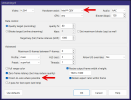
Hello, apologies if this has been asked and addressed; if it has, I'd appreciate a link to the thread.
Here's my setup:
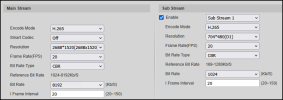
Cameras: 12 x Dahua IPC-T5442TM-AS and 1 x IPC-HFW5241E-Z12E
Server:
Hardware: Intel i7-12700, 32GB DDR5 on B760M board.
OS: Windows Server 2025
Blue Iris: v6.0.5.6 and UI3 v323
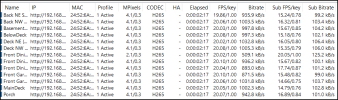
I have had this setup (with an older computer) for about 4 years and everything worked as expected. Had to rebuild the server last year due to hardware issues. I have continuous + alerts recording on all 13 cameras with main and sub streams configured.
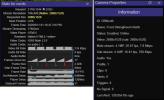
Not sure when exactly this issue started, but, I noticed it this morning - clicking on a camera in UI3 grid view opens the camera but the image quality is blurry. In looking at the properties in UI3, it looks like it's the substream being rendered and not the mainstream. This happens with both live view and timeline view.
Within the BlueIris console, single camera view renders a sharp image and is the main stream (as expected). And so does viewing any recorded clip.
Are there any settings that can be preventing single camera view from switching to main stream via UI3?
Other data points that may be relevant:
Here's my setup:
Cameras: 12 x Dahua IPC-T5442TM-AS and 1 x IPC-HFW5241E-Z12E
Server:
Hardware: Intel i7-12700, 32GB DDR5 on B760M board.
OS: Windows Server 2025
Blue Iris: v6.0.5.6 and UI3 v323
I have had this setup (with an older computer) for about 4 years and everything worked as expected. Had to rebuild the server last year due to hardware issues. I have continuous + alerts recording on all 13 cameras with main and sub streams configured.
Not sure when exactly this issue started, but, I noticed it this morning - clicking on a camera in UI3 grid view opens the camera but the image quality is blurry. In looking at the properties in UI3, it looks like it's the substream being rendered and not the mainstream. This happens with both live view and timeline view.
Within the BlueIris console, single camera view renders a sharp image and is the main stream (as expected). And so does viewing any recorded clip.
Are there any settings that can be preventing single camera view from switching to main stream via UI3?
Other data points that may be relevant:
- Testing with a Win 11 device on the same LAN - 1GB3 wired LAN, Chrome and Edge browsers
- Tried enabling DIrect to wire and with it disabled
- UI3 profile in the browser is set to inherit all settings.
- Cameras are set to send H265 streams for both main and substreams to Blue Iris.
- About this UI in UI3 shows support for H264 and H265
- With Direct to wire enabled, H265 streams play fine in the browser. With it disabled, the stream defaults to H264.
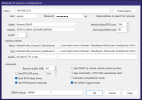
- I've tried changing other settings in the BI -> settings -> WebServer -> "Streaming 0" - encoder page to see if it makes a difference.