Snapshots Not Being Sent with Dahua WizMind NVR5216-16P-I

Longview

n3wb
Nov 27, 2020
7
6
Texas
I am certain it is my error but can't find it? It records (General, Motion and Alarm) all Tripwires. I can view the snapshots in the AI search but they are not sent to my E-Mail?
The other cameras send but not this one. Does anyone have a checklist for me to compare to my configuration to see what is missing? I have the snapshot times established for 24 Hours, the drives configure for recording 24 hours, I can successfully test the email send. Don't nkw why this one camera fails?
 
I don't have that exact camera but you should have two settings (assuming its recording snapshots under the main recording schedule/snapshot)

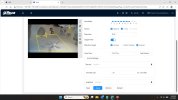
  • on the camera individual IVS rule their is a snapshot box to tick (as well as the "Record" and "Snapshot" event linkage
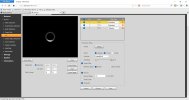
  • on the NVR on email setup there's an "attachment" box to tick
record-snapshot.jpg
record-snapshot2.jpg
 
Last edited:
BIGRED: Your the best! That nudge got me searching every setting in the NVR. After 30 Minutes I found a setting labeled MORE!

When clicking on it, showed alerts, email and several more, the E-Mail was NOT CHECKED! It is working now. Thanks a million...
 
  • Like
Reactions: bigredfish
Thanks, my camera is eight years old. I have a new one from Andy but installers want too much to replace it. ($400 for a manlift plus labor fees).

Might try it this summer.

I mean the NVR should see it and synch. I’ve had it do that on a number of cameras
 
Maybe you have seen this? When I select (AI Manage by Camera) it defaults to (AI Manage By NVR). Not a dealbreaker but a nuisance. I can no longer login to the Camera Locally so I need to replace it, not worth the cost of resetting such an old device.
 
  • Like
Reactions: bigredfish