Wooded campground -- 3 cam zones connected via bridges to Starlink

Apr 21, 2026
10
1
United States
Hi all. Need some guidance here please. I've been charged with setting up 3 surveillance zones in a heavily wooded campground --- a "home" zone at the camp store/office, and 2 remote zones monitoring several buildings 500 ft away and 700 feet away respectively. The remotes will have 5 and 6 indoor & outdoor cameras, most PoE/some wifi+solar in each zone. Hoping to utilize an NVR to collect each remote zone's feeds and then ALSO to also transmit each of those 2 remote zone feeds back to the office zone using bridges.

Because of trees, I'll have to relay the bridge zones but 2 of the relay points won't have access to 120v power, nor will the tree canopies allow for a solar panel/battery/inverter to provide power. Any ideas from you fine folks?

The best way I can describe my proposed layout is as follows :
Bridge jump #1 : Store to Pole #1 (~60 yards clear line of sight but no power)
Bridge jump #2 : Pole #1 to Pole #2 (~80 yards clear LOS, but no power)
Bridge jump #3 : Pole #2 to Remote Zone 2 (~50 yards clear LOS, has power available)
Bridge jump #4 : Pole #2 to Remote Zone 3 (~80 yards clear LOS, has power available)

Am I able to "push" power from the store to pole #1 using a PoE injector?
Am I able to "push" power from either (or both) remote zone buildings to pole #2 using a PoE injector?

Any other special hardware needed to achieve this other than outdoor PoE switches on each jump end? Can I use ONE switch on pole # 2 to power and xfer signals from all three jumps connected to that pole? Wanting to utilize our store's Starlink Gen 3 for all wifi coverage too, so not sure on what special hardware needed (I've seen a Starlink Gen 3 Ethernet Adapter being needed?). Sorry, so many questions and can't quite find an answer anywhere online for my unique situation.

Final question : am I able to gather the many camera feeds into ONE NVR at the store (store will have 7 cams, zone 2 = 5 cams, zone 3 = 6 cams), or will I be better off using an NVR at each zone? Boss wants to be able to pull up any camera on his phone so was hoping to gather ALL feeds into one place for him to access. He'd prefer Reolink hardware so have been building a shopping list of cams and NVRs to look at. Any assistance GREATLY appreciated.

Cheers all, Mike
 
How about a simple, hand-drawn but clear sketch of the proposed layout that reflects the above? Speaking for myself, it would clarify things a lot.:cool:
 
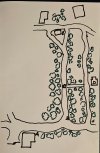
Sorry for that. Here's a drawing that (hopefully) helps show the layout. Forgive me if I'm not using the correct nomenclature ---- I think each connection between a pair of bridge antennae is called a jump, but I might be wrong.

Starting at the bottom left is the camp office, with the start of jump 1 marked "A". Moving to the right is the end of jump 1 / start of jump 2 marked "B". Head up the road halfway to a power pole which would be the end of jump 2, marked "C". From that point, I anticipate bridges heading in two different directions ..... pole "C" to the building on the right edge marked "D" being one jump, Pole "C" heading towards the buildings in the upper left marked "E".

I have no power readily available at points "B" and "C" and the tree canopies would unfortunately make a solar panel-sourced power supply impossible. Points "A", "D" and "E" all have 120v AC power available.

Groups or clusters of cameras would be at the following points : A (camp store), D (remote bathhouse) and E (laundry/pool etc). Each of these three locations will likely have their own NVR if I can't get ALL individual camera feeds to the home base at building A (camp store) in one large switch/NVR setup. Grand total of around 18 cameras (A=7 cams, D=5 cams, E=6 cams).

Hopefully this makes more sense now. Open to ANY and ALL ideas or thoughts or other options.
Cheers to all. Mike
 

Attachments

  • Camp_pic.jpg
    Camp_pic.jpg
    403.9 KB · Views: 21
Regarding your question to run POE power to poles B and C, are those 2 poles privately owned (by the campground) or by the local power company? If they are installed, owned and maintained by the power utility co. then "no", you cannot and should not run any kind or cables to them and between them.

It would require written permission from them and there would be specific requirements and specifications, a complicated process, IMO. :confused:
 
There are trees that I could mount the hardware on, so I don't need to use the power poles. Thank you for pointing that out.
Location A: Install 16 channel POE NVR or PC with VMS such as Blue Iris and 8 port POE switch for 7 POE cameras
Location D: Install 8 port POE switch and 5 POE cameras
Location E: Install 8 port POE switch and 6 POE cameras

Run up to 325 feet of Ethernet cable with outdoor-rated jacket (water, UV) from switch to switch, and built-in messenger cable for support and hanging, path depends on distances, so what are distances from (poles or trees) ? :
  • A to B
  • B to C
  • C to D
  • C to E
The idea is to have 1 NVR or PC/VMS at Loc. A and network all the other locations to it via Ethernet cable and switches. No solar, no Wi-Fi except at A, D and E for local access, not for cameras.

BTW, what is your geographic area?
 
  • Like
Reactions: VorlonFrog
so what are distances from (poles or trees) ? :
  • A to B
  • B to C
  • C to D
  • C to E
A to B = 200 feet
B to C = 300 feet
C to D = 180 feet
C to E = 400 feet

I was really steering away from hardwiring the links because below ground are the roots of 100 trees (even along the roadways some are flush with the hard-packed gravel) so even dragging a heavy toe for a 6" deep trench would be beyond arduous. Overhead would be the only other option for hardwiring and some of these trees sway a lot in decent winds. We're in central NJ in the pine barrens, BTW. So that's why the idea of wireless bridges seemed the path of least resistance.
 
I was really steering away from hardwiring the links because below ground are the roots of 100 trees (even along the roadways some are flush with the hard-packed gravel) so even dragging a heavy toe for a 6" deep trench would be beyond arduous.
Understood, which is why I suggested Ethernet with a messenger wire so it can be strung overhead between poles and/or trees.

So that's why the idea of wireless bridges seemed the path of least resistance.

The C to E run of 400 ft: Is there LOS (Line Of Sight) between those 2 points?
 
Thanks Tony! Hmmm, never heard of messenger wire before. So this changes things up. Yes, clear LOS between C and E. So you're thinking a Cat6 + messenger for the long run feeds back to the store/office (A)?

Zone D to home base A :
Multiple PoE cams --> direct wired --> 8 port PoE switch --> long run Cat6+msgr back to home base A

Zone E to home base A :
Multiple PoE cams --> direct wired --> 8 port PoE switch --> long run Cat6+msgr back to home base A

Home base A with capable switch for local zone cams PLUS the 2 incoming streams from D and E, all hooked into a single NVR and our Starlink Gen3 router.

I found this Youtube video where the guy ran Cat6 up over 2000 ft using outdoor PoE extenders.... IYHO, is this the direction I should be looking at for the long runs? In our perfect world (if there ever was such a thing), zone E actually consists of three different buildings so could I use some wifi cameras hooked into a local router along with the PoE cameras in that zone, all hooked up the the Zone E switch, or would I need an NVR in that zone's base to tie in the wifi and PoE camera feeds?

Sorry, sometimes I take in TOO MUCH info while learning that I end up confusing myself. Please be gentle with me whilst I'm learning all this on the fly....... Thanks Sir!
 
Last edited:
1) Avoid streaming any camera video, even via Ethernet, through the Starlink or any router.
2) Wi-fi cameras and router Wi-fi does not stream video well.

Earlier, in my post #6, I asked about your geographic area...this is primarily because of lightning. I'm all for hardwire vs Wi-Fi but purpose-built, layer 2 transparent wireless bridges such as from Ubiquiti can mitigate some issues cause by long overhead, hardwired runs in a lightning prone area....if LOS is good.

The Ubiquiti wireless bridges use proprietary protocol, higher sensitiviy and power output to provide superior quality and reliability when compared to conventional Wi-Fi obtained from consumer-grade routers. It's like a Ethernet cable with regards to data, from point to point, just minus POE capability and less liable to suffer induced ESD damage from nearby lighting strikes.
 
  • Like
Reactions: looney2ns
So you're suggesting using the Ubiquiti bridge just for the E-->C stretch, or E-->A stretch? Is this a viable option if I don't have a power supply at pole/tree C (and pole/tree B if going all the way back to A)? Kinda liking the idea of the hardwire both for ease of installation and for lack of turning my brain into a pretzel, but the $550 for 1500ft of Cat6+msgr is a 20% chunk of the budget allocated to me for this project. My sanity has got be worth something, right? I watch these videos of guys allocating IP addresses and all the networking stuff and wonder if I've bitten off more than I can chew. I love a good "Atta boy", but if I don't doubt my skillset, who will?

And the only reason we'd connect it the Starlink is so we can have live feed remote access (at night from our campsites, or in the offseason when we shut down (Nov--March when we are all off-property but want to watch over it). I would imagine the vast majority of the reviewing of footage recorded on the NVR would be done at the home base (office/store).

FYI, on property we already have one Reolink RLN8-410 NVR and I think 8 of their B400 PoE cameras (mostly not deployed yet but a couple already in use I can utilize as part of the new store/office surveillance --- all installed by prior management. There are two other standalone systems barely working on property (each of them using a Dahua N41B1P2 NVR and a set of six N42BJ62 IP cameras --- half deployed already, the others still brand new in their boxes. So redeploying some of this hardware into the new setups is money saved out of my budget obviously.

I really appreciate your feedback and input into all this, Tony. Looking forward to finally locking down the plan and the shopping list of hardware and crossing this off my to-do list. Boss has a Reolink single cam setup just for monitoring his rig and loves the brand, so is pushing me towards trying to get as much Reolink hardware as possible (cams, NVR, switches etc). Any suggestions you have in this regard TREMENDOUSLY appreciated.
 
It is amazing the love people have for Reolink in other socials LOL. People get fascinated with bright static images and think they are great. Until something happens.

Reolinks suffer from firmware designed to provide a bright static image in low light conditions. But that comes at the expense of not getting clear captures at night.

Reolink gets lots of ghosting and blurring, and sometimes the invisible man LOL.

If all you care about is to look around, then probably ok. But if you plan to be able to use them in the event something happens and you need to get the police involved, think again....


What you mean a missing hand isn't normal LOL :lmao: (plus look at the blur on the face and he is barely moving and this should be ideal indoor IR bounce and it struggles):
1708801531582.png


How about missing everything but the head and upper torso :lmao:

The invisible man, where can he be. Thank goodness he is carrying around a reflective plate to see where he is LOL (hint - the person is literally in the middle of the image at the end of the fence holding a rectangular reflective piece of metal)

I've seen better images on an episode of ghost hunters :lmao:


1708801585568.png


And of course, this is an example from Reolink's marketing videos - do you see a person in this picture...yes, there is a person in this picture.... Could this provide anything useful for the police other than the date and time something happened? Would this protect your property? The still picture looks great though except for the person and the blur of the vehicle... Will give you a hint - the person is in between the two visible columns:

1708801599328.png


Bad Boys
Bad Boys
Watcha gonna do
Watcha gonna do
When the camera can't see you


Here is the unofficial Reolink thread.

You can see all the attempts people have provided to demonstrate the quality of Reolink, and they are all a blurry mess at night or missing body parts or other messes.

We have challenged someone to provide a clean capture of someone moving at night with a Reolink and as you can see with over 20 pages, nobody has yet to provide a usable image with motion at night.


Reolink: Deconstruction of a dangerous misleading youtube review "Finding the BEST 4K Security Camera NVR Package (Reolink vs Amcrest vs Swann)"

Most will say these don't cut it.
 
Just for spits n giggles, I might go ahead and set up one of the unused B400 cams outside the office to see what image quality they give at night. So if not Reolink, what brand would you suggest? I have a $2500--$3000 budget for everything so having some unboxed brand new hardware sure helps the cause but I'd be shocked if they're not proprietary and incompatible with other brand NVRs. I would hope that other hardware (switches etc) would present little to no compatibility issues if cross-branding.
 
Netgear switches are economical and trusted here.

Empiretech cameras are trusted here - They are Dahua OEM without paying for the Dahua Logo LOL.

Without knowing what your goals of the camera is, this thread is used as the go to for the new person here outlining the commonly recommended cameras (along with Amazon links) based on distance to IDENTIFY that represent the overall best value/best bang for the buck in terms of price and performance day and night. It might be a 2MP camera in some instances. Many here feel 4MP is the current sweet spot for these cameras.

The Importance of Focal Length over MP in camera selection

And coupled with that thread is this great thread which will show why all of the same 2.8 or 3.6mm cameras is the wrong choice (these are the common focal lengths consumer brands sell):

i-want-2-8mm-cameras-everywhere-to-see-everything-this-is-why-you-need-specific-fovs-with-purposeful-focal-lengths.70053/

We would encourage you to look at those threads in detail.

It will probably raise more questions than answers LOL.
 
  • Like
Reactions: VorlonFrog
Wow, quite eye-opening indeed. Just when I thought a 4K cam would give me significantly better detail than a 2K, you've just thrown that out the window. But maybe it did need to be thrown out, to tell the truth. I did read up at the start of this project about DORI but had not circled back yet to incorporate that into our camera selection decision-making process. And even then, my budget constraints will likely leave me with less-than-ideal options.
 
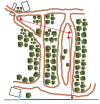
Well the project keeps evolving..... the latest iteration --- if it's feasible --- is to link the two remote zones together via wireless bridge, then add a second bridge to bring the camera feeds from BOTH remote zones down to a boundary fence, and run Cat6 along that boundary fence back to the office/store (approx 275--300 ft).

Updated layout attached. Red diamonds/red lines are the wireless bridges. Blue line @ bottom = Cat6. Will have 120v power at both ends of bridge #1. Power at start of bridge #2, but will have to utilize solar panel/controller/battery setup down at the boundary fence bridge end.

What would be your hardware recommendations? Any issues I should be concerned with regarding bandwidth? (6 PoE cameras at top left zone PLUS additional 5 PoE cams at the relay building, so a total of 11 cameras @ 8MP resolution max running on the 2nd leg bridge and running along the Cat6 to the office/store). ALL camera feeds (11 remote plus about 10 around the office/store all going into one NVR, all connected to an access point for remote viewing. That's the plan for now anyway.... until the boss' next change.

Thanks in advance for any responses, ideas, suggestions etc
Mike
 

Attachments

  • Camera data bridges.png
    Camera data bridges.png
    663.2 KB · Views: 2