Connecting the DH-XVR5108HS-I2 to internet to be able to use DMSS APP

Hiccup

n3wb
Feb 5, 2026
5
1
Eu
Hello,

I bought a new house with security system already in it
The Dahua is connected to the 8 cameras with a cable

long story short it used to be connected via ethernet but it's not anymore possible as the internet provider changed the ONT and the ONT has now only one port (used to connnect the rj45 connected to the main router which goes to an other room)

The simpliest for me would be to connect the the Dahua DH-XVR5108HS-I2 DVR to my home wifi (if possible the guest network), is it possible if I buy a wifi dongle or a special router which would work as a client and "convert" the wifi to usb or ethernet ?


The other solution proposed by the internet provider is to add a switch after the ONT device and connect the DVR to the switch, they mention they can give a dedicated IP for the dvr but is it safe as the dvr wont come after the router ?
 
Last edited:
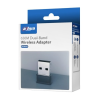
There is a Dahua WiFI USB dongle available.
DHI-NC650
transmission
1775822983448.png

According to a very old Dahua Wiki article; a WiFI USB dongle using the Ralink RTL8188CU Chip set could work.
 
Hello,

I bought a new house with security system already in it
The Dahua is connected to the 8 cameras with a cable

long story short it used to be connected via ethernet but it's not anymore possible as the internet provider changed the ONT and the ONT has now only one port (used to connnect the rj45 connected to the main router which goes to an other room)

The simpliest for me would be to connect the the Dahua DH-XVR5108HS-I2 DVR to my home wifi (if possible the guest network), is it possible if I buy a wifi dongle or a special router which would work as a client and "convert" the wifi to usb or ethernet ?


The other solution proposed by the internet provider is to add a switch after the ONT device and connect the DVR to the switch, they mention they can give a dedicated IP for the dvr but is it safe as the dvr wont come after the router ?
Going to Wi-Fi is a downgrade in reliability and performance, IMO, and I would use only if there are no other options to remain with Ethernet.

Can you move your router from that "other room" to be next to the ONT, connect the ONT to the router where it was before you moved it (likely "WAN" port), connect the DVR's Ethernet port to a LAN port on the router, connect the cable that was connected to the ONT to a LAN port on the router and that same cable's other end (that's still in the "other room") to either a wireless AP (Access Point) or a wireless router set to "AP mode"? That's assuming you had the router in the "other room" to provide Wi-Fi there.

If this is feasible but the wireless router doesn't have an AP mode get back to me and I can tell you how to turn any wireless router into a wireless AP with a non-routing function.
 
Thank you for your answers,
I didn't like much the idea to plug the device directly to my router as this is a second hand device, which has been in several hands (including to remove the admin pass from previous owner of the house), so to avoid to create security risk for all network (rather than only the DVR which has only outdoor cameras), I prefered the idea to connect either to guest wifi, either before my main router

I was thinking that it was not a big issue to use WIFI for the internet connection as long as the cameras are wired to the DVR ? (8 cameras HD 1080p)

I actually ordered a new AP which I am waiting for to try to connect the DVR to that (I didn't know the dahua wifi dongle existed)

Other possiblity mentionned by the internet provider is to use a switch after the ONT and one ethernet goes to my router and one goes to the DVR where he would provide IP for the DVR, is it risky to have the DVR directly plugged to the ONT without router in between ?
 
Last edited:
If the "old" ONT was connected to the WAN port of your router then connecting your DVR via Ethernet to a LAN port of that same router would be the same as connecting to that router's Wi-Fi.

The DVR's LAN should be configured as DHCP or have a unique static IP in the same subnet as the router's LAN but outside of that router's DHCP pool.
 
  • Like
Reactions: looney2ns
If the "old" ONT was connected to the WAN port of your router then connecting your DVR via Ethernet to a LAN port of that same router would be the same as connecting to that router's Wi-Fi.

The DVR's LAN should be configured as DHCP or have a unique static IP in the same subnet as the router's LAN but outside of that router's DHCP pool.


The old ONT had two ethernet exits

One of them was connected to the DVR, one of them was connected to the Router

The New ONT has however only One rj45 exit

The internet provider propose to maybe add a switch after the ONT (before the router), so I guess it would come back to the old ONT situation

however is it risky to have a DVR connected to the ONT directly without any router between the Ont and the DVR ?

And do you think the downgrade will be really visible between having a wired DVR VS a wifi connected DVR for the Dahua DMSS app (for a system with 8 cameras 1080p) if my connection is above 200mbps for the standard use of the DMSS app (alerts on movement etc)