PTZ3E10X-T180 Freezed when ptz is moving

Alfredo Monarrez

Young grasshopper
Aug 25, 2015
31
8
PTZ3E10X-T180

Anyone have this issue on this Multi sensor ptz, I notice i get some video skipping when the ptz gets triggered and moves to the person, i loose video for like 3 or 4 seconds.
 
This usually happens when someone is underpowering the PTZ like using POE when POE+ is needed, so confirm you have enough power.
 
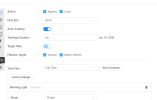
Is "Picture freeze" turned on in Camera > Conditions?
This purposely freezes the PTZ's image until it stops moving.
 
I bought one of the PTZ3E10X-T180 cameras, knowing that I was taking a bit of a risk, and so far it's been a disaster. Dahua must have gone extra cheap on the CPU(s) because it can't keep up with anything. The video streams stutter if there is any motion, even at only 5 frames per second (fps) on both streams, or if I'm trying to manually pan, tilt, or zoom. It feels like they took the hardware from a basic single-lens camera, then added the dual-lens 180-degree view, hoping the processor could handle the additional load, including stitching together the two lenses for the 180 degree view, but the hardware just cannot handle it.

I have tried multiple POE+ and even one POE++ options with no improvement. I thought I might have a network problem, so at one point I started a ping and found that anytime the camera might be doing something (e.g. AI detection, PTZ, etc.) the ping would time out once or twice. After a few such actions or motion, the pings start to regularly time out even when nothing is happening. If you simply reboot the camera, it then all user actions again return to normal responsiveness with a steady ping, until you do a few more things. It feels grossly inadequate for processing. Andy had a Dahua engineer connect to my camera to test it out and basically just said that's the way it is, which implies it could never perform the basic functions as advertised.

For clarity, I'm not saying the ping timeouts are a problem. They are merely a symptom of a processor that is so underpowered that it is overloaded doing anything and cannot even find time to respond to a ping.

So, @Alfredo Monarrez , I wouldn't be surprised if you are seeing another symptom of this camera being completely underpowered to even stream the video. Of course I could be completely wrong and you could have a completely different issue (e.g. power or image freeze as mentioned here), but this sounds a lot like what I have.
 
I have four of these PTZ3E10X-T180 cameras installed at two different locations, 2 in one house and 2 in another. In one house house I get multiple "no signal" errors for both cams, despite trying multiple POE+ plus switches and injectors. One of the cams at this house will sometimes go offline for a few hours in the early morning hours, which suggests a power issue but I haven't been unable to pin that down as it happens with a regular POE+ switch and a 90w POE injector.

At the other house, I occasionally get a "no signal" error but they are few and far between. The cams in both houses have comparable cat6 runs (60 feet and about 175 feet respectively) with all copper, non CCA cable, so I don't think the cable is the issue, and computers at both run Blue Iris version 5. The only difference that I can ascertain is that at the house that I get the most signal errors the computer that runs Blue Iris has a i5-8500 CPU while the house with very few errors runs Blue Iris on an i7-9700, which is significantly faster. Not sure if this is helpful to anyone but maybe it helps to connect the dots.
 
Last edited:
In another thread, a person was having trouble with just the PTZ (different model) in BI showing "no signal" and a delete of the camera in BI and adding by scratch eliminated the issue, so it had a corrupt protocol in BI.
 
Andy alerted me to new firmware that became just two weeks ago and and my situation improved dramatically. The camera is now usable for me. The firmware system version is V3.211.0000010.1.R, Build Date: 2026-04-11. It is not yet available on Andy's site, but on the Dahua site it is found with the model number SDT3E410-8P-MB-A-PV1.

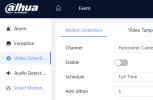
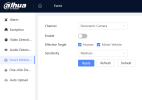
One other thing I learned is that even if you're not using the old style "Video Detection/Motion Detection" (I do not use this, only using IVS tripwires), you should/must DISABLE the "Smart Motion Detection". I have a screenshot of each setting below. You might think the "Smart Motion Detection" setting doesn't matter (or might impact IVS triggers) since you're not using the old video motion detection, but my testing seemed to indicate that the camera CPU may still be doing some "smart motion detection" in the background, even if the old "Motion Detection" is not being used, and this may contribute to the slow responses on the camera. My current interpretation based on my tests is that "Smart Motion Detection" tells the camera to "analyze everything with AI, using a ton of camera resources, even if the user doesn't care or want any of it". I may be completely wrong about that, and perhaps that is exactly what was fixed in the latest firmware, but if you have responsiveness issues, just make sure the setting is disabled.

Below are screenshots of the two settings. Make sure BOTH are disabled unless you are really using the "old school" motion detection (which respectfully suggest no one should use).

1778769556574.png

1778766353057.png
 
Very helpful post about the newest firmware. Installed it on both of the cams in the house that have the most "no signals" in Blue Iris. The firmware generally seems more stable because when doing "Find/Inspect" on the channel 2 PTZ camera under the older firmware, it usually would not pull the presets. The newer firmware seems to have fixed that problem. One of the cameras now has only 1 or 2 "no signal" errors a day, while the other has more. Under the older firmware, when I would do "one click diagnosis" under the maintenance menu, the "power supply" diagnostic would flag with potential power problems. Even with the disconnects with the new firmware, the "power supply" comes up clean and green. I'm wondering if the disconnects are something specific to Blue Iris or the i5-8500 CPU that I'm running it on.
 
Very helpful post about the newest firmware. Installed it on both of the cams in the house that have the most "no signals" in Blue Iris. The firmware generally seems more stable because when doing "Find/Inspect" on the channel 2 PTZ camera under the older firmware, it usually would not pull the presets. The newer firmware seems to have fixed that problem. One of the cameras now has only 1 or 2 "no signal" errors a day, while the other has more. Under the older firmware, when I would do "one click diagnosis" under the maintenance menu, the "power supply" diagnostic would flag with potential power problems. Even with the disconnects with the new firmware, the "power supply" comes up clean and green. I'm wondering if the disconnects are something specific to Blue Iris or the i5-8500 CPU that I'm running it on.
Most likely there is an issue with the crimping of the RJ45's on the ends.
Did you use 568B wiring scheme?
Did you use solid copper cable, and not CCA garbage.

ANy kinks or sharp bends in the cables?
 
Most likely there is an issue with the crimping of the RJ45's on the ends.
Did you use 568B wiring scheme?
Did you use solid copper cable, and not CCA garbage.

ANy kinks or sharp bends in the cables?
It's all solid copper and the connections aren't an issue. Other non-PTZ cams have been installed on the same runs with zero "no signal" errors.