EmpireTech aka Dahua LPR Settings

I asked ChatGPT if it could give me the corrected curl commands to program my camera:
I pulled the git repos for DahuaSunriseSunset and the required BPUtils on my Windows box, made the changes suggested by ChatGPT, and it appears to work.

ChatGPT also offered me some changes so that the updated utility will query each configured camera to determine which API it uses, to work with both older firmware and newer firmware, and I tested that with an Amcrest IP5M-T1277EW-AI (legacy API), and that appears to work as well.

The logging is also enhanced to show more detail.

I can compile and install the app, and the Simulate buttons cause my EmpireTech IPC-B52IR-Z12E S2 and my Amcrest IP5M-T1277EW-AI to switch to Day or Night mode, respectively.

I'll know more about whether it's actually working properly in a few days. How should I set my cameras up for profile management, if I'm going to rely on this service?
1773197899511.png

I am working with local code on my C: drive, and I'm not sure how to update a git repository, or even whether these changes are worth putting in, since I really don't know what I'm doing, and I'm just doing what the machines tell me to to do.

But in any case, all the changes were made to a single file, ServiceWrapper.cs, and my new version is available, here:


as well as the compiled executable:


YMMV, n=1, use at your own risk.
 

Attachments

  • 1773197892799.png
    1773197892799.png
    472.7 KB · Views: 5
More on this, the essentials of the change are to query:

Code:
curl -g --digest -u '<user>:<password>' "http://<Camera-IP-Address>/cgi-bin/configManager.cgi?action=getConfig&name=VideoInMode""
and then:
  • if getConfig&name=VideoInMode contains ConfigEx, use:
    • VideoInMode[...].ConfigEx=Day
    • VideoInMode[...].ConfigEx=Night
  • if it contains Config[0], use:
    • VideoInMode[...].Config[0]=0
    • VideoInMode[...].Config[0]=1
That matches exactly what you observed:
  • EmpireTech: ConfigEx
  • Amcrest: Config[0]
Are there any other variations out there?
 
When I get home I will try this out. Thanks TWB.
 
  • Like
Reactions: TheWaterbug
One way to get closer is to use LUX in place of a sunrise/set offset. This takes into account sunny vs cloudy days and switches cameras based on light intensity in place of time.

More complex to setup - this is not a turn key solution.
Is there an article or write up on using LUX? I'm not at as north as Alaska but I do have the same problem where the time can vary by over an hour from the beginning of the month to end of the month. The sun and cloud also really screw things up during these transition months.
 
Yes, agree that LUX is a good overall solution, but also at the same time a bit on the complex side to implement. No plug and play here!

LUX in the daytime can reach over 100K. However, depending on placement of the north facing outside LUX sensor the units of interest are in the 100 to 300 LUX range. Thus it is not necessary to have a LUX sensor that can read maximum intensity.

The system is a bit complex as it relies on using a Hubitat hub that interfaces with a LUX sensor. Then custom Hubitat apps that will fire the correct camera API (Web 4 vs Web 5) to change from day to night mode based on a LUX value. And the other way around for night to day. Note: One HTTP GET statement is needed for each camera.

There may be some other ways to build such a system perhaps using Window's built in Power Shell or Home Assistant to perform the same functions.
 
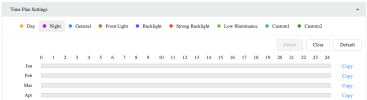
How should I set my cameras up for profile management, if I'm going to rely on this service?

View attachment 239665
I just had all of my cameras do their own thing because I had entered a set of Time Plan settings, so I just clicked Clear on all of my LPR cameras:

1773368831475.png

and I'm hoping that will stop the cameras from switching on their own, and rely only on the new service.
 
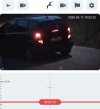
I see what you guys were talking about during sunrise/sunset issues...
There is a 5-10 Minute window where you get bad results.
 

Attachments

  • Screenshot_20260313_211134_net_waterfox_android_release_HomeActivity.jpg
    Screenshot_20260313_211134_net_waterfox_android_release_HomeActivity.jpg
    264.9 KB · Views: 13
With Web 5 cams it is possible to have finer control of when the camera switches between modes. In place of just day and night add general or custom 1 or custom 2 using time plan settings to make adjustments to shutter, gain, etc.

The overall concern is that this is a time based solution that has to be reset once per month to take into account changing day/night lengths. Plus there is no compensation for cloudy vs sunny days or for those living in the far north or south where day length can change up to 10 minutes per day in the extreme north or south.
 
I just had all of my cameras do their own thing because I had entered a set of Time Plan settings, so I just clicked Clear on all of my LPR cameras:
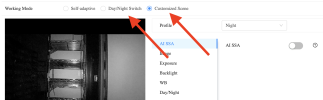
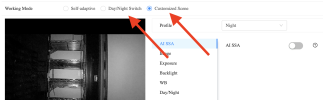
Using the API that works for Web 5 day/night mode switch and have the Web 5 cams set for "Customized Scene". However, using Hubitat and HTTP GET statements for cam day/night mode switching based on LUX and not time.