

6.0.3.6 New Logfile Entries
- Thread starter jaydeel
- Start date
You are using an out of date browser. It may not display this or other websites correctly.
You should upgrade or use an alternative browser.
You should upgrade or use an alternative browser.
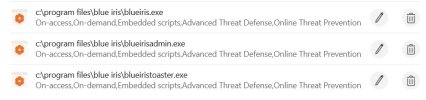

Not sure if this will work, but you could try enabling Windows Defender, add the process exclusion and then disable Windows Defender.Windows defender is not involved as I am using Bitdefender as shown in the log file
I'd suggest emailing Ken and letting him know that when a third-party AV (Bitdefender, Norton, etc.) is registered with Windows Security Center, Defender is disabled and its exclusion list may be unavailable --- apparently causing the warning to appear even though Defender is not active.
You might suggest that it might help if BI checked the active AV provider via Windows Security Center and either suppressed the Defender warning or logged something like:
“Third-party antivirus detected — configure exclusions in that product.”
You might suggest that it might help if BI checked the active AV provider via Windows Security Center and either suppressed the Defender warning or logged something like:
“Third-party antivirus detected — configure exclusions in that product.”

Bruce_H
Getting comfortable
Thanks, I will send the info to Ken, and post back on any resolution etc!I'd suggest emailing Ken and letting him know that when a third-party AV (Bitdefender, Norton, etc.) is registered with Windows Security Center, Defender is disabled and its exclusion list may be unavailable --- apparently causing the warning to appear even though Defender is not active.
You might suggest that it might help if BI checked the active AV provider via Windows Security Center and either suppressed the Defender warning or logged something like:
“Third-party antivirus detected — configure exclusions in that product.”
Bruce_H
Getting comfortable
Bruce_H
Getting comfortable
Just installed 6.0.4.1 and this issue is now resolved on my systems that use Bitdefender Antivirus.
Just curious- What does the logfile now show?Just installed 6.0.4.1 and this issue is now resolved on my systems that use Bitdefender Antivirus.
Bruce_H
Getting comfortable
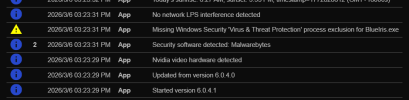
Here is the relevant section of the log file

I guess I should really try removing the exception entries from my AV and see if the warnings actually return
I guess I should really try removing the exception entries from my AV and see if the warnings actually return
That would be a way to test if Ken is able to access the exclusion settings for Bitdefender. Did he provide any hints in your email exchange?Here is the relevant section of the log file
View attachment 239288
I guess I should really try removing the exception entries from my AV and see if the warnings actually return
I have bitdefender, and as far as I can tell windows defender is off, but I still get the warning:
/5/2026 8:02:54.123 PM App Started version 6.0.4.1
0 3/5/2026 8:02:54.156 PM App Intel video hardware detected
0 3/5/2026 8:02:56.002 PM App Current profile: Night
0 3/5/2026 8:02:56.130 PM App Security software detected: Bitdefender
0 3/5/2026 8:02:56.130 PM App Security software detected: Windows Defender
1 3/5/2026 8:02:56.130 PM App Missing Windows Security 'Virus & Threat Protection' process exclusion for BlueIris.exe
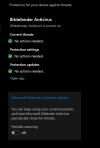
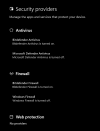
Any clues why? something I have not turned off in windows defender?
/5/2026 8:02:54.123 PM App Started version 6.0.4.1
0 3/5/2026 8:02:54.156 PM App Intel video hardware detected
0 3/5/2026 8:02:56.002 PM App Current profile: Night
0 3/5/2026 8:02:56.130 PM App Security software detected: Bitdefender
0 3/5/2026 8:02:56.130 PM App Security software detected: Windows Defender
1 3/5/2026 8:02:56.130 PM App Missing Windows Security 'Virus & Threat Protection' process exclusion for BlueIris.exe
Any clues why? something I have not turned off in windows defender?
Bruce_H
Getting comfortable
No the only response was it was going to be fixed in this release.
So I removed all of the exceptions from my AV, reboot the system and no warning from BI that it needed a process exception! I will report this back to Ken, it could be that he just determined if a third party AV was running and suppressed the warning message!
New message sent to Ken!
So I removed all of the exceptions from my AV, reboot the system and no warning from BI that it needed a process exception! I will report this back to Ken, it could be that he just determined if a third party AV was running and suppressed the warning message!
New message sent to Ken!
Bruce_H
Getting comfortable
Interesting that yours reports that both Bitdefender and Windows Defender are detected, need to do some testing on my system, I have an idea!I have bitdefender, and as far as I can tell windows defender is off, but I still get the warning:
/5/2026 8:02:54.123 PM App Started version 6.0.4.1
0 3/5/2026 8:02:54.156 PM App Intel video hardware detected
0 3/5/2026 8:02:56.002 PM App Current profile: Night
0 3/5/2026 8:02:56.130 PM App Security software detected: Bitdefender
0 3/5/2026 8:02:56.130 PM App Security software detected: Windows Defender
1 3/5/2026 8:02:56.130 PM App Missing Windows Security 'Virus & Threat Protection' process exclusion for BlueIris.exe
View attachment 239289
Any clues why? something I have not turned off in windows defender?
Bruce_H
Getting comfortable
Well this gets stranger my the minute
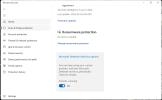
I discovered an option to turn on Microsoft Defender for periodic scans and now I have the warning back and it says that I am using Windows Defender in the BI log

I discovered an option to turn on Microsoft Defender for periodic scans and now I have the warning back and it says that I am using Windows Defender in the BI log
Bruce_H
Getting comfortable
Now I am really starting to lose my mind, all the exceptions that I thought I removed from Bitdefender are back again, I did nothing!
Edit, I removed them again and rebooted, they appear to now be actually gone now and BI is happy!!! going to try turning on the Defender periodic scan again and see what happens!
Edit, I removed them again and rebooted, they appear to now be actually gone now and BI is happy!!! going to try turning on the Defender periodic scan again and see what happens!
Bruce_H
Getting comfortable
Last edited:
Bruce_H
Getting comfortable
Well here is the official response from Ken regarding my question - Did you just suppress the error check if the AV was anything other then Windows Defender?
Correct. It's only possible to check for windows exemptions without knowledge of external methods or API for each.
Edit: Version 6.0.4.1 suppressed the error message on one of my BI installs, but I have another one that also runs Bitdefender and for some reason BI thinks that one is running Windows Defender and still displays the warning message; I did check and I do not have periodic scans enabled, probably going to send another message to Ken later today when I get a bit more time to check over the differences between my two BI systems
Correct. It's only possible to check for windows exemptions without knowledge of external methods or API for each.
Edit: Version 6.0.4.1 suppressed the error message on one of my BI installs, but I have another one that also runs Bitdefender and for some reason BI thinks that one is running Windows Defender and still displays the warning message; I did check and I do not have periodic scans enabled, probably going to send another message to Ken later today when I get a bit more time to check over the differences between my two BI systems
Last edited:

bob2701
Known around here
Bruce_H
Getting comfortable
I have been in contact with Ken, and it basically boils down to that if you are using a third part AV solution he has no way of determining if exclusions have been added, he has some code in the most recent version 6.0.4.1 that tries to determine if a third part AV is running and then just suppresses the check for the exclusions! But as some are finding there are some potential anomalies in his code at the moment (Bugs).