Add Sunrise Sunset to Time Plan Settings

I've been attempting to implement the day/night switch via Blue Iris 5.9 on my T54IR-ZE-S3 running Web Version V5.01.0.2308726 but haven't gotten past this error "Web: No stream: 404." I'm using the api calls listed in this post: I've removed special characters from my password, tried with and without the port setting in the url. No Luck. Searching on this error and didn't come across anything that helped. I'm using the presets, on call... section of PTZ/Control. I've left my working mode as Customized Scene. Appreciate any help - yes I realize I can just keep using the Day/Night Switch but where's the fun in that? It annoys me that this should be working.
 
I've been attempting to implement the day/night switch via Blue Iris 5.9 on my T54IR-ZE-S3 running Web Version V5.01.0.2308726 but haven't gotten past this error "Web: No stream: 404." I'm using the api calls listed in this post: I've removed special characters from my password, tried with and without the port setting in the url. No Luck. Searching on this error and didn't come across anything that helped. I'm using the presets, on call... section of PTZ/Control. I've left my working mode as Customized Scene. Appreciate any help - yes I realize I can just keep using the Day/Night Switch but where's the fun in that? It annoys me that this should be working.

If the camera GUI is the blue/white color, then the utility doesn't work - it only works for the older black/grey/orange GUI.
 
I've been attempting to implement the day/night switch via Blue Iris 5.9 on my T54IR-ZE-S3 running Web Version V5.01.0.2308726 but haven't gotten past this error "Web: No stream: 404." I'm using the api calls listed in this post: I've removed special characters from my password, tried with and without the port setting in the url. No Luck. Searching on this error and didn't come across anything that helped. I'm using the presets, on call... section of PTZ/Control. I've left my working mode as Customized Scene. Appreciate any help - yes I realize I can just keep using the Day/Night Switch but where's the fun in that? It annoys me that this should be working.
I use the following from Blue Iris on a T54IR-ZE-S3 Turret and they work fine:

Sunrise
Code:
user:password@cameraIPaddress/cgi-bin/configManager.cgi?action=setConfig&VideoInOptions[].NightOptions.SwitchMode=0&VideoInOptions[].NightOptions.DayNightColor=0

Sunset
Code:
user:password@cameraIPaddress/cgi-bin/configManager.cgi?action=setConfig&VideoInOptions[].NightOptions.SwitchMode=3&VideoInOptions[].NightOptions.DayNightColor=2

But I also still use the Dahua Sunrise/Sunset app to switch my B54IR-Z4E-S3, although this is the older interface.

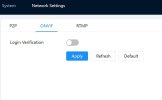
I do have ONVIF Login Verification turned off on the T54IR-ZE-S3, keep that in mind. See screen shot..

If you need more info let me know, took a bit for me to get this nailed down initially!
 

Attachments

  • Onvif verify.jpg
    Onvif verify.jpg
    25.7 KB · Views: 4
Last edited:
I use the following from Blue Iris on a T54IR-ZE-S3 Turret and they work fine:

Sunrise
Code:
user:password@cameraIPaddress/cgi-bin/configManager.cgi?action=setConfig&VideoInOptions[].NightOptions.SwitchMode=0&VideoInOptions[].NightOptions.DayNightColor=0

Sunset
Code:
user:password@cameraIPaddress/cgi-bin/configManager.cgi?action=setConfig&VideoInOptions[].NightOptions.SwitchMode=3&VideoInOptions[].NightOptions.DayNightColor=2

But I also still use the Dahua Sunrise/Sunset app to switch my B54IR-Z4E-S3, although this is the older interface.

I do have ONVIF Login Verification turned off on the T54IR-ZE-S3, keep that in mind. See screen shot..

If you need more info let me know, took a bit for me to get this nailed down initially!
This camera is running empire tech firmware from 2025 and I've never seen the orange GUI even when I first received the cam. I'm using the exact API call as shown in this post above.

The only difference is I'm not using port 80 so I have to add in the port number to the IP address. If I remove the port I get a no stream 12029 error, with the port I get a 404 error. I'm tempted to set the cam back to port 80 and see what happens...?

I have ONVIF Login Verification turned off.

I'm not using the Dahua sunrise/sunset app but using blue iris to send the http command using the presets, on call... section of PTZ/Control as bp2008 shows here:
 
This camera is running empire tech firmware from 2025 and I've never seen the orange GUI even when I first received the cam. I'm using the exact API call as shown in this post above.

The only difference is I'm not using port 80 so I have to add in the port number to the IP address. If I remove the port I get a no stream 12029 error, with the port I get a 404 error. I'm tempted to set the cam back to port 80 and see what happens...?

I have ONVIF Login Verification turned off.

I'm not using the Dahua sunrise/sunset app but using blue iris to send the http command using the presets, on call... section of PTZ/Control as bp2008 shows here:
Interesting, well you are using the same camera as me, Blue Iris the same and mine is working with the API call I posted above. If you paste the command straight into a browser and hit enter will it execute?

Check to make sure the API call setup in Blue Iris is using http and not https as well.
 
Interesting, well you are using the same camera as me, Blue Iris the same and mine is working with the API call I posted above. If you paste the command straight into a browser and hit enter will it execute?

Check to make sure the API call setup in Blue Iris is using http and not https as well.
Running that command in the browser gives me the same 404 error. Yep - http.
I think I'm going to set the cam back to port 80 and see if that makes any difference. I've validated the user name and password also.
 
I'm not using the Dahua sunrise/sunset app but using blue iris to send the http command using the presets, on call... section of PTZ/Control as bp2008 shows here
No need to use ptz presets anymore. Just go to the camera's schedule and click events schedule, the add an action set to initiate the web request. Keep in mind you can just have one camera switch all your cams.

Screenshot 2026-03-01 073746.jpg
 
  • Like
Reactions: gwminor48
Running that command in the browser gives me the same 404 error. Yep - http.
I think I'm going to set the cam back to port 80 and see if that makes any difference. I've validated the user name and password also.
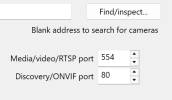
Assuming you have the correct port set in Blue Iris under Video > Configure.... then yes try port 80 on cam again and report back.

1772373124996.png
 
You can also try putting the modified port after the IP, as below:

Code:
user:password@cameraIPaddress:8080/cgi-bin/configManager.cgi?action=setConfig&VideoInOptions[].NightOptions.SwitchMode=0&VideoInOptions[].NightOptions.DayNightColor=0

This assumes port number is 8080 in the example code snippet
 
No reason to be changing port numbers from default thinking it makes it more secure. It is a false sense of security and many things are hardcoded with what the expected port will be regardless of what someone changes it to.

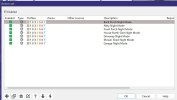
Hit the find/inspect button in BI for this camera and post the pop-up window - you may have an ONVIF password issue as well that is mucking it up.
 
  • Like
Reactions: CamCrazy
No reason to be changing port numbers from default thinking it makes it more secure. It is a false sense of security and many things are hardcoded with what the expected port will be regardless of what someone changes it to.

Hit the find/inspect button in BI for this camera and post the pop-up window - you may have an ONVIF password issue as well that is mucking it up.
It was many years ago I had something that required me to change the default port of my old cam for a reason I no longer remember - It became a habit continued to this day. Here is the find/inspect. Setting the cam back to port 80 made no difference so I put it back to what I'm using for now.

Opening 192.168.60.51 port 4561...
HTTP Get / request...
OK
ONVIF GetSystemDateAndTime
2026-03-01T14:08:04.000Z
Requesting device information...
Manufacturer: General
Model: IPC-T54IR-ZE-S3
FirmwareVersion: 3.142.0000000.8.R
GetCapabilities...
Querying services
Has Imaging services: /onvif/imaging_service
Has media services: /onvif/media_service
Has RTP_RTSP_TCP, requesting profiles
profile token MediaProfile00000
profile name MediaProfile_Channel1_MainStream
profile source is 00000
profile token MediaProfile00001
profile name MediaProfile_Channel1_SubStream1
profile source is 00000
profile token MediaProfile00002
profile name MediaProfile_Channel1_SubStream2
profile source is 00000
profile token MediaProfile00003
profile name MediaProfile_Channel1_SubStream3
profile source is 00000
requesting URI for profile MediaProfile00000
RTSP URI: rtsp:/192.168.60.51:554/cam/realmonitor?channel=1&subtype=0&unicast=true&proto=Onvif
requesting URI for profile MediaProfile00001
RTSP URI: rtsp:/192.168.60.51:554/cam/realmonitor?channel=1&subtype=1&unicast=true&proto=Onvif
requesting URI for profile MediaProfile00002
RTSP URI: rtsp:/192.168.60.51:554/cam/realmonitor?channel=1&subtype=2&unicast=true&proto=Onvif
requesting URI for profile MediaProfile00003
RTSP URI: rtsp:/192.168.60.51:554/cam/realmonitor?channel=1&subtype=extra3&unicast=true&proto=Onvif
Has Event services: /onvif/event_service
Has WSPullPointSupport
RelayOutputs: 0
InputConnectors: 0
Has Device IO services: /onvif/deviceIO_service
AudioOutputs: 0
Has PTZ service: /onvif/ptz_service
Done

 
Oh wow that all looks normal.

The only thing I can think of now is the camera is wonky in BI or the firmware itself.

First and easiest choice is to delete the camera in BI and re-add by scratch. That fixes lots of things here as the camera protocol got corrupt in BI.

If that doesn't do it, then a factory reset of the camera is the next option as the firmware can get corrupt and mess things up.
 
It was many years ago I had something that required me to change the default port of my old cam for a reason I no longer remember - It became a habit continued to this day. Here is the find/inspect. Setting the cam back to port 80 made no difference so I put it back to what I'm using for now.

Opening 192.168.60.51 port 4561...
HTTP Get / request...
OK
ONVIF GetSystemDateAndTime
2026-03-01T14:08:04.000Z
Requesting device information...
Manufacturer: General
Model: IPC-T54IR-ZE-S3
FirmwareVersion: 3.142.0000000.8.R
GetCapabilities...
Querying services
Has Imaging services: /onvif/imaging_service
Has media services: /onvif/media_service
Has RTP_RTSP_TCP, requesting profiles
profile token MediaProfile00000
profile name MediaProfile_Channel1_MainStream
profile source is 00000
profile token MediaProfile00001
profile name MediaProfile_Channel1_SubStream1
profile source is 00000
profile token MediaProfile00002
profile name MediaProfile_Channel1_SubStream2
profile source is 00000
profile token MediaProfile00003
profile name MediaProfile_Channel1_SubStream3
profile source is 00000
requesting URI for profile MediaProfile00000
RTSP URI: rtsp:/192.168.60.51:554/cam/realmonitor?channel=1&subtype=0&unicast=true&proto=Onvif
requesting URI for profile MediaProfile00001
RTSP URI: rtsp:/192.168.60.51:554/cam/realmonitor?channel=1&subtype=1&unicast=true&proto=Onvif
requesting URI for profile MediaProfile00002
RTSP URI: rtsp:/192.168.60.51:554/cam/realmonitor?channel=1&subtype=2&unicast=true&proto=Onvif
requesting URI for profile MediaProfile00003
RTSP URI: rtsp:/192.168.60.51:554/cam/realmonitor?channel=1&subtype=extra3&unicast=true&proto=Onvif
Has Event services: /onvif/event_service
Has WSPullPointSupport
RelayOutputs: 0
InputConnectors: 0
Has Device IO services: /onvif/deviceIO_service
AudioOutputs: 0
Has PTZ service: /onvif/ptz_service
Done

Try:

Code:
user:password@cameraIPaddress:4561/cgi-bin/configManager.cgi?action=setConfig&VideoInOptions[].NightOptions.SwitchMode=0&VideoInOptions[].NightOptions.DayNightColor=0
 
As @wittaj suggested, it will likely be either username/password related or port error. Things like this can have you chasing your tail :thumb:
 
As @wittaj suggested, it will likely be either username/password related or port error. Things like this can have you chasing your tail :thumb:
Yep - the username/password has been validated, the port 80 thing eliminated, tried the command (actually many versions of that api call/command) in the action set window - same 404 error.

The camera was just reset last month as the IVS rules had stopped working.

I factory reset the cam, loaded the current FW and then factory reset the cam again per the instructions here in the forum.

Other than I can't get this command to initiate the day-night switch the camera is working fine. I have a spare T54IR-AS-S3 in the closet - I'll play around with that one today and see what it does.

Thanks again guys for your help here in the forums - I lurk here often gleaning in the tidbits and this was one that seemed interesting.
 
Yep - the username/password has been validated, the port 80 thing eliminated, tried the command (actually many versions of that api call/command) in the action set window - same 404 error.

The camera was just reset last month as the IVS rules had stopped working.

I factory reset the cam, loaded the current FW and then factory reset the cam again per the instructions here in the forum.

Other than I can't get this command to initiate the day-night switch the camera is working fine. I have a spare T54IR-AS-S3 in the closet - I'll play around with that one today and see what it does.

Thanks again guys for your help here in the forums - I lurk here often gleaning in the tidbits and this was one that seemed interesting.
That is very odd, test first in browser, then move to Blue Iris once you get the OK result shown in browser window. Also confirm that ONVIF triggers are sending to Blue Iris, this will give some additional confirmation on login command/user etc.
 
Also just for confirmation, copy and paste your api command in full with password in xxxx's or something similar, second pair of eyes can often help
 
If the cameras are isolated from the internet, then showing user and password won't matter here and could help YOU realize a simple typo that is being missed because you have looked at it for so long.
 
  • Like
Reactions: CamCrazy
If the cameras are isolated from the internet, then showing user and password won't matter here and could help YOU realize a simple typo that is being missed because you have looked at it for so long.
100% for possibly spotting something that has been missed, very easily done and can cost hours of troubleshooting...ask me how I know :lmao:
 
  • Like
Reactions: Tinman