Version 6

I've never tried this approach so I'm not sure. I think I would try to modify the Windows Registry first. If you want to try this I would suggest you backup your registry first and then go into "Computer\HKEY_LOCAL_MACHINE\SOFTWARE\Perspective Software\Blue Iris\encoders". Open each folder under this key and look for "hwaccel" and change the value data to 0.

View attachment 237423
Thanks, I actually managed to have success in reloading in V5, turning off global acceleration, restarting 6 and everything worked fine.

Another question - does the iOS app work correctly? I can't seem to connect, either on my old connection or setting up a new one.
 
Thanks, I actually managed to have success in reloading in V5, turning off global acceleration, restarting 6 and everything worked fine.

Another question - does the iOS app work correctly? I can't seem to connect, either on my old connection or setting up a new one.
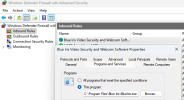
Yes, it does work. Check your firewall rule and make sure that it is pointing to the right directory.

Screen Shot 2026-02-01 at 8.06.36 PM.png
 
Thanks, I actually managed to have success in reloading in V5, turning off global acceleration, restarting 6 and everything worked fine.

Another question - does the iOS app work correctly? I can't seem to connect, either on my old connection or setting up a new one.
I find Chrome on iOS to work better than the app, and it's free. I just added a Chrome page to my home screen. The only downside is that it opens a new tab every time I click that icon, so every few days I close a dozen tabs. ‍♂️
 
Yes, it does work. Check your firewall rule and make sure that it is pointing to the right directory.
Bingo - Should've thought this one through, I set it up that long ago I forgot I needed to allow a firewall rule
I find Chrome on iOS to work better than the app, and it's free.
I don't mind it, but the app supports family sharing and is a 'little' more polished, so I just need to purchase it once and I can give it to everyone in my household

Having issues with the new local AI now, but I will investigate that a little later.

Cheers for all the pointers
 
  • Like
Reactions: Vettester
Will there come a point where users can just update to Version 6 here?

View attachment 238446
At one time you could, but it caused all sorts of trouble with the installed version number, trust me you are better off to download the full install from the BI web site download page and run it to do the upgrade, do not uninstall V5 before you install V6!
 
I created an Blue Iris Help Chatbot using the current Blue Iris help pdf file. The link to the Chatbot is below, let me know what you think of it, is it helpful.

Blue Iris AI Help Chatbot

This is amazing and should be stickied & placed in the tools section. The upgrade torpedo'd my groups (I keep my LPR 'hidden' in the main view but visible in its own group) and couldnt figure out how to show it in the LPR group I created..

Thanks so much for putting this together.

1772941391127.png
 
Is anyone else seeing flakiness with Alerts since upgrading to 6.x, especially very recently?

Over the last ~week or so I've noticed a dramatic reduction in the number of alerts that I see in the UI3 Timeline view on all 3 of my upgraded installations.

Camera groups that typically have dozens of alerts overnight from wildlife, etc., have 1 or 2 alerts, or sometimes none at all. Other cameras have their typical alert count.
So this morning my UI3 was unresponsive, so I RDPed in to see that Win11 had done an update and rebooted itself :banghead:, and was waiting for me to acknowledge some requests to sell me new services :banghead::banghead:.

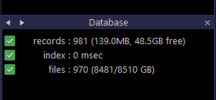
I clicked through as normal, and UI3 came up with its small handful of alerts, so I went back to my RDP session to do "Database: Repair/Regenerate." It finished instantly, which was ominous. And now my UI3 Timeline view has no alerts at all :facepalm:. The Database section of the console shows indexing took 0 ms:
1772990094013.png

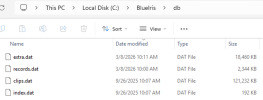
The C:\BlueIris\db\ folder has files:

1772990054220.png

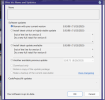
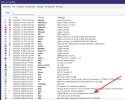
but Compact, Run Maintenance, and Repair/Regenerate finish instantly/do nothing:
1772990459164.png

and none of these operations restores any old Alerts in my UI3 timeline, which should have literally hundreds of alerts overnight:
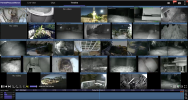
1772990393623.png

I do see this warning in the Log that, "Legacy DB files may now be deleted or archived". Could that be the culprit? Do I have to manually update the database format/file/location/????, or is BI6 supposed to do that automatically?

I do appear to be getting new alerts since the reboot, so this is not a catastrophe, but it's still an annoyance, especially since my db folder looks like it contains a bunch of stuff, including files that are very current.

 

Attachments

  • 1772990169070.png
    1772990169070.png
    857.4 KB · Views: 4
Have you checked to make sure that the old V5 service is not running instead of the V6 service, and just to confirm that you are actually opening the V6 BI instance, since the V5 instance is still on the computer unless you have uninstalled it. Worth checking to make sure since, your log file is cut off just above the point where it would state the version started!
 
Have you checked to make sure that the old V5 service is not running instead of the V6 service, and just to confirm that you are actually opening the V6 BI instance, since the V5 instance is still on the computer unless you have uninstalled it. Worth checking to make sure since, your log file is cut off just above the point where it would state the version started!
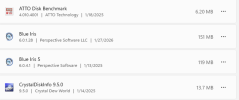
I do still have v5 installed, even though it says version 6 right below it:

1773005759709.png

but I'm definitely running v6:

1773005895704.png

So I just uninstalled v5, then disabled the V6 service, re-enabled it, and rebooted. We'll see what happens.

Can the v6 console even talk to the v5 service? I would have thought it complain if it were mismatched.