Extending a Blue Iris Network - Assistance on How to Keep Secure?

Alaska Country

Getting comfortable
Jun 10, 2021
642
899
Alaska
Plan
The Spring plan is to extend the BI network from the present home location to another home down the block. An Ubiquiti RF link will be added to the POE switch on the .55 subnet side of the system. Three Dahua cameras will be added at the remote location all on the same .55 BI subnet.

Issues

1) How to prevent the remote home from accessing the Dahua login screen for the three remote cameras or my 25 cameras? i.e. if they connect a computer to their remotely located POE switch on the .55 subnet

If "Advanced IP Scanner" is connected to the remote POE switch (.55) all of the camera's IP and MAC addresses are displayed along with all of the IP addresses on my .1 home LAN.

2) How to add UI3 on 192.168.1.132:81 to the subnet (.55) via the Ubiquiti remote link? i.e. so that the remote user can connect their computer to the remote POE switch and view UI3 in place of using TailScale

3) How to isolate all my home LAN .1 traffic so that only UI3 is available on the remote end? i.e. access to only 192.168.1.132:81 and no other traffic or IP address should be accessible

4) How to prevent the internet from appearing on the .55 subnet or .1 network? i.e. if the remote home connects their LAN to the subnet switch

5) How to block any LAN snooping from the present home to the remote home or the other way around? i.e. most likely from 192.168.1.1 on both ends assuming the remote home is also using the same router IP address.
BlueIris.png


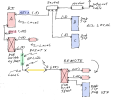
Using Blue Iris with two NICs. One NIC is on 192.168.1.1 (home LAN) to other home connected Window's computers and the other BI NIC is used for the cameras on 192.168.55.xxx.

No internet is available on either NIC on the Blue Iris computer. Plus no BI camera traffic is going through the home router.

However, the router is exposed to UI3 for in home LAN access via a second NIC in the BI Windows computer. In addition, for home use, a TailScale client in exit mode has been added to the Asus router to view UI3 on a cell phone as the BI computer will not support TailScale without an internet connection.

Overall Goal
Provide a high level of security so that the remote home location can not, under any circumstances, access any traffic on the BI (.55) Ubiquiti link or .1 LAN with the exception of UI3 on 192.168.1.132:81.

If the above goal is not possible, then only allow remote home access to the three cameras (login screen-password required) at the remote location. i.e remote cameras IP would be 192.168.55.132, 192.168.55.134 and 192.168.55.136 But no login screen access to my cameras from 192.168.55.1 to 192.168.55.100 are to be permitted.

Or if not possible, then deny access to all subnet (.55) cameras at the remote home.

Priorities

1) Secure the subnet on .55 first.

2) If adding UI3 to the remote home is not feasible then abandon this scenario and look at other solutions for remote camera viewing. Perhaps using TailScale as a fallback position.

Suggestion and comments as to the next steps would be most appreciated.
 
Last edited:
If you have things you don't want to be accessible from the "REMOTE" network, you simply don't connect them to that network.

I'm not sure I 100% understand what you're doing. In the diagram you have a 24 port PoE switch and a camera and a mysterious green rectangle and yellow rectangle and somewhere in there is the "RF link", all clearly connected to the REMOTE network. If you don't want some of those things to be accessible to things on the REMOTE network, don't connect them to that network.

Get another network interface for the Blue Iris computer. Plug the REMOTE camera network into that.

1769729412076.png

Assign the NIC in that BI machine an address in unused subnet such as 192.168.56.1. Assign the devices on the other end their own addresses in that same subnet. 192.168.56.2, etc.

In the example above, UI3 will be reachable in the REMOTE network via http://192.168.56.1:81/ Or they can connect through the internet using the tailscale setup you have created.

Additional notes:
  • If the "POE switch 24 port" is a managed switch, you could use VLANs to logically split that POE switch into two. You'd still need another dedicated NIC in the BI computer because Windows doesn't really have proper support for VLAN tagging unless you put BI in a virtual machine, which I'm guessing you did not. It is safer and simpler to use totally separate hardware for the separate network.
  • The BI machine, being a Windows machine, will be exposing all kinds of other services to its LAN interfaces. Me personally, I wouldn't worry about that. If it bothers you, you can mostly limit that by making sure the NIC connected to the REMOTE network is marked as "Public" (not Private). In Windows firewall, create a TCP port 81 inbound firewall rule to allow access on public networks. That'll allow UI3 to be accessible on that network interface even with it being "Public". I don't 100% trust Windows Firewall or its network type setting (public vs private) though. If I was paranoid about it, I would install a dedicated firewall device (e.g. a 2-NIC mini PC running OpnSense) inline between the BI machine and the REMOTE network, and configure that to only allow the TCP 81 traffic inbound, and the RTSP (TCP and/or UDP 554) traffic outbound.
 
Appreciate the reply.

The yellow is the RF link to the existing subnet at .55. The green is not of importance and was added as a possible location to add either a Cisco 3750 switch or ANC 5510.

Like your idea of adding a third NIC to the BI computer. That would simplify the entire process as setting up either of the Cisco devices would be a challenge on my part. With the added NIC on .56 will BI be able to display my 25 cams and the additional 3 cams all on one screen via the BI computer and also on UI3 on my home LAN?

The POE switch is NOT a managed switch but have a Cisco 3560G (24 ports) that could be used as a replacement depending on its power efficiency. i.e. don't want to run up the home power bill too much! Tested the Cisco with one cam and it powered up and the cam was accessible (login, cam settings and video) when using a laptop connected to the uplink port.
 
In the example above, UI3 will be reachable in the REMOTE network via http://192.168.56.1:81/ Or they can connect through the internet using the tailscale setup you have created.
Will the person at the remote home location have to add a NIC to their computer set on the .56 subnet in order to access UI3? Can BI be setup to provide access to UI3 on both 192.168.56.1:81 and 192:168.1.132:81 (my home LAN) using the modified setup? i.e. Web Server > Local, internal LAN address
 
It sounds like you want to isolate the "remote" network from your own personal network. You can do this using either a completely separate physical network for the remote site and then have two network NICs installed in the BI machine to allow it to see devices on both networks (local and remote), or by using VLANs (virtual LAN networks) which will effectively do the same thing, but requires the use of managed network switches to allow for proper VLAN tagging.

If you use the first option, devices on the remote network will be able to see and access the BI machine by default, but it will not be able to access the other devices on your local network, including not being able to access the Dahua webpages for your local cameras.
If you use VLANs, it could be as simple as putting the BI machine in both VLANs by using two network NICS (one in each VLAN) which will mirror the functionality of the 1st method. However by using VLANs you can achieve more granular control over what devices can be accessed from either VLAN (local vs remote) by customizing the firewall rules on each VLAN to achieve this granularity. It takes more effort to do that, but it also has more flexibility. This would also allow you to use just a single network NIC in your BI machine because you could set up a rule to allow the remote devices access to ONLY your BI machine on your local VLAN. All other traffic from the remote VLAN could be blocked from accessing your local VLAN.
 
Last edited:
Did some testing the last few days in regard to using the managed Cisco POE 24 port switch or the Dahua unmanaged 24 POE switch. Was concerned about the overall cost of power and ease of system implementation in spite of the advantage of adding a VLAN with the Cisco.

The Cisco 3560G 24PS-S-V05 Port Managed POE switch consumed 62 watts with no camera connections. With connected cams at 151 watts. Cost per year at $331.

The Dahua PFS3226-24ET-240 24 Port Unmanged POE switch consumed 11 watts with no camera connections. With connected cams at 82 watts. Cost per year at $180.

The Cisco 3750G-24T-S-V05 Managed switch consumed 53 watts with no connections. Cost per year at $116.

The best solution, as suggested above, is to add another NIC to the BI computer. It is also the lest complicated to implement. Plus, if I understand the comments correctly, this will allow BI to see cams on both subnets at .55 and .56 along with UI3 and thus display all cams on one screen. i.e. 25 cams from subnet .55 and 3 cams from .56 subnet.

The use of TailScale to view my UI3 at the remote home is also the easiest to implement. By setting up a user on BI it is possible to control what cams are viewed (Limit to camera groups) along with other settings. Plus TailScale, through the use of Access Controls can restrict access to one IP on my LAN. In this case UI3 at 192.168.1.132:81.

The upside of TailScale is its simplicity and it is free. The downside is that TailScale is limited to my upload speed. Plus TailScale uses bandwidth from both my home and the remote home.

It would be nice to have UI3 on both my LANs at 192.168.1.1 and the remote subnet at 192.168.55.1 in place of using Tailscale. However, that adds complexity to the system and requires a greater knowledge of networking setups. Thus using the KISS acronym has it advantages!

Appreciate both of your suggestions.
 
Last edited:
With the added NIC on .56 will BI be able to display my 25 cams and the additional 3 cams all on one screen via the BI computer and also on UI3 on my home LAN?

Can BI be setup to provide access to UI3 on both 192.168.56.1:81 and 192:168.1.132:81 (my home LAN) using the modified setup? i.e. Web Server > Local, internal LAN address

Yes. There is no limit to the number of networks you can connect a computer to, and Blue Iris will be able to access resources on all of them and serve UI3 on all of them. Do not have the "Bind exclusively" box checked in BI's web server settings as that limits UI3/webserver access to only one IP address. With the box unchecked, UI3 will be accessible on all of the machine's IP addresses.

Will the person at the remote home location have to add a NIC to their computer set on the .56 subnet in order to access UI3?
They have several options. At the remote location, they have the option of adding a NIC (it could even just be a USB NIC) to connect to the camera/BI network, or just using the NIC that is already in that machine. If they need access to both networks, they can either plug both networks into each other (so the cameras and your BI 3rd NIC are all on their normal LAN with internet access) or they will need the second NIC. One NIC can be assigned multiple IP addresses in the same or different IP ranges, so there are lots of choices available. Also if wifi is available on the machine they want to view UI3 on, that counts as a separate network adapter from the wired interface. So they could connect the wire to the camera network, and wifi to their own internet router.
 
Yes, the bind box was checked limiting BI to one IP. With it now unchecked, my .55 subnet is now showing. That is a PLUS for sure.

Thanks for the how to. It is most appreciated!
 
  • Like
Reactions: bp2008
The simplest is actually to bring you camera network in a separate vlan that hanged off of your router or similar upstream L3 device and use ACLs to restrict the traffic between vlans. Im not familiar with the specific ubiquiti hardware you are using for the point to point wireless bridge but would assume you could set it to a trunk and run multiple vlans across.
 
  • Like
Reactions: bp2008
I like to think of the RF Ubiquiti link as nothing more than a CAT5e cable between the two locations without POE.

Agree on the use of VLANs and ACL. Was considering that option, but for the first run will go with the added NIC for the extra subnet. That will keep the power usage down as the old Cisco switch uses more power than I would like.

Appreciate the suggestion.
 
Last edited: