Version 6
- Thread starter Blue Iris Update Bot
- Start date
You are using an out of date browser. It may not display this or other websites correctly.
You should upgrade or use an alternative browser.
You should upgrade or use an alternative browser.


I am having the same issue with the CPU at 100%. If you have your BI settings the save a backup of the .exe when you upgrade, you can easily revert back to the previous version. Just shut down BI, delete the current "BlueIris.exe" and then rename the file, BlueIris_60125.exe to BlueIris.exe and then restart the program.There was a new update today again stating "custom AI models supported" . Don't know what the changes are however after installing it CPU is stuck at 100%. Anyone has this issue or has a solution? Can I downgrade? The latest version (that I have issues with) is 6.0.1.26
p.s. OK I found a 6.0.1.25 version on ipcamforum, will try to download and install

Yep, managed to install it after excercising a lot of patience using a 100% CPU via TeamViewertry 6.0.1.25 it works for me.


 I was with 6.0.1.25 until today and it worked fine as well, not sure what broke with 6.0.1.26.
I sent support a note.Yep, managed to install it after excercising a lot of patience using a 100% CPU via TeamViewer
Skinny1
Getting the hang of it

This version has been pulled. The latest version is back to 6.0.1.25.6.0.1.26.
killerdan56
Getting the hang of it

JDWX
Getting the hang of it
Yep, but he's changed the JSON format again which breaks @algertc’s alpr database app.new version is up btw

your turn to email supportYep, but he's changed the JSON format again which breaks @algertc’s alpr database app.

Doneyour turn to email support

adventuredphoto
Young grasshopper

Bruce_H
Getting comfortable
6.0.1.27 apparently fixes the CPU issueShoot just noticed too. I thought I was the only one. I reached out as well.

TheWaterbug
Known around here
View Changelog is still on 6.0.1.25.6.0.1.27 apparently fixes the CPU issue
1.0.6.28 Resolves the JSON format issue.Yep, but he's changed the JSON format again which breaks @algertc’s alpr database app.
Just out of curiosity, I've already reached out to BI support
I've installed as per the instructions I could find - Basically stop the old service, install the new BI download from web, start the new application (not v5). Once I do this, the app jumps to 100% cpu usage immediately, mentions something about deadlocked decoders (I couldn't really see much as the computer was running very slow) and then crashes.
Programs and features tells me I am running 6.0.1.30
Any tips or is this more a wait for support?
I've installed as per the instructions I could find - Basically stop the old service, install the new BI download from web, start the new application (not v5). Once I do this, the app jumps to 100% cpu usage immediately, mentions something about deadlocked decoders (I couldn't really see much as the computer was running very slow) and then crashes.
Programs and features tells me I am running 6.0.1.30
Any tips or is this more a wait for support?
Do you have hardware acceleration enabled for your cameras? If so, you need to turn it off.Any tips or is this more a wait for support?
Ah, yes there would be. What would be the best way to do this? Fire up in V5, change and then attempt to fire up V6 again?Do you have hardware acceleration enabled for your cameras? If so, you need to turn it off.
What would be the best way to do this? Fire up in V5, change and then attempt to fire up V6 again?
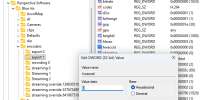
I've never tried this approach so I'm not sure. I think I would try to modify the Windows Registry first. If you want to try this I would suggest you backup your registry first and then go into "Computer\HKEY_LOCAL_MACHINE\SOFTWARE\Perspective Software\Blue Iris\encoders". Open each folder under this key and look for "hwaccel" and change the value data to 0.