

Yes, but that was before Ken added "Action sets" Now you no longer need to mess with PTZ presets on each camera, one camera can change all the cams day/night profiles with a lot less clutter.@bp20089 has instructions for something like this in his post where he said he has stopped using his sunrise/sunset app.
Dahua day/night switch utility - DahuaSunriseSunset
I wanted to use stronger noise reduction at night and weaker during the day, but Dahua seems to have made a mess of the profile management. On most cameras, there doesn't seem to be a way to have the camera switch automatically between Day and Night profiles when the camera changes between...ipcamtalk.com
Add Sunrise Sunset to Time Plan Settings
- Thread starter CamCrazy
- Start date
You are using an out of date browser. It may not display this or other websites correctly.
You should upgrade or use an alternative browser.
You should upgrade or use an alternative browser.

So I have always tried to just use one profile. I would basically set up a profile that's best for night time and use only that with my 4K T's and S3's. Of course daytime looks a little bright/washed out in non-shaded areas. Today I started playing around with daytime profiles. Most of my cameras look out away from my home where the area of importance is open with no buildings etc blocking light. On the camera I am experimenting with (4K T) I can actually put the shutter setting down to 0-1 ms and that actually looks best for freeze framing. Plus the actual complete scene looks just fine although maybe slightly dimmer than what you see with your naked eye. And this is in the cloudy dark pacific northwest.
Does anyone run their shutter at this setting?
Does anyone run their shutter at this setting?

So I have always tried to just use one profile. I would basically set up a profile that's best for night time and use only that with my 4K T's and S3's. Of course daytime looks a little bright/washed out in non-shaded areas. Today I started playing around with daytime profiles. Most of my cameras look out away from my home where the area of importance is open with no buildings etc blocking light. On the camera I am experimenting with (4K T) I can actually put the shutter setting down to 0-1 ms and that actually looks best for freeze framing. Plus the actual complete scene looks just fine although maybe slightly dimmer than what you see with your naked eye. And this is in the cloudy dark pacific northwest.
Does anyone run their shutter at this setting?
The 4K-T has been the one camera I have been able to run one profile on.
Yeah same here but I just thought I would tinker with some day profile settings and see if it can be improved any. You can almost close the shutter down and still get a fine picture.The 4K-T has been the one camera I have been able to run one profile on.
Ok I tested this out on one of my 4K T cams using the action set feature. I must have set it up ok because it switched from my daytime profile to my nighttime profile just fine.I am not the best in detailed instructions, but I sure will try to answer any questions if you need any help.
I'm confused a little on a couple things. First I assume I don't have to do anything in the Blue Iris settings>Schedule window? That's the global settings correct? And we leave that alone since we are overriding that with each cameras schedule?
Also in the camera settings under schedule I manually filled in todays info (Monday) with the proper slider settings for sunset/sunrise. Do I do that for each day? How is this whole setup keeping track of the correct sunset/sunrise times automatically since they change all the time? And if it is keeping track automatically, why do we need to use the sliders to adjust sunset/sunrise for each day in the cameras schedule window??
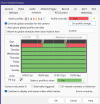
OK, It works best if you go into Blueiris settings/schedule and the create a new schedule Day_Night. You can call it whatever you want but do it here and save it. Then you can use that saved schedule for each camera. For example:Ok I tested this out on one of my 4K T cams using the action set feature. I must have set it up ok because it switched from my daytime profile to my nighttime profile just fine.
I'm confused a little on a couple things. First I assume I don't have to do anything in the Blue Iris settings>Schedule window? That's the global settings correct? And we leave that alone since we are overriding that with each cameras schedule?
Also in the camera settings under schedule I manually filled in todays info (Monday) with the proper slider settings for sunset/sunrise. Do I do that for each day? How is this whole setup keeping track of the correct sunset/sunrise times automatically since they change all the time? And if it is keeping track automatically, why do we need to use the sliders to adjust sunset/sunrise for each day in the cameras schedule window??
View attachment 235283

Creating the schedule takes some patience as it is a learning process. First click on the days box and get all the days selected. The use the sliders, and click the slider icon and then check the box relative to sunrise/sunset. You can then adjust the minutes, like mine I set to 10minutes before sunrise and 10 minute after sunset.
Once you have this set click OK to save it. Keep in mind you must have the global schedule ENABLED just to create and save. Once you have that done, go back in and disable the global schedule. BUT, you can still be able to select your saved schedule on any camera now. See example:

Now when you select "Events Schedule" you will see where you add a "Action set 1" I used this for day mode. Then you edit the action set and add the "configure web request" for each of your cameras.

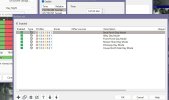
Now you can do this for each cam within the cam, or in my case I just used one camera to change all of mine, depends on your use.
BE SURE you have your Blueiris settings location set correctly so it will change as the sunrise/sunset times change. The times will change and BI will change the times for you, once this is set, you can forget about it

Last edited:
I think where I was getting confused is why we have to switch profiles in Blue Iris. If all I want to do is change my actual camera profiles (Night and Day) dependent on sunrise/sunset, wouldn't I just need to use Action sets and forget about the other profile changing in Blue Iris? I just want my Shutter, Gain, NR etc to change on the camera at sunset and sunrise automatically.OK, It works best if you go into Blueiris settings/schedule and the create a new schedule Day_Night. You can call it whatever you want but do it here and save it. Then you can use that saved schedule for each camera. For example:
View attachment 235287
Creating the schedule takes some patience as it is a learning process. First click on the days box and get all the days selected. The use the sliders, and click the slider icon and then check the box relative to sunrise/sunset. You can then adjust the minutes, like mine I set to 10minutes before sunrise and 10 minute after sunset.
Once you have this set click OK to save it. Keep in mind you must have the global schedule ENABLED just to create and save. Once you have that done, go back in and disable the global schedule. BUT, you can still be able to select your saved schedule on any camera now. See example:
View attachment 235288
Now when you select "Events Schedule" you will see where you add a "Action set 1" I used this for day mode. Then you edit the action set and add the "configure web request" for each of your cameras.
View attachment 235289 View attachment 235290
Now you can do this for each cam within the cam, or in my case I just used one camera to change all of mine, depends on your use.
BE SURE you have your Blueiris settings location set correctly so it will change as the sunrise/sunset times change. The times will change and BI will change the times for you, once this is set, you can forget about it
No you need 2 BI profiles....one will be day and one will be night. In my case I used Green profile 1 for day and red profile 3 for night as its shown in pics. I use profile 2 for something else, but you can use whatever you want.I think where I was getting confused is why we have to switch profiles in Blue Iris. If all I want to do is change my actual camera profiles (Night and Day) dependent on sunrise/sunset, wouldn't I just need to use Action sets and forget about the other profile changing in Blue Iris? I just want my Shutter, Gain, NR etc to change on the camera at sunset and sunrise automatically.
From the discussion in the Blue Iris forum you linked to. One member said:No you need 2 BI profiles....one will be day and one will be night. In my case I used Green profile 1 for day and red profile 3 for night as its shown in pics. I use profile 2 for something else, but you can use whatever you want.
"Just to understand (I'm a bit fuzzy here)... the Action sets change the cameras itself from color to b/w, adjust exposure, etc for day to night. The global (or individual) schedules in BI change the Profiles, which generally control other things like alerts on or off, or any motion or recording or other such things? So both need to be changed for sunrise or sunset... one w schedule in BI for the profiles, one with the action sets (or individually in the camera itself if not using the action set) ?"
With my setup, I don't want to change my recording, motion alerts, AI, etc to different settings at night. I want that to stay the same 24/7. So shouldn't I just be able to set up Sunrise/Sunset action sets and call it a day? I don't want to change any Blue iris settings at all.
You can sure try it, but you can also just check the box "sync with profile 1" for your night profile. You will know if it is working and log will show also.From the discussion in the Blue Iris forum you linked to. One member said:
"Just to understand (I'm a bit fuzzy here)... the Action sets change the cameras itself from color to b/w, adjust exposure, etc for day to night. The global (or individual) schedules in BI change the Profiles, which generally control other things like alerts on or off, or any motion or recording or other such things? So both need to be changed for sunrise or sunset... one w schedule in BI for the profiles, one with the action sets (or individually in the camera itself if not using the action set) ?"
With my setup, I don't want to change my recording, motion alerts, AI, etc to different settings at night. I want that to stay the same 24/7. So shouldn't I just be able to set up Sunrise/Sunset action sets and call it a day? I don't want to change any Blue iris settings at all.

After thinking about it, having a Blue Iris schedule for day/night settings might come in handy for adjusting AI settings etc for night time.You can sure try it, but you can also just check the box "sync with profile 1" for your night profile. You will know if it is working and log will show also.
View attachment 235300
So I took your advice and set up a global "Day_Night" schedule then disabled it. It worked great to populate the entire schedule in the camera settings. So now that I have done that, it will automatically adjust for the constant time changes for sunset/sunrise?
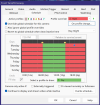
correct. These times will change as time goes by.After thinking about it, having a Blue Iris schedule for day/night settings might come in handy for adjusting AI settings etc for night time.
So I took your advice and set up a global "Day_Night" schedule then disabled it. It worked great to populate the entire schedule in the camera settings. So now that I have done that, it will automatically adjust for the constant time changes for sunset/sunrise?
View attachment 235301
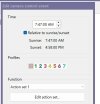
I have to correct myself. I tried setting JUST the "action set" on my BI demo and you are correct, you do not need to use profiles in the schedule in order to send the web requests. In my case I do have other settings I change at night is why I went that route, but glad you pointed that out. Hopefully someone will make a detailed walk thru, like I said, I am not good at making instructions. You will find that this works very well and be sure to BACKUP your settings. Its hard to remember all these little tweaks after a year or so....oh wait, I started on BI2 so guess its been awhileWith my setup, I don't want to change my recording, motion alerts, AI, etc to different settings at night. I want that to stay the same 24/7. So shouldn't I just be able to set up Sunrise/Sunset action sets and call it a day? I don't want to change any Blue iris settings at all.
 I still have a copy of BI3 that still works I should add on W11. I don't use it but fire it up once every now and then to remind myself how much this software has changed over the years. One of my buddies still uses BI3 to this day.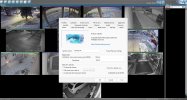
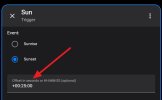
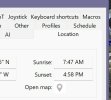
Let me check that out. Thanks!You can select include civil twilight under Location/options.
Looks like all that does is make sunrise happen 30 minutes earlier and sunset 30 minutes later. That's the opposite way that I want to go. What happens when you change the time setting like in my screen shot? I basically don't want my daytime shutter and gain settings on my camera to kick in until 20 minutes or so past sunrise.You can select include civil twilight under Location/options.
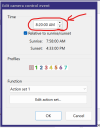
Yes, your image above is the right way to achieve the automatic offset relative to the ever changing sunrise/sunset times. I've had it setup this way for a few years now and never have to touch it. Your image shows 22 minutes of offset for today, and it will keep the same number of minutes all year.Looks like all that does is make sunrise happen 30 minutes earlier and sunset 30 minutes later. That's the opposite way that I want to go. What happens when you change the time setting like in my screen shot? I basically don't want my daytime shutter and gain settings on my camera to kick in until 20 minutes or so past sunrise.
View attachment 235568
Excellent! ThanksYes, your image above is the right way to achieve the automatic offset relative to the ever changing sunrise/sunset times. I've had it setup this way for a few years now and never have to touch it. Your image shows 22 minutes of offset for today, and it will keep the same number of minutes all year.
