B54PRO-Z4E first impression

Today I swapped out the B54PRO-Z4E for the B54IR-Z4-S3 (again). I like the daytime image of the B54PRO more than the B54IR because of the better dynamic range and color palette, but at night the B54IR is a better choice. The noise from the sensor on the B54PRO negatively affects the image, and the IR isn't as strong as the IR on the B54IR. Haven't had any quick-moving targets, but even with this neighborhood cat, it is apparent which camera is preferable at night. One thing I did attempt today was to mimic the color palette of the B54PRO on the B54IR. I found that setting the white balance to 22 red gain and 18 blue gain got it close. Sigh, if only the dynamic range could be improved with just a few settings, the B54IR would be the clear winner. A lot of swapping between the cameras is surely in the future.

Maybe try some added accessory IR with the B54PRO?
 
  • Like
Reactions: CCTVCam
After updating the firmware of the B54PRO-Z4E with the April 1, 2026 release, I noticed two things immediately: the smart illumination function now works much better than it had previously, and the light sensitivity seems to have been optimized since the previous firmware. Here are two clips. In the first, I had only IR illumination, and in the second I switched to smart illumination. You will notice a slight pause in the 2nd clip because I wanted the smart illumination (white light) to turn off before I walked toward the camera. I wanted to see at what distance the white light (smart illumination) would turn on. This update finally made the smart illumination workable, so I am going to leave it switched on. Now comparing it to the B54IR-Z4E-S3, which it replaced, the B54IR-Z4E-S3 still has an advantage over the B54PRO-Z4E because it provides a more powerful IR light; however, this new firmware update solved one of the camera's problems: switching of smart illumination. It is very usable now. Still a lot of additional testing to come, but I was anxious to see what changes had been made to the firmware.
 
Last edited:
You can slap all of the lipstick you want on the new Dahua pigs, uh, I mean models, but you're still got pigs.
 
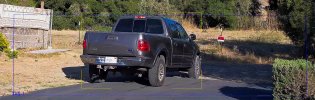
No one has walked down the driveway at night since swapping cameras, but this guy drove down the driveway tonight and also a few nights ago, when the B54IR-Z4E-S3 was set up; so it shows the comparison. Unlike last night when AI-ISP and AI-SSA were "off", I decided to switch on AI-ISP. Didn't try AI-SSA, since that makes the camera unwatchable.
 
After updating the firmware of the B54PRO-Z4E with the April 1, 2026 release, I noticed two things immediately: the smart illumination function now works much better than it had previously, and the light sensitivity seems to have been optimized since the previous firmware. Here are two clips. In the first, I had only IR illumination, and in the second I switched to smart illumination. You will notice a slight pause in the 2nd clip because I wanted the smart illumination (white light) to turn off before I walked toward the camera. I wanted to see at what distance the white light (smart illumination) would turn on. This update finally made the smart illumination workable, so I am going to leave it switched on. Now comparing it to the B54IR-Z4E-S3, which it replaced, the B54IR-Z4E-S3 still has an advantage over the B54PRO-Z4E because it provides a more powerful IR light; however, this new firmware update solved one of the camera's problems: switching of smart illumination. It is very usable now. Still a lot of additional testing to come, but I was anxious to see what changes had been made to the firmware.


Unfortunately as much as I want to like it I still see issues even with the new Firmware. With smart illumination "on", walking away (bearing in mind it's just jeans and a white shirt so not much to show up issues), the picture looks great until it turns to IR then ghosting occurs. I'm guessing AI is setting too much gain even with IR. Walking back towards the camera, it's still present which makes it's doubtful for use in instances where the subject doesn't walk up to the camera. As it changes to daylight illumination, at 1st glance it looks ok further out at the trigger point but then as you get close to the camera where you'd expect to finally see your face well for the money shot, the product of slow shutter / gain and AI becomes apparent, your face lacks detail and appears smoothed. Can you be recognised? Probably by someone who knows you. However, the detail is lacking.
 
Last edited:
No one has walked down the driveway at night since swapping cameras, but this guy drove down the driveway tonight and also a few nights ago, when the B54IR-Z4E-S3 was set up; so it shows the comparison. Unlike last night when AI-ISP and AI-SSA were "off", I decided to switch on AI-ISP. Didn't try AI-SSA, since that makes the camera unwatchable.


Thank you for posting these, the effort is appreciated. Now to my eyes the Pro look better at night with the truck footage? quite a lot better, sharper, more focused. I might be tempted to try this firmware, if I can install it, historically I have not had any luck with official Dahua firmware but Andy's has always worked fine.
 
Thank you for posting these, the effort is appreciated. Now to my eyes the Pro look better at night with the truck footage? quite a lot better, sharper, more focused. I might be tempted to try this firmware, if I can install it, historically I have not had any luck with official Dahua firmware but Andy's has always worked fine.

Our eyes must be very different..

The PRO to me looks much like the last round of tests I did some months back.

Its Brighter and Softer/Smoother, but lacks detail.
Still looks like you have to dial Sharpness back to around 15 and NR high to mitigate the "fuzzies" creating a soft image lacking detail
 
Last edited:
Unfortunately as much as I want to like it I still see issues even with the new Firmware. With smart illumination "on", walking away (bearing in mind it's just jeans and a white shirt so not much to show up issues), the picture looks great until it turns to IR then ghosting occurs. I'm guessing AI is setting too much gain even with IR. Walking back towards the camera, it's still present which makes it's doubtful for use in instances where the subject doesn't walk up to the camera. As it changes to daylight illumination, at 1st glance it looks ok further out at the trigger point but then as you get close to the camera where you'd expect to finally see your face well for the money shot, the product of slow shutter / gain and AI becomes apparent, your face lacks detail and appears smoothed. Can you be recognised? Probably by someone who knows you. However, the detail is lacking.

^^^^^
Exact;y this
 
After updating the firmware of the B54PRO-Z4E with the April 1, 2026 release, I noticed two things immediately: the smart illumination function now works much better than it had previously, and the light sensitivity seems to have been optimized since the previous firmware. Here are two clips. In the first, I had only IR illumination, and in the second I switched to smart illumination. You will notice a slight pause in the 2nd clip because I wanted the smart illumination (white light) to turn off before I walked toward the camera. I wanted to see at what distance the white light (smart illumination) would turn on. This update finally made the smart illumination workable, so I am going to leave it switched on. Now comparing it to the B54IR-Z4E-S3, which it replaced, the B54IR-Z4E-S3 still has an advantage over the B54PRO-Z4E because it provides a more powerful IR light; however, this new firmware update solved one of the camera's problems: switching of smart illumination. It is very usable now. Still a lot of additional testing to come, but I was anxious to see what changes had been made to the firmware.


Assuming these were originally supplied by Andy, did you do anything other than full factory reset to allow the official Dahua firmware to install OK. Mine failed and reverted when trying Dahua firmware in the past, granted this was without a factory reset which I know technically you should carry out.
 
  • Like
Reactions: Chokolinho
Our eyes must be very different..

The PRO to me looks much like the last round of tests I did some months back.

Its Brighter and Softer/Smoother, but lacks detail.
Still looks like you have to dial Sharpness back to around 15 and NR high to mitigate the "fuzzies" creating a soft image lacking detail
Yep sharpness at 10-15 at night. I have nr at 15-20 at night.
 
Yep sharpness at 10-15 at night. I have nr at 15-20 at night.
The night settings I have found to work best for this particular setting:
Brightness = 50, Contrast = 56, Saturation = 50, Sharpness = 19, Gamma = 50
Shutter 0-6ms, Gain 0-50, Iris = 100, Exposure Compensation = 50, 3D NR = 39, 2D NR = 34
For daytime, most settings are similar except:
Shutter 0-2ms, Gain 0-42, Iris = 50, 3D NR = 30, 2D NR =29
 
I didn't blur the plate out. He has painted some stuff over the letters of the plate to distort it, so it can't be read at night.
Here is an extended clip...


Yeah there’s some spray they use. LE around here uses it on most all of their vehicles, produces a black smudge under IR
 
  • Like
Reactions: tmxv4128
The night settings I have found to work best for this particular setting:
Brightness = 50, Contrast = 56, Saturation = 50, Sharpness = 19, Gamma = 50
Shutter 0-6ms, Gain 0-50, Iris = 100, Exposure Compensation = 50, 3D NR = 39, 2D NR = 34
For daytime, most settings are similar except:
Shutter 0-2ms, Gain 0-42, Iris = 50, 3D NR = 30, 2D NR =29

Apart from the sharpness and the daylight Gain, those settings almost mirror the 4kt's I run. I can't remember daylight NR settings off the top though.

That daylight shot looks a lot more like what I'd expect from a camera of this calibre. Be interesting to see what the night looks like.