Fine, OK. My OS is Server 2022, and my hypervisor Qemu, but I shouldn't think it makes all that much difference.
Apologies if any of this sounds daft, or if I am pointing out anything you already spent ages thinking about. These are just my very first observations.
1. I have never personally seen, on my system, the 'UI glitches' you showed in G. Wait, silly me, that's probably you redacting your cameras

. Can you show another screenshot, but with blur, not black masks? Is it just the icons you are showing or is some other part of the UI going wrong?
2. Are you definitely running BI as a Service?
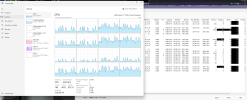
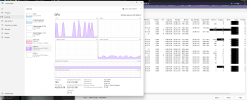
3. Your MP/s value of 779 seems quite high. I have a system with about 130Mbps nominal on the NIC (compare to your 200), which shows about 195MP/s I think. So on your system, you have about 55% more Mbps on the NIC, but about 295% more MP/s,

. I suspect your clones are causing some of this (I don't use clones at the moment), because there is more video passing through the pipeline, but not having to arrive on the NIC (it's already there from the primary 'copy' of each camera.
4. Your substream are set to quite a high resolution! Most of them are on 2.1MP. I know 2.1MP seems like 'a lot less' than 8MP, but there are still many cameras whose highest resolution for the MAIN STREAM is 2MP. Usually, people run substream considerable below 2MP, and that is perfectly good enough for the substream. It's the whole point of the substream after all. So is there a reason this is so high?
5. In image C, it looks like most of your cameras are running 25FPS. There is nothing wrong with 25FPS, and I used to run it as standard, until someone pointed out to me it might not be needed. Now my standard frame rate is 15, unless otherwise required. Although the viseo is slightly less smooth with fast moving objects, 15FPS is still plenty for a reasonable viewing experience in my opinion, and it saves plenty of storage and processing power. Note, FPS usually doesnt impact the freeze frame shots, which is the key thing in most security applications, so consider lowering your FPS unless you have a specific reason to keep it high.
6. There is a big difference between C and B. With the more healthy one, it looks like most cameras are running 25FPS. In the other, many have dropped by nearly 10FPS, to pretty varying, random looking values. Now is this a symptom of having the BI UI open, or does this variation happen irrespective of that? Is it possible there is some other odd bottleneck, like on the network, or even a Poe switch running out of power budget and browning out?
Might be worth posting a few screenshots of your config, particularly HA etc.
Sorry, I'm not sure if any of that answers your question rewarding the capabilities of BI, just some thoughts.
My (albeit not too extensive) experience has so far lead me to believe that if / when I need my BI server to handle a higher workload, I just feed it more and it'll do it. E.G more cores and more RAM. I suppose at crazy high workloads it may start to break down, but keep in mind that BI supports up to 128 cameras - I doubt if the limit would have been raised from 64 to 128 if BI fundamentally couldnt handle it, if you see what I mean?
Win casino casino Bangladesh