Moved Camera from Port 1 to Port 2

Rockjaw

Young grasshopper
Jun 23, 2024
52
12
Canada
Good morning everyone,

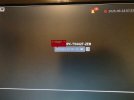
I had a camera working for about 2 years (my only camera) and I added another camera 2 days ago. My new camera works fine and shows an image but my old camera now comes up with a password. I have entered the password to the NVR, I get in and it's blank. It was working for about 10 hours and now I just see this screen. I have tried rebooting, unplugging etc.

Any ideas?
 

Attachments

  • Camera.jpg
    Camera.jpg
    39.9 KB · Views: 9
Need more information:
a) Vendor / Model / Firmware release for NVR
b) Vendor / Model / Firmware release for cameras
I can definitely get you that information. But seems weird that it worked for 2 years on Port 1 on the NVR and I move it to Port 2 on the NVR and it doesn't work now and asks for a password.

The NVR is: NVR5208-8P-EI
System Version: V4.005.0000000.3.R

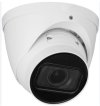
Camera is: EmpireTech - IPC-T5442T-ZEB
I can't remote into the camera to get that information but was working for 2 years straight until I plugged it into port 2.
 
We have seen instances where NVRs will "assign" a camera to a port and moving cameras to different ports results in cameras not working and the only fix is factory resets.

Why not move the camera back to Port 1?
 
  • Like
Reactions: bigredfish
Reboot NVR first...then see
 
We have seen instances where NVRs will "assign" a camera to a port and moving cameras to different ports results in cameras not working and the only fix is factory resets.

Why not move the camera back to Port 1?
Yeah, the cameras point in opposite ways so my left camera on the screen points right and the right points left. It looks confusing when you are looking at the windows like your eyes are crosseyed looking down the street so I don't really want to put it back
 
Yeah, the cameras point in opposite ways so my left camera on the screen points right and the right points left. It looks confusing when you are looking at the windows like your eyes are crosseyed looking down the street so I don't really want to put it back

How about simply re-arranging the cameras in the camera view?

 
  • Like
Reactions: bigredfish