Hi all,
I recently switched internet provider/router. I have a Dahua NVR with two cameras.
Camera 1 is connected directly to the NVR/PoE port and works fine. In the NVR it shows as something like 10.1.1.65.
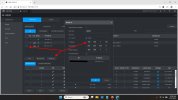
Camera 2 is connected via a separate switch/LAN, not directly to the NVR. This camera is now offline. In the NVR it still shows as 192.168.2.115 on port 37777.
My new router/network is 192.168.1.x; the NVR itself is online at 192.168.1.213. So I suspect camera 2 is still configured with a static IP from the old network (192.168.2.x).
The NVR can sometimes detect the camera in search, but when I add/register it, it stays red/offline.
What is the best way to move this second camera from 192.168.2.115 to the new 192.168.1.x network? Can this be done from the NVR UI, or do I need to connect a laptop to the same switch and temporarily set the laptop to a 192.168.2.x address to access the camera directly?
Any tips/tricks to get it working? Probably something with its network, but I don't know where to start.
Thanks in advance for your help!
I recently switched internet provider/router. I have a Dahua NVR with two cameras.
Camera 1 is connected directly to the NVR/PoE port and works fine. In the NVR it shows as something like 10.1.1.65.
Camera 2 is connected via a separate switch/LAN, not directly to the NVR. This camera is now offline. In the NVR it still shows as 192.168.2.115 on port 37777.
My new router/network is 192.168.1.x; the NVR itself is online at 192.168.1.213. So I suspect camera 2 is still configured with a static IP from the old network (192.168.2.x).
The NVR can sometimes detect the camera in search, but when I add/register it, it stays red/offline.
What is the best way to move this second camera from 192.168.2.115 to the new 192.168.1.x network? Can this be done from the NVR UI, or do I need to connect a laptop to the same switch and temporarily set the laptop to a 192.168.2.x address to access the camera directly?
Any tips/tricks to get it working? Probably something with its network, but I don't know where to start.
Thanks in advance for your help!