It looks like better ONVIF support is coming to UniFi Protect

I’d buy a UNAS in a heartbeat if Protect would figure out motion alerts with IVS rules for third-party cameras. The Protect app is excellent, and the video quality and playback experience on my phone are miles ahead of Blue Iris. But I can’t justify dropping another $600 on AI Ports on top of the UNAS just to make it work.
I debated selling my UNVR to my neighbor and upgrading to the G2 NVR (which reportedly has 16GB RAM, not 8GB as advertised); but 95% of the cameras in my network are Third-Party Non-Ubiquiti - I would just be wasting money and making a "dumb" UNVR record 24/7 without any labelled motion events which in my opinion is counterproductive. I only use two 2x AI Ports presently, one for G4/G5 Unifi cameras and the second one exclusively for LPR with a Dahua camera. Blue Iris / Frigate (if you can get it to work flawlessly) wins hands down in combination with a standard Dahua NVR
 
On my AI ports, the thing that annoys me is the resolution limit. The max resolution won't support some cameras with a crazy aspect ratio such as some pano cameras. End up needing to lower the resolution on those as the horizontal spec is over the range. Also their definition of a 2K camera. A lot of my cameras have a resolution of 2688 x 1520 which the AI port sees as 4K so it only allows me one camera instead of the two in 2K resolution.
 
  • Sad
Reactions: Arjun
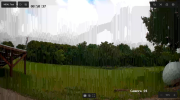
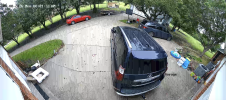
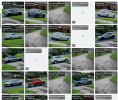
Speaking of AI Port.... Anyone adding cameras in using ONVIF and the AI port seems to add strange lines to the image when trying to play the "HQ" stream?

Example:
1780927296618.png


1780927323491.png
It doesn't do it in "auto" or "LQ". It also doesn't do it with every camera. Very strange.
 
  • Like
Reactions: Arjun
Speaking of AI Port.... Anyone adding cameras in using ONVIF and the AI port seems to add strange lines to the image when trying to play the "HQ" stream?

Example:
View attachment 244686


View attachment 244687
It doesn't do it in "auto" or "LQ". It also doesn't do it with every camera. Very strange.
Not me, you seem to be using Hikvision cameras - I use Dahua mainly
 
Not me, you seem to be using Hikvision cameras - I use Dahua mainly
Yeah. For these two they are Hikvision. With that being said I remember on a different camera a while back that I figured it out and fixed it. I believe I just changed it to H264 instead of H265. I'll have to test it out and confirm. I logged into a camera last week and was scratching my head wondering why I had a camera set to H264. That could be why.
 
  • Like
Reactions: Arjun
Like others, I cannot get Protect to trigger recording based on IVS events, but if I enable "Smart Motion Detection" on the Dahua camera it self, Protect does record when it receives a motion trigger from the camera. As mentioned, there are many false positives. Can someone help me understand the difference between the ONVIF events produced by "Smart motion detection" and IVS? I thought they were the same, but clearly they are not.
 
  • Like
Reactions: Arjun
Looks really interesting. All 17 of my 54IRs are configured to use on-board IVS and AI to trigger ONVIF alerts in BI. While testing Protect, I noticed that the iOS app interface seemed better than the BI app for me. This could possibly allow me to use my camera configuration as is and then use Protect for the iOS app etc. Only thing that would be a deal breaker for me would be if the alerts from the camera to Protect are slow to arrive. Anyone here tried this yet? Thanks
 
  • Like
Reactions: Arjun
Like others, I cannot get Protect to trigger recording based on IVS events, but if I enable "Smart Motion Detection" on the Dahua camera it self, Protect does record when it receives a motion trigger from the camera. As mentioned, there are many false positives. Can someone help me understand the difference between the ONVIF events produced by "Smart motion detection" and IVS? I thought they were the same, but clearly they are not.
As far as I know.... Basic motion detection just goes off of pixel changes in the area that is set up for motion detection. So it could be from shadows or anything. Smart motion detection they would go by the shape of the pixel changes. Most popular would be human and vehicle. So if the pixels that are changing colors are for instance in a human or vehicle or whatever was selected then it would trigger it. IVS for Dahua or VCA for Hikvision... being I would say the two most popular brands...These detection types are for line crossing (tripwire) or intrusion (perimeter protection) or face detection. This would be when an object crossings or goes into a certain area and also may have a size limitation to reduce the amount of false alarms.
 
Right, I understand what IVS does. But, I also thought that it generated standard ONVIF events like normal motion detection. It worked fine with Blue Iris, but does not with Unifi Protect which is why I was wondering what the technical difference between the events that it generates are.
 
I would say it has to do with the ONVIF profile. IVS would usually be in a different profile than motion detection. I would say motion detection would be "Profile T". IVS would be "Profile M". Then again it depends on which profiles the camera supports and whether or not there is full support of that profile or just partial. S, G, and T are the profiles that are pretty much standard for most cameras. Older cameras are S and G only which only let you get a video, audio input and record. Recording would only be continuous with S and G. T adds motion detection and two way audio. This also usually lets you record on motion instead of continuous. M is any event recording. I haven't seem many cameras that have M support yet so the detections are only valid within the camera manufacturers ecosystem and not through onvif. An alternative is having the recorder doing the detection processing which means the camera only supplies the video while the recorder (NVR) takes care of the detection (metadata).
 
I wonder how the ONVIF events are noted in UniFi Protect especially when the times are not perfectly synchronized across all involved devices
 
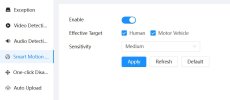
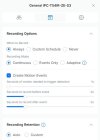
I just setup smart motion on an IPC-T54IR-ZE-S3 to trigger events for Protect today. Knock on wood, but I don’t believe I've had any false positives so far. May be way too early to tell though. I wish it did have the thumbnails like the G6 Pro turret does. That comes in rather handy.
 
I just setup smart motion on an IPC-T54IR-ZE-S3 to trigger events for Protect today. Knock on wood, but I don’t believe I've had any false positives so far. May be way too early to tell though. I wish it did have the thumbnails like the G6 Pro turret does. That comes in rather handy.
Can you screenshot the settings?
 
Did anyone manage to successfully put their UNVR in the same subnet as their cameras?