Blue Iris "FPS / key rate" error and no signal

TuckNTruck

Pulling my weight
Aug 16, 2022
84
135
NC
I have a Tyco / Illustra PTZ that I believe is a rebranded Hikvision DS-2DF8236I5X-AEL(W).

There's something going on with it and Blue Iris. Most of the time, no issues, but then the stream will slow down and I get the error "Check FPS and key rates".

Sometimes the error goes away and the stream "catches up" and works fine again until it happens again. Other times, it goes to a "No Signal" after being on the "Check FPS and key rates" error.

It's like there's a backlog of frames that are trying to get through but can't, and then they all come through at once before resuming normal operation. Which just reminded me, I have seen a message that says "frame bottleneck" as well, but it's very rare.

There have been times where it never recovers from "no signal" and I have to reset the switch, again it feels like to clear the backlog of frames that aren't getting through.

When all this happens, the camera's web interface is perfectly fine. I never have problems pinging the camera or viewing the live feed in the camera's interface. The problems seems to be with blue iris.

In the configuration, I have constant bitrate, H264, 30 FPS, I frame interval 30. I've tried 25 FPS along with bitrates as low as 6144 with no change in behavior.

In BI, I have the max rate set to 30.00 fps, no decoding, continuous recording BVR direct to disc. I don't use substreams at all with this camera.
 
Not using substreams could mean you are overloading the system and it cant keep up and that is why resetting or restarting the switch works because it is clearing out all of the lost packets sent that start piling up because it keeps trying to resend the packets.

Watching live view from camera interface doesnt say much unless you are watching it 24/7. Opening it when it shows no video in BI isn't proving anything other than the camera is working, which leads to lost packets being sent to BI.

Why not use substreams or drop FPS to 15?
 
+1^^^.
If no joy from the above, try UNchecking "Send RTSP keep-alives" and bump up "Receive Buffer" to 20MB (both settings under "camera settings" => "Video" tab).
 
  • Like
Reactions: Flintstone61
Not using substreams could mean you are overloading the system and it cant keep up and that is why resetting or restarting the switch works because it is clearing out all of the lost packets sent that start piling up because it keeps trying to resend the packets.

Watching live view from camera interface doesnt say much unless you are watching it 24/7. Opening it when it shows no video in BI isn't proving anything other than the camera is working, which leads to lost packets being sent to BI.

I monitor this camera most of the day while I'm working, so I like to see full quality. Nothing should be bandwidth limited and CPU usage on my BI PC is 10% and no storage issues either. When you say I could be overloading the system and it can't keep up, what system? The PC is hardly breaking a sweat, and everything in the network is gigabit or better, more details on that below.

Why not use substreams or drop FPS to 15?
I can manage with 25 FPS but the camera can do 30 FPS so I like to get everything I can out of it. All the components should be more than capable, so I don't understand what's up with this one camera and BI.

+1^^^.
If no joy from the above, try UNchecking "Send RTSP keep-alives" and bump up "Receive Buffer" to 20MB (both settings under "camera settings" => "Video" tab).
I'll try that on the RTSP keep-alive. First thing I did was bump up the receive buffer when I set up this camera. I've tried multiple settings between 20-50, no change.

what is the actual hardware your pushing data thru? like PC, Switch, Hard disk setup,
PC is a Dell Optiplex 5060, 32 GB ram, I5-8700, not running AI or any of that stuff, CPU usage stays around 10% and the PC is not used for anything other than BI.
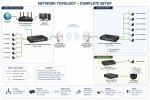
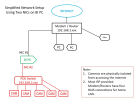
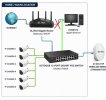
Here's a ChatGPT generated network map. Everything is gigabit or better, quality CAT6 ethernet cables, everything in operation for years, but the PTZ in question is new.

The part I'm hung up on is that if I watch the PTZ's web interface, the livestream on that never slows down, glitches, drops out, etc. It's perfect. But the stream in BI has problems. There's usually 100-120 mbps of camera traffic flowing through everything, so nowhere near the gigabit everything is rated for. But again, BI is the only part of the setup that is having problems, and just with this one camera despite the feed being perfect in the camera's web interface.

Network.jpg
 
Who makes the switch that when you restart all is good?

So your cameras go thru the router to the BI computer? That alone can be the reason for the resend packets request and your problems. Removing the router from the equation solves lots of these issues. These routers are just not designed for the full-throttle never ease up demands of cameras. Unlike Netflix, these things never buffer and that causes issues with lost packets.

Under Task Manager, what does the performance of the NIC card look like? It appears you are only one ethernet port on the BI computer? If so you have all the cameras blasting in on mainstream and viewing out on the same NIC and you could be overloading it.

For example, On my isolated camera NIC, my cameras are streaming non-stop 350Mbps. This is full-on, never stopping to take a breath. Even if someone has a gigabit router, a 3rd of non-buffering 24/7 data will impact its speed.

If I didn't have dual NIC, then I could potentially be having 350Mbps incoming and watching multi-camera on mainstream at 350Mbps, so I am now pushing 700Mbps thru a gigabit ethernet port and other devices. And most GB routers and devices cannot push that through. For example, the EdgeRouter X is claimed to be 1Gbps, but you see tests all over where people are only getting in the 700Mbps range.

Are you not using substreams at all? If not, do you know that by using substreams, when you solo the camera it goes to mainstream?

And since it is just the PTZ, it could be any of the devices it is going thru.

Also, keep in mind just because the camera is rated at 30FPS doesn't mean it can actually do it with other things in operation.

Of course, some cameras are better than others, but many have just barely enough processor power and can overload easily.
 
I'm thinkin the software (Blue Iris) is only as fast as your hardware.
what hardware( i.e. WD purple(s) are all these cam streams being written to?
are all your cams running high frame rates? at 30 FPS ?
i5 is an 8500, 6 core 6 thread processor. You should be good with either processor.
i7 is an 8700 6 core 12 thread processor. ( which I'm running as well)
I would do a trial of 15-18 FPS and see if the problem continues or goes away.
then you might get more data to work with. like is it a limitation of the cam? or the Wireless lan? or ?
 
Who makes the switch that when you restart all is good?

So your cameras go thru the router to the BI computer? That alone can be the reason for the resend packets request and your problems. Removing the router from the equation solves lots of these issues. These routers are just not designed for the full-throttle never ease up demands of cameras. Unlike Netflix, these things never buffer and that causes issues with lost packets.

Under Task Manager, what does the performance of the NIC card look like? It appears you are only one ethernet port on the BI computer? If so you have all the cameras blasting in on mainstream and viewing out on the same NIC and you could be overloading it.

For example, On my isolated camera NIC, my cameras are streaming non-stop 350Mbps. This is full-on, never stopping to take a breath. Even if someone has a gigabit router, a 3rd of non-buffering 24/7 data will impact its speed.

If I didn't have dual NIC, then I could potentially be having 350Mbps incoming and watching multi-camera on mainstream at 350Mbps, so I am now pushing 700Mbps thru a gigabit ethernet port and other devices. And most GB routers and devices cannot push that through. For example, the EdgeRouter X is claimed to be 1Gbps, but you see tests all over where people are only getting in the 700Mbps range.

Are you not using substreams at all? If not, do you know that by using substreams, when you solo the camera it goes to mainstream?

And since it is just the PTZ, it could be any of the devices it is going thru.

Also, keep in mind just because the camera is rated at 30FPS doesn't mean it can actually do it with other things in operation.

Of course, some cameras are better than others, but many have just barely enough processor power and can overload easily.
All my switches are Mokerlink - yes, cheap amazon brand, but they've been flawless and I have several of them. I have the one on the boat dock plugged into a cloud power switch and that's how I cycle the power, so it actually cycles the power on that switch but that switch going down also cuts the data link to the tree switch, POE++ injector, and PTZ, so not sure what the actual "fix" is, but it works every time it goes to "no signal".

I'm confused about the question about the cameras going thru the router to the BI computer. Don't they have to? The router sits next to the BI PC and is connected to it via ethernet LAN1. Then I run ethernet from LAN2 to the outdoor switch. After that it goes dock switch, the tree switch, and finally the POE++ injector all downstream from the router. Those are all daisy chained together, starting at the router it goes via ethernet to outdoor switch, then 60ghz bridge to dock switch, then fiber from dock switch to tree switch, then tree switch to POE++ injector via ethernet patch cable, then from injector up to the PTZ.

If we're narrowing it down to a network issue, seems like the POE++ would be the first possible culprit, correct? The POE++ injector is connected to the tree switch, and the single camera on that switch works fine, so maybe the cheap POE++ can't handle the throughput even though it's only handling the data from a single PTZ?

Task manager on the BI PC shows 115 mbps receive and 2-3 mbps send. When the PTZ goes to no signal, it drops approx 12 mbps, which is the continuous bitrate I have it set to right now. BTW, I've adjusted the FPS, but bitrate stays the same - it's still pushing 12 mpbs whether it's 30, 20, or 10 FPS. Makes sense to me, is that the way it should be? If I'm trying to figure out a "too much data" problem, I need to drop bitrate, right? I've gone all the way down to 6 mbps CBR and no change.

I do use substreams on all but a couple cameras.

Anyways, I did have trouble when I first installed this camera as it would power cycle when the IR was on and pan/tilt were active - it was pulling too much power or my injector just wasn't cooperating. It was a very nice Cody unit rated for 90W so it should have been no problem. I replaced it with a cheap POE++ from amazon and that resolved the power cycle issue, but maybe it introduced this data bottleneck? I'll put the Cody injector back in tomorrow to see if it resolves the throughput issue. If it does, then I'll just dump the POE completely and power it with an AC adaptor.

I'm thinkin the software (Blue Iris) is only as fast as your hardware.
what hardware( i.e. WD purple(s) are all these cam streams being written to?
are all your cams running high frame rates? at 30 FPS ?
i5 is an 8500, 6 core 6 thread processor. You should be good with either processor.
i7 is an 8700 6 core 12 thread processor. ( which I'm running as well)
I would do a trial of 15-18 FPS and see if the problem continues or goes away.
then you might get more data to work with. like is it a limitation of the cam? or the Wireless lan? or ?
Yeah, it's all going to a 4gb WD purple on the BI PC. All cams are set to at least 20 fps, most 25 or 30. Sorry, you're right - it's an I7-8700. I'm building an I5 gaming set up for my kid, so I5 was on the brain lol.

While I've been typing all this, I've dropped FPS down to 10 and bitrate to 6000 kbps and still having the issue. In fact, I've disabled ALL cameras except the problem PTZ, and I still get the same problem, ultimately ending in "no signal" error for a few seconds, then it's back. So literally no change even after disabling every other camera on the network.

So, I guess now I'm down to checking POE++ injector. If that doesn't fix it, what's next? The ethernet cable from injector to PTZ? Maybe a bad connector?

After I made the fiber run from dock switch to tree switch, I connected my laptop to tree switch to make sure the fiber connection was good, and I played youtube videos at 4K, ran speed tests, etc and got 900+ mbps with no drops or buffering etc, so I don't think it's an issue with the fiber link.

Oh well, it's late, going to bed lol. I'll try the Cody injector tomorrow and go from there. Open to more suggestions!