

PTZ5A4M-25X: Unable to update firmware from 2021-09-04 to 2026-01-19

geauxbayou

n3wb
Apr 3, 2023
4
1
Louisiana
Greetings everyone.

I am stuck but not for lack of trying or googling or gemini-ing...

I have two (2) PTZ5A4M-25X cams and can't seem to get them updated. Here is a snip of the current Version information from the cam's web portal...
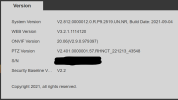
1776305367207.png

I downloaded this from support at www.empiretech01.com...

1776294655623.png
General_SD-Taurus_MultiLang_PN_Stream3-Normal-M_V3.200.0000028.3.R.260119.bin

Every time I try to upgrade to this file, the below window displays, never makes any progress and the camera restarts.
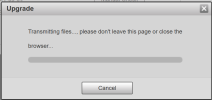
1776294378161.png

I have unblocked the file (thanks Windows) and tried both Chrome and Edge.

I want to upgrade this camera to a newer firmware, have been unable to do so so I'm using my phone a friend...

Many thanks in advance for any advice y'all provide.
 
Last edited:
Why are you updating? Do the release notes specifically mention fixing a problem you are experiencing?

Have you tried Internet Explorer- the PTZs are really sensitive to browser.

But the bigger issue is the 2026 firmware is for the newer GUI firmware which will not be compatible with your version of camera.
 
Last edited:
  • Like
Reactions: Broachoski
I have tried Firefox. IE has been deprecated and is no longer available on Windows 11 but I did try IE mode within Edge. Before anyone else asks, I also rebooted. ;) I am experiencing a few issues that seem to be resolved across past updates as best I can tell from various forums. I haven't been able to find a repository where prior versions of firmware updates are stored so I am unable to comment specifically on release notes for updates since 2021 other than the most recent one referenced above. The release notes are not cumulative. I opened a support incident on Andy's support site but have yet to hear back.
If anyone has a link to a repository that contains past firmware downloads for the PTZ5A4M-25X camera, that'd help me tremendously. My camera is running on 2021 firmware and all I'm looking to do is get it updated to the most recent version possible.

Tagging @EMPIRETECANDY for visibility.
 
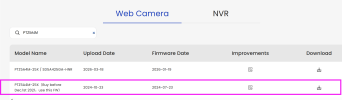
The one you bought is an older version. Please go to website to download this one, also please don't paste your SN anywhere on public forums, it's not safe.

1776305032465.png
 
I have tried Firefox. IE has been deprecated and is no longer available on Windows 11 but I did try IE mode within Edge. Before anyone else asks, I also rebooted. ;) I am experiencing a few issues that seem to be resolved across past updates as best I can tell from various forums. I haven't been able to find a repository where prior versions of firmware updates are stored so I am unable to comment specifically on release notes for updates since 2021 other than the most recent one referenced above. The release notes are not cumulative. I opened a support incident on Andy's support site but have yet to hear back.

If anyone has a link to a repository that contains past firmware downloads for the PTZ5A4M-25X camera, that'd help me tremendously. My camera is running on 2021 firmware and all I'm looking to do is get it updated to the most recent version possible.

Tagging @EMPIRETECANDY for visibility.

Oh but IE is available as it is still used by Windows, they just hid it:

How to enable native Internet Explorer in Windows 10 and 11:
  • Open Notepad:
    • Copy then paste the single line of code below into Notepad:
    • CreateObject("InternetExplorer.Application").Visible=true
    • Save as OpenIE.vbs
  • Make sure the the file name ends in .vbs not .txt, If it ends in .txt you must rename to .vbs
  • Create a shortcut to the above file and double-click it anytime you want native Internet Explorer.
 
The one you bought is an older version. Please go to website to download this one, also please don't paste your SN anywhere on public forums, it's not safe.

View attachment 242008
Wow. I swear that wasn't on your support download site earlier today. Did you just add it? In any event, THANK YOU! It worked, I got my camera updated using Chrome and the oddities I was experiencing have now gone away. We all appreciate you!
 
  • Like
Reactions: EMPIRETECANDY
Wow. I swear that wasn't on your support download site earlier today. Did you just add it? In any event, THANK YOU! It worked, I got my camera updated using Chrome and the oddities I was experiencing have now gone away. We all appreciate you!
Yes I just add it, because another guy asked me yesterday, was plan to add it, aha you push me to add it on, thanks!
 
What is unsafe about posting serial numbers?
 
Some people keep type your SN with wrong password will lock your account, or cybersecurity attack.
 
  • Like
Reactions: geauxbayou