Camera No signal

kickstart24

Young grasshopper
Dec 23, 2024
99
23
US
I have a T54IR-ZE-S3 that keeps showing as "No Signal" on BI. It was working great for the first few weeks, but now I keep getting this error. If I unplug the camera from the POE switch, and plug it back in, the camera starts working again. Then randomly, it stops working again.

The camera has a static IP and is on a dedicated switch that has only other cameras and my BI PC. I'm using a dual NIC setup.

Could this be a cabling issue? Or more likely a camera issue?
 
Likely a cable termination issue. If outside did you use dielectric grease?

Or it could be the POE switch starting to fail or maybe that port.

I have noticed BI is sensitive to power fluctuations and can give you a heads up before it fails - do you routinely see the yellow triangle caution saying FPS rates are not stable? If so then it is likely a power issue.

My troubleshooting when it happens is first try alternative power source. If it still happens, then re-terminate the outside connection. If it still happens then bring inside and try on short known good cable. If it still happens then a factory reset.

If none work then camera or POE is failing and then try powering with 12VDC.
 
Likely a cable termination issue. If outside did you use dielectric grease?

Or it could be the POE switch starting to fail or maybe that port.

I have noticed BI is sensitive to power fluctuations and can give you a heads up before it fails - do you routinely see the yellow triangle caution saying FPS rates are not stable? If so then it is likely a power issue.

My troubleshooting when it happens is first try alternative power source. If it still happens, then re-terminate the outside connection. If it still happens then bring inside and try on short known good cable. If it still happens then a factory reset.

If none work then camera or POE is failing and then try powering with 12VDC.

Yes, I did use dielectric grease.

Do you have any recommended tools for terminating CAT6 cable? The cable is pretty short outside, so I don't want to ruin much more of it.
 
Yes, I did use dielectric grease.

Do you have any recommended tools for terminating CAT6 cable? The cable is pretty short outside, so I don't want to ruin much more of it.

I guess you could try some deoxit first. Or skip that part and try a different power supply or bring the camera inside and try on a known cable.

I try to avoid a new termination and consider that last for the very reason and issue you have. You can only cut off so many times before nothing is left!
 
I guess you could try some deoxit first. Or skip that part and try a different power supply or bring the camera inside and try on a known cable.

I try to avoid a new termination and consider that last for the very reason and issue you have. You can only cut off so many times before nothing is left!

I'm pretty sure its going to be a termination issue. I've had a lot of problem with the cables. Can I just cut off the cable right at the start of the plastic connector so I don't waste anymore cable?

Also, I'm so lost on what crimping tool etc to get. I just want something simple to get the job done since I won't be terminating lots of cables. Maybe something like this?
 
As an Amazon Associate IPCamTalk earns from qualifying purchases.
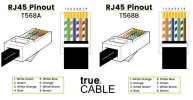
...and make sure you terminate it the same as the other end (T-568A or T-568B) or re-terminate BOTH ends the same ("B" is most common in the U.S. of A.). :cool:

RJ-45 T-568A and T-568B.jpg
 
  • Like
Reactions: kickstart24
Yeah that is what I do - as close to the connector as possible.

Thanks. I guess what confuses me is if this was a cable problem, why would unplugging and replugging the cable at the switch put the camera back online? It seems like it just needs a power off, power on to get it going again.
 
At the connection point, every time it is plugged out and in, it has an opportunity to reseat itself and if it isn't at the connection point, even though you may not feel or see it, just the slight slack/stretch of the cable could be temporarily opening up a restriction/kink in the line that then resettles over time.

That is why I suggested trying a different power supply first - that is the easiest thing to swap out.
 
At the connection point, every time it is plugged out and in, it has an opportunity to reseat itself and if it isn't at the connection point, even though you may not feel or see it, just the slight slack/stretch of the cable could be temporarily opening up a restriction/kink in the line that then resettles over time.

That is why I suggested trying a different power supply first - that is the easiest thing to swap out.

Thanks. Yes, I'm trying that first. When I say I am unplugging/plugging the cable, I'm not actually unplugging and plugging the cable that runs to the camera. I'm unplugging the small cable that runs from the patch panel to the switch.