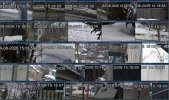
Dahua Camera Times - How close from Cam to Cam?

Alaska Country

Getting comfortable
Jun 10, 2021
672
919
Alaska
Should Dahua cams all have time within a second or is that something that is not practicable and impossible to achieve using Blue Iris?

Here are the results of the cams that are running on Blue Iris.

IP Address -- Time HMS
192.168.55.12 -- 14:19:02
192.168.55.16 -- 14:19:05
192.168.55.18 -- 14:19:05
192.168.55.24 -- 14:19:06
192.168.55.26 -- 14:19:05
192.168.55.28 -- 14:19:03
192.168.55.32 -- 14:19:08
192.168.55.34 -- 14:19:04
192.168.55.36 -- 14:19:06
192.168.55.38 -- 14:19:03
192.168.55.40 -- 14:19:03
192.168.55.42 -- 14:19:05
192.168.55.44 -- 14:19:08
192.168.55.50 -- 14:19:06
192.168.55.54 -- 14:19:06
192.168.55.56 -- 14:19:05
192.168.55.58 -- 14:19:03
192.168.55.60 -- 14:19:08
192.168.55.64 -- 14:19:05
192.168.55.66 -- 14:19:08
192.168.55.70 -- 14:19:04
192.168.55.72 -- 14:19:10
192.168.55.74 -- 14:19:05
192.168.55.76 -- 14:19:06
192.168.55.78 -- 14:19:04
192.168.55.80 -- 14:19:07

Good IPs: 26 | Failed IPs: 0 | Repeated IPs: 0
Execution time: 00:00:01.328
Start: 14:19:05.100 | End: 14:19:06.436
 
Last edited:
It has nothing to do with BI - the cameras basically suck at keeping time.

Turn off any NTP or sync and watch how fast some of them will get off of correct time.

Some of my cams I have it sync to the NTP at the shortest time interval the camera GUI allows, while others can go longer.

So you either increase the NTP sync frequency with every camera or use BI to do the overlay.

Just keep in mind that the biggest reason not to use the BI overlay is that the attorney and law enforcement members here have said that having BI add the time overlay constitutes a manipulation/modification/altering of the video after the fact and in a lawsuit, a good defense lawyer would claim the video has been altered to try to get it dismissed in court.

The reason being you could overlay any time you want on it after the fact.

Sure a camera could have the wrong date and time too, but that cannot be altered after the fact.

It would suck to have great video of a crime and have it tossed on a technicality.

Now how often that happens or the likelihood, who knows.

Plus when you export video, if you are having BI add the time, you are re-encoding the video, and that is inefficient and takes more storage than not re-encoding and depending on the size of the export, could take a long time.

Having BI add the time does use some CPU% as well, although now with substreams it isn't as big of an impact as before.
 
  • Like
Reactions: Alaska Country
Yes, agree. Will just have to live with the system as is. Too bad the cams can not do better, but overall being a few seconds off is a lot better than hours off! Would love to see all the cams switch at the same time, but only in Hollywood movies!

Did use an overlay a few years ago but now, as you have suggested, only use the camera time. Attempted to use Hubitat to re-sync (Sync PC - on cam GUI) the cams every 10 minutes, however it was not functional. One could also use PowerShell for the same operation in place of Hubitat or HA.

Now using NTP Merlin on the router for the time server. That way the time source is on 24/7 in place of just part of a day as a desktop was used as the time server with NetTime.
 
Trying out a new script that will update Dahua cameras in BI on a user set time schedule. It uses a Dahua API to set the current camera time. So far it is working well but will need more testing to make sure.

As pointed out above by wittaj, some cams have a mind of their own when it comes to time drift. Within seconds, a few of the Dahua cams will drift in the range of a few seconds. While others are stable over a longer period of time.

On this system, the desktop system clock is being used for time updates in place of directly using NTP on BI. However, the BI system clock is updated via NTP through an NPT time server that is on an Asus router.

If internet is available, to the BI computer, then the script could use any NPT server of choice. In my case, BI is isolated from the net with no internet connection on either of the two NICs.

See below screen shot of current times updated every 3 minutes.

Updates-3-Mins.jpg
 
Where do you get that output in BI? I'm interested to see what mine say
 
  • Like
Reactions: EMPIRETECANDY
As far as I can tell just from watching the UI, all my cameras have perfect time and switch seconds at the exact same moent

I have BI running on Windows Server and have it serving NTP on the VLAN the cameras use. The upstream NTP from the BI box is my 3 local GPS backed NTP servers
 
Are you referring to the screen shot or the first post with the times? If the initial post that is done with a PowerShell script.

The first post with the times, I'm interested in running the same
 
It is using a local Asus router on the LAN as the NTP source. Overall, it appears that the issue is not the time, but the drift within the cams.

Out of interest, have you tried a different NTP source and seen if you end up with the same issue? When I look a packet capture I see NTP traffic from the cameras quite often

I wonder if the Asus router is rate limiting NTP or something. It certainly wouldn't be my first choice for NTP. Why not set it up on the BI box?
 
Right now it is running on the system clock. From a historical aspect there has been a lot of drift on certain cams even with running NetTime using Google time.

The BI box has no internet. Is there a way to make that happen?
 
Right now it is running on the system clock. From a historical aspect there has been a lot of drift on certain cams even with running NetTime using Google time.

The BI box has no internet. Is there a way to make that happen?

Yep, it will just service whatever time it has, right or wrong


Internet NTP has a lot of rate limiting, especially when you have a lot of devices using the same server from the same public IP
 
The first post with the times, I'm interested in running the same
Will be glad to share has only been tested on BI.

It runs on PowerShell ver 5.1 - 7.6 plus one needs to setup a flat datebase file with a listing of your cam IP addresses of interest. That is nothing more than a text file with one line for each IP address.

Will get that file ready to go sometime on Thursday.
 
Last edited:
Yep, it will just service whatever time it has, right or wrong
Not concerned at this time with the overall time. But more concerned that the cams vary so much from one another.

Did a test using a static set date/time. Reset all the cams. And in a few seconds some were off. It would be my guess that it is a cam issue and related to the internal clock that has way too much drift.
 
Yeah sure thing, I can always modify if needed. I'm pretty good at PS
 
Excellent! That way you can modify the paths and file names. They are all listed in the params. Usually place a new folder on C drive to keep it simple. Easy to add and remove.
 
Should Dahua cams all have time within a second or is that something that is not practicable and impossible to achieve using Blue Iris?
Yes, the camera times are always within a second on all of my Blue Iris installations. Some use the router as the time source (when the cameras are on the network with a router I provided), and others use the Blue Iris PC as the time source (when the cameras are on their own private network). I typically use the slowest NTP interval permitted by the cameras (30 minutes, 60 minutes, and 1440 minutes seem to be common figures).

There are steps many of the online tutorials leave out, which can cause the Windows NTP time server not to work. So to enable the Windows NTP time server on a Blue Iris PC, I use the script below (save as a .bat file and then run):
Bash:
@echo off
echo This tool will enable the Windows NTP timeserver on this PC.
echo.
net session 1>nul 2>nul
if errorlevel 1 (
  pause
  echo Requesting administrative privileges...
  echo Set UAC=CreateObject("Shell.Application"^):UAC.ShellExecute "%~0",,,"runas",1 > "%temp%\Elevate.vbs"
  "%temp%\Elevate.vbs"
  exit
)
if exist "%temp%\Elevate.vbs" ( del "%temp%\Elevate.vbs" )
echo --------------------------------------------------
echo.
timeout 1 > nul
net stop W32Time
netsh advfirewall firewall delete rule name="NTP Time Server"
timeout 1 > nul
echo Enabling Windows NTP server...
sc config W32Time start= auto
reg add "HKLM\SYSTEM\CurrentControlSet\Services\W32Time\Config" /v AnnounceFlags /t REG_DWORD /d 5 /f
reg add "HKLM\SYSTEM\CurrentControlSet\Services\W32Time\TimeProviders\NtpServer" /v Enabled /t REG_DWORD /d 1 /f
netsh advfirewall firewall add rule name="NTP Time Server" dir=in action=allow protocol=UDP localport=123 program="%systemroot%\system32\svchost.exe" enable=yes
timeout 1 > nul
net start W32Time
echo --------------------------------------------------
echo.
pause