Jetson Orin Super Nano

wpiman

Getting comfortable
Jul 16, 2018
495
340
massachusetts

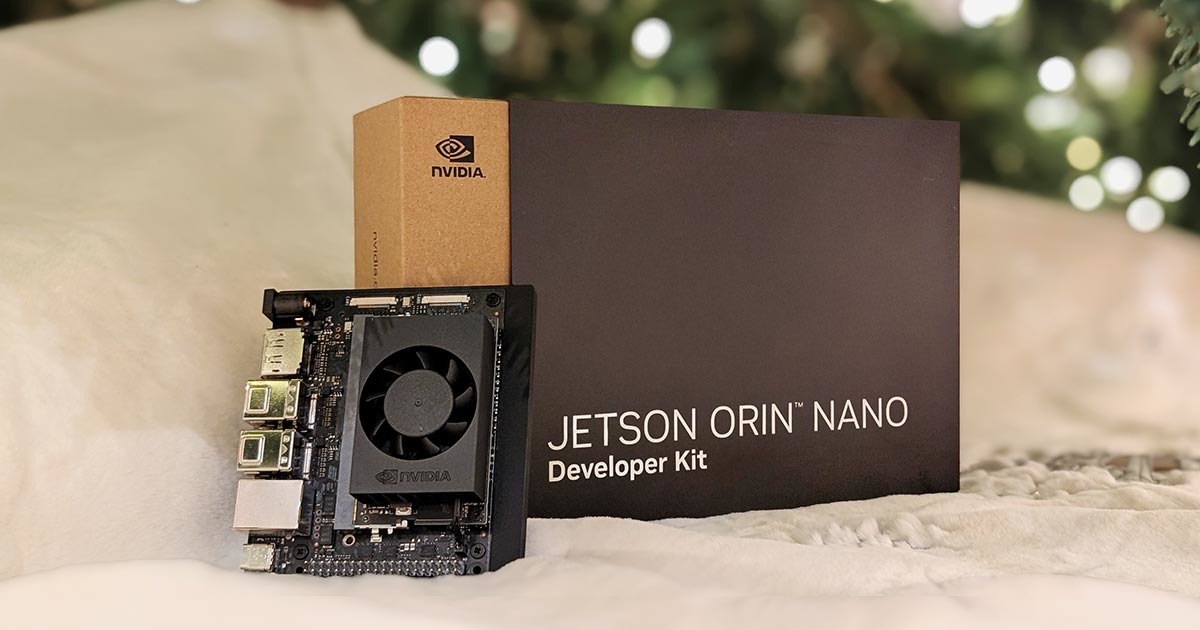
I recently got one of these Jetson Super Nanos and I got Ubuntu running on it.

I got codeproject to work in a container, but I think there is an issue with the ARM and CUDA incompatibilities. Wonder if anyone else has manage to get it working.
 
So just an update....

I have been playing with this NVIDIA board once again, and I manage to get the CUDA working for the YoloV5 6.2 models. I added the delivery and package models.

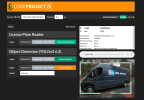
I tested this photo on a truck in my driveway. The first picture is the Jetson Super Nano. Detects the "bus" and that is it. 93ms round trip. Inference 52 ms.

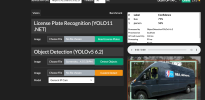
Same photo: older Xeon E3 but with a 3090. Windows on Proxmox. 140ms with 97 ms inference. It also sees a person in the window.

The Orin was $250 while the GPU was $300. I bought a $50 NVME drive for it.

The ALPR works but is doing CPU only. Working on that next. I have this running on Docker so it should just be a pull.

Seems like it is pretty good value for this application.


Screenshot 2026-03-25 at 1.40.33 PM.png


Screenshot 2026-03-25 at 3.06.50 PM.png
 
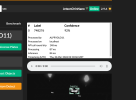
Ok, so I don't think anyone else is using this-- and probably doesn't care.. but I had the original 3.3.4 ALPR running with the CPU. I took Mike's Yolo11 ONNX file and with the help of my friend Claude, I managed to get the ALPR working with CUDA acceleration. Seems to be beating my 3090 and appears to be more consistent on Speed.


Screenshot 2026-03-25 at 10.18.14 PM.png
 
Ok, so just adding one more thing here. The board comes in 15W mode when shipped. I just learned you can put it in "SUPER" mode which increases the speed and the wattage to 25 Watts.

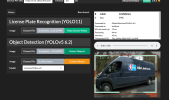
I am now running TWICE the speed of the 3090 at 25 watts Max. My ALPR reads are 67 ms round trip 33 ms processing, inference 31 ms.


Screenshot 2026-03-25 at 11.27.25 PM.png
 
thanks for sharing, i was trying to use the jetson nano for ai detection on blueiris and your image worked like a charm.
By any chance do you have one that i can also install the face detection? seems like there are missing dependencies if i try to install it on your image, like python runtime and other stuff
 
  • Like
Reactions: wpiman
thanks for sharing, i was trying to use the jetson nano for ai detection on blueiris and your image worked like a charm.
By any chance do you have one that i can also install the face detection? seems like there are missing dependencies if i try to install it on your image, like python runtime and other stuff

I don't use it for Face Detection but I will try to add it this week. What sort of object detection times are you getting? Did you upgrade it to the Super Nano?

Make sure your power mode in MAXN_SUPER.

mike@JetsonOrinNano:~$ nvpmodel -q
NV Power Mode: MAXN_SUPER
2
 
yea, mine reports that too:
root@jetson-ai:~# nvpmodel -q
NV Power Mode: MAXN_SUPER
2

with one image im using its taking
#LabelConfidence
0person68%
1handbag40%
Processed byObjectDetectionYOLOv5-6.2
Processed onlocalhost
API call round trip96 ms
Processing70 ms
Inference69 ms
Timestamp (UTC)Mon, 06 Apr 2026 13:29:45 GMT

and benchmark standard
16.5 operations per second - 50/50
 
btw, i was able to get the faces recognition running by manually linking the python executables on the facerecognition folder and adding all the modules of python on the yolo into the global python modules, then having to manually download the assets.
that way i was able to run the module, but it seems that the way the image was done, it would not allow to just click-and-install any modules due to python not being enabled globally
 
Ok, I managed to get it running here too. I was able to use CUDA too.. though not sure how much it actually helps here. I'll put it out later today.
 

Attachments

  • Screenshot 2026-04-06 at 9.59.53 AM.png
    Screenshot 2026-04-06 at 9.59.53 AM.png
    163.8 KB · Views: 3
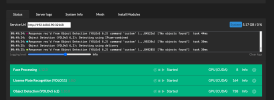
its stopped by default and on CPU.
starting it, starts and remains on cpu but on the logs it throws

Code:
11:27:36:alpr_adapter.py: 2026-04-06 14:27:36.270967598 [W:onnxruntime:Default, device_discovery.cc:164 DiscoverDevicesForPlatform] GPU device discovery failed: device_discovery.cc:89 ReadFileContents Failed to open file: "/sys/class/drm/card1/device/vendor"[m
11:27:36:alpr_adapter.py: Traceback (most recent call last):
11:27:36:alpr_adapter.py:   File "/app/modules/ALPR/alpr_adapter.py", line 11, in
11:27:36:alpr_adapter.py:     ALPRAdapter().start_loop()
11:27:36:alpr_adapter.py:   File "/app/modules/ALPR/alpr/adapter.py", line 36, in __init__
11:27:36:alpr_adapter.py:     self.config = load_from_env()
11:27:36:alpr_adapter.py:   File "/app/modules/ALPR/alpr/config.py", line 248, in load_from_env
11:27:36:alpr_adapter.py:     return ALPRConfig(
11:27:36:alpr_adapter.py:   File "", line 31, in __init__
11:27:36:alpr_adapter.py:   File "/app/modules/ALPR/alpr/config.py", line 75, in __post_init__
11:27:36:alpr_adapter.py:     self.validate()
11:27:36:alpr_adapter.py:   File "/app/modules/ALPR/alpr/config.py", line 135, in validate
11:27:36:alpr_adapter.py:     raise ValueError(f"Required model file does not exist: {model_path}")
11:27:36:alpr_adapter.py: ValueError: Required model file does not exist: /app/modules/ALPR/models/plate_detector.onnx


i doubt its anything i broke while installing the face module.
 
Ok, I pushed it all to docker hub. If you do a

docker pull wpiman/codeprojectai-jetson:latest

the face detection will be there. Seems to run pretty fast I guess with the CUDA.
 
to be honest, i havent used anything else other than the jetson for codeproject.ai, but the speed seems great for what im using (ai persons alert confirm on bi). barely see cpu/gpu usage on the jetson when it process the images
 
I am going to keep the Jetson exclusive use for CP.AI. I might get a second for mucking with. I also got a 16 Gb Raspberry pi with a Hailo 10 board.