Reducing illumination brightness.

Mar 29, 2026
3
0
E.Devon
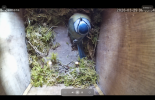
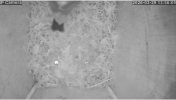
I have a CamHi IP Camera mounted in a bird box and it works a treat, BUT, at nighttime or when the bird temporarily blocks the entrance hole the IR kicker in and it's just too bright, completely washes out the video feed.
Is there any way to reduce this light intensity??

Also, with the hour change the time is out - how can this be altered please?

Many thanksHOLE BLOCKED.jpegHOLE BLOCKED.jpegDAYLIGHT.pngHOLE BLOCKED.jpeg
 
Does the camera have an embedded webGUI or do you use an app to configure?

How much is the time "out" ....exactly?
 
Hi TonyR, thanks for getting back to me.

To answer your question, I have no idea about the webGUI thingy!! No idea what that is. I watch the stream on IPCAMS App. As a free App it's pretty basic.There/s certainly nowhere to change settings....... I'm thinking of opening the top at nighttime when there is no action and taping over a few of the LEDs.

Time out exactly one hour, when the clocks went forwards.
 
tape
 
Hi TonyR, thanks for getting back to me.

To answer your question, I have no idea about the webGUI thingy!! No idea what that is. I watch the stream on IPCAMS App. As a free App it's pretty basic.There/s certainly nowhere to change settings....... I'm thinking of opening the top at nighttime when there is no action and taping over a few of the LEDs.

Time out exactly one hour, when the clocks went forwards.
FWIW, a "webGUI" is an acronym for a "web-based graphical user interface" and in the case of IP cameras, routers, encoders and more network-based devices, it allows you to configure the device's internal software by opening a browser to the device's IP address.

I doubt that your device has that ability, so "toning down" a few IR LED's with opaque tape might be your only option.

Regarding the time being off, maybe you can choose a different time zone using the app and remember to do so spring and fall to manually correct the time......assuming the app does not allow to set when to perform DST.