Dahua SD49225XAN-HNR Auto Tracking Enabled Firmware

larrylin

n3wb
Mar 25, 2026
3
0
台灣
This is my first time asking a question, please be kind.
I bought the DH-SD49225XAN-HNR from eBay. An earlier description suggested it supported tracking functionality.
Could I please ask for help from the experts? Thank you.
Is there a way to update it?
Thank you very much


Device TypeDH-SD49225XAN-HNR
System VersionV2.810.0000025.0.R.P9.2520.UN.NR, Build Date: 2021-03-17
WEB VersionV3.2.1.1034079
ONVIF Version20.06(V2.9.0.979397)
PTZ VersionV2.401.0000000.64.RHNZ_200219_34642
S/N7F01067PAJ4B860
Security Baseline VersionV2.1
Copyright 2021, all rights reserved.
 
Have you installed the PTZ to see if the auto tracking works? If the auto tracking works, don't update the firmware. As you may be aware, Dahua removed auto tracking with newer firmware, so you have to be careful that you don't update and lose the tracking functionality. Also, settings for that camera are best made using Internet Explorer. If you try to use another browser, some settings may be hidden or not hold, i.e. tracking duration.
 
  • Like
Reactions: larrylin
Have you installed the PTZ to see if the auto tracking works? If the auto tracking works, don't update the firmware. As you may be aware, Dahua removed auto tracking with newer firmware, so you have to be careful that you don't update and lose the tracking functionality. Also, settings for that camera are best made using Internet Explorer. If you try to use another browser, some settings may be hidden or not hold, i.e. tracking duration.
I haven't updated, but I don't see any options. I'm looking for firmware.
 
As he said, you DO NOT want to update that firmware, so don't go looking for firmware. You will lose autotracking if you update it. That is the last firmware to still have auto tracking.

As mentioned, you need to use Internet Explorer for this camera.

It doesn't come right out and say it has tracking in big bold letters.

There is not a box called auto tracking.

Here is how you can determine if you have the autotracking version.

First use Internet Explorer as this camera more than most will not hold or show all settings in other browsers.

You need to set up a preset.

Then you need to set-up the Smart Plan with Deep IVS for the presets you want to track.

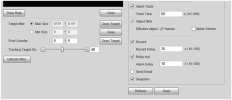
Then go to Deep IVS Rules Config page and you should see Track Time under alarm and Tracking Target size slider. If your screen doesn't show this, then you have a version without autotrack.

When setting up IVS rules, I strongly recommend you use intrusion box with appears and crosses instead of tripwire. And less is more. One IVS rule.


1774620619682.png
 
  • Like
Reactions: bigredfish
As he said, you DO NOT want to update that firmware, so don't go looking for firmware. You will lose autotracking if you update it. That is the last firmware to still have auto tracking.

As mentioned, you need to use Internet Explorer for this camera.

It doesn't come right out and say it has tracking in big bold letters.

There is not a box called auto tracking.

Here is how you can determine if you have the autotracking version.

First use Internet Explorer as this camera more than most will not hold or show all settings in other browsers.

You need to set up a preset.

Then you need to set-up the Smart Plan with Deep IVS for the presets you want to track.

Then go to Deep IVS Rules Config page and you should see Track Time under alarm and Tracking Target size slider. If your screen doesn't show this, then you have a version without autotrack.

When setting up IVS rules, I strongly recommend you use intrusion box with appears and crosses instead of tripwire. And less is more. One IVS rule.


View attachment 240764
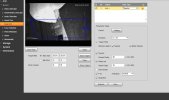
1774632020265.jpg

I've seen people on forums and YouTube claiming to have it, but when I actually opened it with Internet Explorer, the functionality was missing.

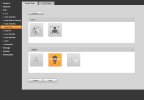
1774632251883.jpg
 
Do you have a preset established. That needs to be first.

Don't use tripwire if you are going to draw a box - use an intrusion box instead.