Using different HDD for different cameras

kickstart24

Young grasshopper
Dec 23, 2024
86
23
US
I have 13 cameras and two 4TB HDDs. I would like to have 6 of them store on one drive and 7 store on another. What's the best way to do this?

What would you use for the GB drive space?
 
You would want to split coverage so when one drive fails you don't completely lose coverage of an area.

Say for example you have 4 cameras on front of house, then put 2 cams on one drive and 2 on the other.

You should leave 10% freeboard, so say 3600GB.
 
You would want to split coverage so when one drive fails you don't completely lose coverage of an area.

Say for example you have 4 cameras on front of house, then put 2 cams on one drive and 2 on the other.

You should leave 10% freeboard, so say 3600GB.
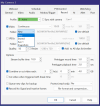
Thanks. I'm having trouble figuring out how to set it do some cameras go on one drive, and other camers go on a different drive. BI just has a setting for new
 
For each camera there is a setting on the "Record" tab that allows you to pick any folder that you have defined on the "Storage" settings in the main program setup. In the storage setup you could rename one of the unused folders to somethimg like "New1" on the second drive then setup some of your cameras to record to that location on the second drive, hope this helps!

1774174661609.png
 
  • Like
Reactions: kickstart24