

Big oops. I went back and fixed it. The IL is the one with lousy detection.Did you type that wrong?
You start saying the S3 is bad then show numbers saying it detects Better?
Comparing the IL to the S3
- Thread starter tigerwillow1
- Start date
You are using an out of date browser. It may not display this or other websites correctly.
You should upgrade or use an alternative browser.
You should upgrade or use an alternative browser.


bigredfish
Known around here
So, it looks like, on average, IL static handles static scenes better, but S3 works better for moving objects.
Same with the 54PRO and 3449 TIOC PRO
The New AI cameras forgot they were VIDEO cameras
Stick with the 5442 unless you have stadium lighting

I'm getting more down on the new improved AI detection. I erased all of the IVS setup and started over after a reboot to see if that would help. Occasionally the IL will detect better than the S3, but the odds are definitely in the S3's favor. I caught some obvious IL failures:
This one it never detected:
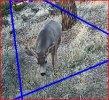
For these it took about a minute to make up it's mind that there was an animal there:
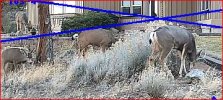
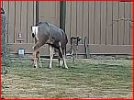
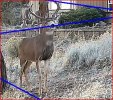
The camera is running the latest IL/PRO firmware and I'm reluctant to try an older version over fear of bricking.
This one it never detected:
For these it took about a minute to make up it's mind that there was an animal there:
The camera is running the latest IL/PRO firmware and I'm reluctant to try an older version over fear of bricking.
bigredfish
Known around here
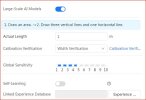
Are you using the Super Dooper Large Scale Models feature? (It supposedly will slice your bread too but I could never get mine to work)

I tried a while with the large scale models off. I'm suspecting that the switch is a placebo, just like the Object Filter switch is in the 5442s and some other models.
As a total surprise, I'm finding that the 541R-S3 is sometimes just as bad as the -IL at IVS triggering. With the side-by-side cameras I'm often seeing cases where the S3 triggers and the IL doesn't, and where the IL triggers and the S3 doesn't. This applies to humans and animals, there are never vehicles in the camera FOV. This leads me say if you think your camera is catching all of the people or animals that go by, you're dreaming.
This is today's IL pathetic failure. The object filters are turned off, so in theory anything moving should trigger IVS. The deer ran through the FOV for 6 seconds, through multiple tripwires and an intrusion zone, no IVS trigger. Only having a 2nd different model camera caught it.
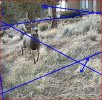
This is today's IL pathetic failure. The object filters are turned off, so in theory anything moving should trigger IVS. The deer ran through the FOV for 6 seconds, through multiple tripwires and an intrusion zone, no IVS trigger. Only having a 2nd different model camera caught it.
bigredfish
Known around here
Weird
I have 3 cameras looking over my backyard and 4 facing the front street so it’s pretty easy to compare. (Not all 5442s but they do seem the most reliable)
I’m pretty certain I’m getting 99% of activity
The past 3-4 days in addition to cats, possums and coons, I also got ducks and a very small wabbit with cameras that have animal detection
I have 3 cameras looking over my backyard and 4 facing the front street so it’s pretty easy to compare. (Not all 5442s but they do seem the most reliable)
I’m pretty certain I’m getting 99% of activity
The past 3-4 days in addition to cats, possums and coons, I also got ducks and a very small wabbit with cameras that have animal detection
I'm trying to find something to make the detection better. For instance, wittaj suggested in another thread that IVS works better if snapshot is turned on, even if there's no SD card. I tried that to no avail. With so many different things to try I'm thinking it will take a few months, plus the darned animals won't follow my schedule. One day there will be 10s that come through, then when I am eager to test something they all disappear.

Arjun
IPCT Contributor
So what’s the difference between the 54PRO and 3449 TIOC Pro - they both have the same sensor too along with the IL
The naming nomenclature sucks to be honest
The naming nomenclature sucks to be honest

Techie007L
Pulling my weight
@tigerwillow1 One of the differences I'm noticing consistently between the pictures you shared of those two cameras is that the 541R-S3 uses TV range encoding, while the IL appears to use Full range encoding. Blue Iris is hardcoded to use Full range decoding, even though most cameras (and H.264/5 streams) are specifically encoded in TV range. This results in a lack of contrast and the colors being off slightly in Blue Iris compared to what you'd see on the camera's UI, or in snapshots taken directly from the camera. I have found that if you enable Intel hardware decoding in Blue Iris, the Intel decoder uses TV encoding range, resulting in the contrast and colors being correct on most cameras (they'd be over contrasty on the IL).
Speaking of this (and the above), the cheap 2449T-S-PRO (IPC-Color4M-TL) is a vastly superior camera that also outputs full range encoded streams that render correctly in Blue Iris by default.
The 3449 TIOC (IPC-Color4M-T) is a terrible camera. You couldn't pay me to use it. It is the only product I've ever returned to EmpireTech. Fuzzy, overcontrasty, constant color issues, motion blur, lack of detail even in broad daylight, serious AI artifacts at dusk/night, etc.So what’s the difference between the 54PRO and 3449 TIOC Pro - they both have the same sensor too along with the IL
The naming nomenclature sucks to be honest
Speaking of this (and the above), the cheap 2449T-S-PRO (IPC-Color4M-TL) is a vastly superior camera that also outputs full range encoded streams that render correctly in Blue Iris by default.
Arjun
IPCT Contributor
I have to agree that the IPC-Color4M-T sucks @$$ - the picture quality is DULL and washed out and as you said, "constant color issues, and lack of detail even in broad daylight" and is sadly same foam factor as the varifocal 5442 S3 turret@tigerwillow1 One of the differences I'm noticing consistently between the pictures you shared of those two cameras is that the 541R-S3 uses TV range encoding, while the IL appears to use Full range encoding. Blue Iris is hardcoded to use Full range decoding, even though most cameras (and H.264/5 streams) are specifically encoded in TV range. This results in a lack of contrast and the colors being off slightly in Blue Iris compared to what you'd see on the camera's UI, or in snapshots taken directly from the camera. I have found that if you enable Intel hardware decoding in Blue Iris, the Intel decoder uses TV encoding range, resulting in the contrast and colors being correct on most cameras (they'd be over contrasty on the IL).
The 3449 TIOC (IPC-Color4M-T) is a terrible camera. You couldn't pay me to use it. It is the only product I've ever returned to EmpireTech. Fuzzy, overcontrasty, constant color issues, motion blur, lack of detail even in broad daylight, serious AI artifacts at dusk/night, etc.
Speaking of this (and the above), the cheap 2449T-S-PRO (IPC-Color4M-TL) is a vastly superior camera that also outputs full range encoded streams that render correctly in Blue Iris by default.

Yet another thing I didn't know. I turned on "Intel" hardware decoding for the S3. I don't see any immediate difference in the image, but it's a cloudy day and all the colors are muted. I'll keep an eye on it. Thanks.@tigerwillow1 One of the differences I'm noticing consistently between the pictures you shared of those two cameras is that the 541R-S3 uses TV range encoding, while the IL appears to use Full range encoding. Blue Iris is hardcoded to use Full range decoding, even though most cameras (and H.264/5 streams) are specifically encoded in TV range. This results in a lack of contrast and the colors being off slightly in Blue Iris compared to what you'd see on the camera's UI, or in snapshots taken directly from the camera. I have found that if you enable Intel hardware decoding in Blue Iris, the Intel decoder uses TV encoding range, resulting in the contrast and colors being correct on most cameras (they'd be over contrasty on the IL).
AlwaysSomething
Pulling my weight
I tried CPAI when I first set up BI, and it didn't work out well. The system was unstable in that it had to be rebooted every week or two. I'm open to the possibility that it was fixable, I just don't have infinite time to spend on it. Since removing CPAI, the BI installation hasn't needed any rebooting for over a year. Plus, CPAI wasn't all that hot at identifying animals, and after a camera false alert, CPAI often found a rock or fencepost to identify as some kind of animal. Once BI 6 goes stable with its built in AI I might give that a try.Time to use Code Project AI for animal detection.
AlwaysSomething
Pulling my weight
Yeah I didn't think it would work for you which is why I put the ROFL emoji.I tried CPAI when I first set up BI, and it didn't work out well. The system was unstable in that it had to be rebooted every week or two. I'm open to the possibility that it was fixable, I just don't have infinite time to spend on it. Since removing CPAI, the BI installation hasn't needed any rebooting for over a year. Plus, CPAI wasn't all that hot at identifying animals, and after a camera false alert, CPAI often found a rock or fencepost to identify as some kind of animal. Once BI 6 goes stable with its built in AI I might give that a try.

Joking aside, I am successfully using CPAI with a Coral TPU (although older version of CPAI and a different model). I am also using the latest version CPAI with the RKNN for LPR.
If you do decide to try CPAI again, there is a memory leak in that many run into and the fix was to just schedule a job to restart the service every day. That may have been your cause for not being stable.
Techie007L
Pulling my weight
Looking at the 5459-IL images, I would suggest dropping 2D NR (under Camera -> Exposure) from 50 to 25 and see if you get sharper results. I'm noticing its over-smoothing artifacts in quite a few of the sample images you provided. You could even try 0 if it doesn't make the image too grainy. Note that Dahua cameras have a firmware bug that causes that setting to internally revert back to 50 when you close the admin session. Rebooting the camera after closing it restores it to the value you saved.By now I have a pretty good feel for image quality between the S3 and IL, so probably my last mass-posting of side-by-side images. Conclusions are:
- In situations with even daytime lighting, it's an overall tie.
- In situations with large difference bright and dim areas, IL wins.
- At night with IR lighting, IL wins.
I've realized there is a bigger elephant in the room, in that so far the IL's object detection kind of sucks. Details in the next post.
Images where the S3 looks better (IMO of course):
View attachment 236180View attachment 236181
View attachment 236182View attachment 236183
Images where the IL looks better:
View attachment 236184View attachment 236185
View attachment 236186View attachment 236187
View attachment 236189View attachment 236190
View attachment 236193View attachment 236194
View attachment 236195View attachment 236196
Arjun
IPCT Contributor
Dahua cameras have a bug in virtually everything software-wise. Its too bad we can't have nice things in the land of the free unless we are prepared to spend 3x-4x the price of a 5442 camera.Looking at the 5459-IL images, I would suggest dropping 2D NR (under Camera -> Exposure) from 50 to 25 and see if you get sharper results. I'm noticing its over-smoothing artifacts in quite a few of the sample images you provided. You could even try 0 if it doesn't make the image too grainy. Note that Dahua cameras have a firmware bug that causes that setting to internally revert back to 50 when you close the admin session. Rebooting the camera after closing it restores it to the value you saved.
bigredfish
Known around here
Note that Dahua cameras have a firmware bug that causes that setting to internally revert back to 50 when you close the admin session. Rebooting the camera after closing it restores it to the value you saved.
Really?
Is this all Dahua cameras? Or just the newest models?
That’s not true on mine.
Sounds more like a browser compatibility issue like we’ve seen for years in various models where settings don’t hold. (Such as the IE vs anything else on playback on pre v5 NVRs where certain controls don’t even display and some settings don’t hold with non-IE browsers)
Using the proper browser for the device can make a difference.
Really?
Is this all Dahua cameras? Or just the newest models?
That’s not true on mine.
Sounds more like a browser compatibility issue like we’ve seen for years in various models where settings don’t hold. (Such as the IE vs anything else on playback on pre v5 NVRs where certain controls don’t even display and some settings don’t hold with non-IE browsers)
Using the proper browser for the device can make a difference.