Windows 10 EOS (22H2) Oct. 14, 2025

WOW, WOW, WOW

I just tried Handbrake NVENC Encoding with my Nvidia 2070 SUPER on this new PC (14700k), oh my, what use to take 30 minutes to encode only took 5 or less...WOW this is really kewl...

I got it now as my Preset/Goto:

View attachment 230328
Still, WOW, WOW, WOW

Just encoded a 3.1 Gig 1080p video file in 3 minutes

1762623860276.png
 
Happy Birthday Windows task manager


I Wrote Task Manager — 30 Years Later, the Secrets You Never Knew

 
  • Like
Reactions: David L and weigle2
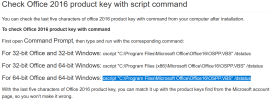
Was trying to find my Office key Codes. There are programs out there that can retrieve Windows and Office keys but I just needed to know which Key went to which PC/Laptop
Ran across this, FYI:
1765734550197.png

Oh BTW, this works on Office 2019 and 2021, guessing 2024 too...
 
Last edited:
  • Like
Reactions: samplenhold
I never had problems with Windows 9 because it never went EOL
Its the best OS till date; acquired from the underground from a former Microsoft employee
It was never meant for a public release because it would have put Microsoft out of business
 
I never had problems with Windows 9 because it never went EOL
Its the best OS till date; acquired from the underground from a former Microsoft employee
It was never meant for a public release because it would have put Microsoft out of business

It's name wasn't by any chance Linux, was it?
 
Don't know if this is because I am getting older or a Windows update but I had to adjust down my Double Click speed in Mouse Settings on my PCs. Seemed like a 1/4 of the files I clicked on would open when I was just highlighting them.

Since I adjusted to 3, I am back to normal.
 
Sharing what I found out:

I ran across an article from last year talking about 13/14 Gen Intel CPUs having degradation issues. Basically heat issues if overclocked or if voltage is set too high. Systems were slowing down and in some cases crashing.

Every new processor seems to always have heat issues, pairing the right cooler is essential. But this is the first time, that I know of, where Intel extended people's warranties from 3 years to 5 because of the issue. The fix, if you can call it that, is a BIOS motherboard update that caps the voltage and temp. settings. Guessing no more overclocking these, not sure.

So, since I just bought an i7 14700k (14th gen) I got concerned. Still reading about it, not sure if my CPU a year later is affected, in that did they fix the issue with newer CPUs, or not. I don't plan to overclock, nor use this PC for gaming so I am probably ok, But I was going to use the existing AIO Water Cooler (Corsair H100 240mm AIO) I have in the case that this is going in but it is over 10 years old, read that they don't last forever, liquid can dry up, pump can stop working, etc. So for $80 I am going to get a new AIO. I don't need LEDs on it, which is only $10 more. This way I know the CPU is protected...

Here is an older article explaining all of this:


Intel has a Diagnostic tool to check your CPU. I ran it on my 12th Gen Gaming PC that has an i9 12900k CPU and all test Passed. When it was doing the load test all my fans went to max speed...


View attachment 227710

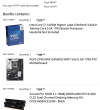
I jumped on a deal that Micro Center had, I normally buy their combo deals (CPU/Motherboard) but this deal included 32Gigs of DDR5 Memory too. The CPU is $300 alone so I definitely saved some money. Why I go this route is to be able to bench test within the 30 day return policy. Each component comes with a 3 year manufacturer warranty but it is much easier to just go down to Micro Center and exchange, which I actually had to do a few times over these last decades, once for me and once for a family build. Micro Center makes zero profit on these deals, or very, very little, I have been told over the years. They are In Store only deals which once you are in their store they will try and sell you the rest of the parts needed for a build. Also, they love to sell their extended warranties too, which I decline.
Anyway, with my Windows 11 upgrades I felt it was time to retire one of my older PCs. The upgraded PC will now be ready for Windows 12 too.

Here is the deal I bought:

View attachment 227711
View attachment 227712
View attachment 227713

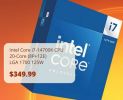
Individual Component Pricing (Which is competitive with what Amazon/Newegg shows):
View attachment 227714
View attachment 227715
View attachment 227716

I got real lucky buying when I did, $399.99, now that DDR5 and other memory prices are ridiculous due to the Data Centers pre-order/purchasing all memory and hard drives.

I saved $170
1771707676915.png

But $579.98 is still a pretty good deal, IMO with Memory Prices where they are...$320 savings is a good deal at this date/time...

1771707403626.png
1771707621024.png

Newegg's CPU is:
1771707975943.png
 

Attachments

  • 1771707228050.png
    1771707228050.png
    283.6 KB · Views: 3
Last edited:
As an Amazon Associate IPCamTalk earns from qualifying purchases.
  • Love
Reactions: Flintstone61
Cross posting so I can find this in the future if I have to:

 
  • Love
Reactions: VorlonFrog
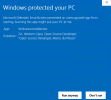
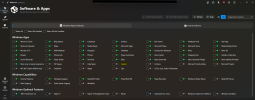
Windows Bloatware...we all experience it, unwanted Apps pushed on us. A family member wanted me to try Winhance before he installed it. I have an old PC that if anything went wrong I could wipe and reinstall Windows so I just installed the portable version of Winhance and tried it out. The PC is a Win10 to WIN11 conversion I did on earlier post here, it is an old PC:
1772934976437.png

My first test was removing an old WIN10 App (3D Viewer), once removed, it will no longer show on Winhance, to reinstall you have to go to Windows Store, if it is available or reinstall through Winhance, FYI
1772935444246.png1772935477284.png

Winhance has a Demo (Instructional) Video that is a recommended watch, I watched it before trying this out, also did as much homework as I could to see if this is safe. There are other Debloats out there, mainly using PowerShell scripts of which I am hesitant in using.

So far I am impressed, maybe I can get Windows to be more like Windows Server...


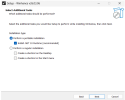
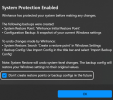
Here are a few screen shots of the install:

Figure MS would bark at this App :)
1772935606659.png1772935703843.png

1772935752514.png1772935799207.png

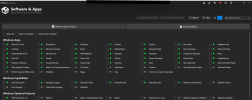
As you see 3D Viewer is no longer showing in the Winhance App, so whatever you remove/delete will be forgotten...
1772936021907.png
 
Last edited:
Windows Bloatware...we all experience it, unwanted Apps pushed on us. A family member wanted me to try Winhance before he installed it. I have an old PC that if anything went wrong I could wipe and reinstall Windows so I just installed the portable version of Winhance and tried it out. The PC is a Win10 to WIN11 conversion I did on earlier post here, it is an old PC:
View attachment 239433

My first test was removing an old WIN10 App (3D Viewer), once removed, it will no longer show on Winhance, to reinstall you have to go to Windows Store, if it is available or reinstall through Winhance, FYI
View attachment 239434View attachment 239435

Winhance has a Demo (Instructional) Video that is a recommended watch, I watched it before trying this out, also did as much homework as I could to see if this is safe. There are other Debloats out there, mainly using PowerShell scripts of which I am hesitant in using.

So far I am impressed, maybe I can get Windows to be more like Windows Server...


Here are a few screen shots of the install:

Figure MS would bark at this App :)
View attachment 239436View attachment 239437

View attachment 239438View attachment 239439

As you see 3D Viewer is no longer showing in the Winhance App, so whatever you remove/delete will be forgotten...
View attachment 239440
Copilot GONE :)
1772948910117.png
 
I recently needed to upgrade my wife's old laptop from Windows 10 to 11 so she could install and use this year's tax software. Unfortunately the laptop hardware doesn't mee the current W11 installation requirements. I used FlyOOBE which is the updated method that has been recommended on this thread countless times. I simply did an in-place upgrade and kept all of the personal files, etc. It worked flawlessly.
 
I recently needed to upgrade my wife's old laptop from Windows 10 to 11 so she could install and use this year's tax software. Unfortunately the laptop hardware doesn't mee the current W11 installation requirements. I used FlyOOBE which is the updated method that has been recommended on this thread countless times. I simply did an in-place upgrade and kept all of the personal files, etc. It worked flawlessly.
Good news. I done several PCs and two old laptops here, plus a friend's PC and have been told by a few family members it worked for them too.

FlyOOBE I didn't try, just the older Flyby11 (classic)

Did you use their Debloat Tools? Just curious...
 
I recently needed to upgrade my wife's old laptop from Windows 10 to 11 so she could install and use this year's tax software.
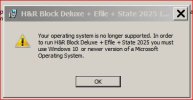
My H&R Block software for the first time refuses to run on win 7. Last time for me using them. I know they don't give a hoot.
 
  • Wow
Reactions: David L
My H&R Block software for the first time refuses to run on win 7. Last time for me using them. I know they don't give a hoot.
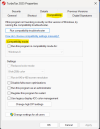
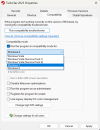
Have you tried Compatibility Mode?

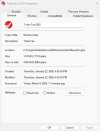
Right click on the Shortcut or .EXE, click Properties:

1773095335536.png1773095412856.png1773095507671.png
 
Have you tried Compatibility Mode?
My machine is win 7. The HR Block program wants 10 or 11. The only compatibility modes available on win 7 are from win 95 to vista. I think there's a good chance it would run on win 7 but they don't want to have to support unsophisticated backwoods people like me.

Capture.JPG
 
  • Angry
Reactions: David L
My machine is win 7. The HR Block program wants 10 or 11. The only compatibility modes available on win 7 are from win 95 to vista. I think there's a good chance it would run on win 7 but they don't want to have to support unsophisticated backwoods people like me.

View attachment 239619
That sucks. I tried to look online for any type of work-around for you. Only suggestion I saw is file online. I still buy TurboTax Home & Business and install it, but a few years ago they made everyone login before you could install it. I remember calling them and there was no way around it.
Our younger family just jumps online and file their taxes. I personally don't like my personal info being online, on any website. Online sites are so easily hacked/breached now a days. I hate portals too.

With TurboTax, from what their Techs told me, no filing info goes online they only required login info for installations to try and stop software theft/coping...I do know the Internet is not required when using their software, believe me I disconnected the Internet after talking to their techs to check :)
 
I tried to look online for any type of work-around for you.
Thanks for looking, I also looked around and anything I found would have been too much hacking for what it's worth. I have a dual boot laptop that runs linux and can also boot into win 10. I ran the tax program on that and carried the end product PDFs over to the office system to save and print. Following my belief that any data you give to the government or a big corporation will eventually be misused, I will not efile through the tax program, plus the network connection is off when I run it. I'll likely just abandon the tax software for next year. Being retired I have a lot of control over when I realize income and have used the tax software to brainstorm the next tax year. Over a few years I've built up a spreadsheet that runs the full federal and state tax scenario and using the tax software for brainstorming has taken a back seat, mainly to verify what the spreadsheet says. And with the tax laws changing every year now, using the previous year software to brainstorm has become more difficult. (Examples, The 2025 6k/person "no tax on social security" deduction, and the 2026 extra 2k charitable deduction). Fast and easy to plug these changes into the spreadsheet calcs. I'm not going to participate in the online account and everything in the cloud movement. There are leaks that win 12 is moving further in this direction, and I'm becoming more linux proficient almost every day.
 
  • Love
Reactions: David L