Installed Object Detection (YOLO11.NET)

AlphaBlueIris

Getting the hang of it
Jan 17, 2022
141
27
Boston
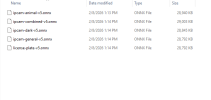
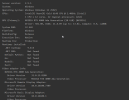
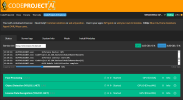
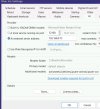
Mike, I need some help please since I'm suck. I Installed Installed Object Detection (YOLO11.NET) and the License Plate (YOLO11.NET)
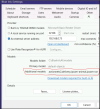
E:\CodeProject\AI\modules\ObjectDetectionYOLO11Net\custom-models/ipcam-general.onnx
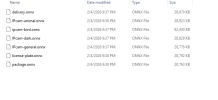
E:\CodeProject\AI\modules\ObjectDetectionYOLO11Net\custom-models-v5 See attached
I would like to install the delivery as well. Where do I put those files, in which directory? I read the forum 100 times I guess I'm getting a little bit old.

Thank you in advance for all your help
 

Attachments

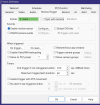
  • Delivery.png
    Delivery.png
    11.2 KB · Views: 8
  • Model5.png
    Model5.png
    9.2 KB · Views: 8
  • NVidia Card.png
    NVidia Card.png
    30.8 KB · Views: 8
  • 2026-02-08 11_19_14-Setup - CodeProject.AI Server.png
    2026-02-08 11_19_14-Setup - CodeProject.AI Server.png
    50.3 KB · Views: 8
Mike, not sure how to thank you, I have been trying to get this and the plate for a week now. I will open another post for the license plate, they both work fine in the codeproject but BlueIris can not find them.

By the way, this was working before thanks to your help, I had to rebuild the server and I lost all the configurations.
 

Attachments

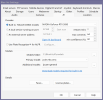
  • AI-Front_Delivery.png
    AI-Front_Delivery.png
    28.3 KB · Views: 14
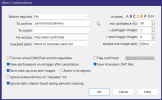
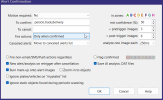
  • Alert Confirmation.png
    Alert Confirmation.png
    26.8 KB · Views: 14
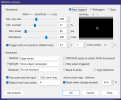
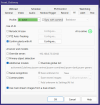
  • Motion-Front_Delivery Zone .png
    Motion-Front_Delivery Zone .png
    27.5 KB · Views: 15
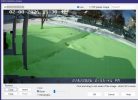
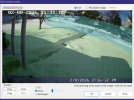
  • Motion-Front_Delivery Zone A.png
    Motion-Front_Delivery Zone A.png
    607.8 KB · Views: 14
  • Motion-Front_Delivery Zone G.png
    Motion-Front_Delivery Zone G.png
    629.2 KB · Views: 15
  • Motion-Front_Delivery.png
    Motion-Front_Delivery.png
    31 KB · Views: 15
Mike, not sure how to thank you, I have been trying to get this and the plate for a week now. I will open another post for the license plate, they both work fine in the codeproject but BlueIris can not find them.

By the way, this was working before thanks to your help, I had to rebuild the server and I lost all the configurations.
Post a screenshot of your main AI settings
 
Thanks again.
 

Attachments

  • AI 2026-02-08 19_44_27-Alert Confirmation.png
    AI 2026-02-08 19_44_27-Alert Confirmation.png
    26.9 KB · Views: 20
  • AI 2026-02-08 19_43_41-Blue Iris.png
    AI 2026-02-08 19_43_41-Blue Iris.png
    30.6 KB · Views: 20
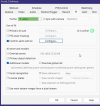
Mike, not sure you had a chance to review those screens and you suggest additional improvements.
Yesterday I got a trigger from this camera that is a good sign, unfortunately when I tried to evaluate it via BU AI evaluator, it indicated that the DAT file that I selected was not the right format or something similar. Do you know what I need to change to save it so I can see what the AI did?
 
Mike, not sure you had a chance to review those screens and you suggest additional improvements.
Yesterday I got a trigger from this camera that is a good sign, unfortunately when I tried to evaluate it via BU AI evaluator, it indicated that the DAT file that I selected was not the right format or something similar. Do you know what I need to change to save it so I can see what the AI did?
Post a screenshot of your main AI settings not the camera settings, like the below screenshot

1770736930660.png
 
FYI, the codeproject is on another server.
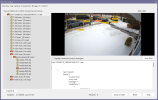
Post a screenshot of a canceled alert AI inspector like the below screenshot. Also it looks like you are using to many models, do you need all of them. Have you though of using Blue Iris built-in AI, you will need to have Blue Iris install on the same PC as the PC with your Nvidia GPU.

1770739079617.png

1770739273749.png
 
That is a great question:
Right now I can not use the AI Inspector or let me rephrase it, when I move the .dat file it says is invalid.
I really like your modules and I would like to use them instead, also I have a dedicated server with GPU installed on it.
My ultimate goal is, delivery, person, car, animals, truck, license plate and faces. Open to suggestions. Since those models are installed on a different server, do I need to download them? The model tab is a little confusing to me. The models folder are not on this server but on the other one.
 
That is a great question:
Right now I can not use the AI Inspector or let me rephrase it, when I move the .dat file it says is invalid.
I really like your modules and I would like to use them instead, also I have a dedicated server with GPU installed on it.
My ultimate goal is, delivery, person, car, animals, truck, license plate and faces. Open to suggestions. Since those models are installed on a different server, do I need to download them? The model tab is a little confusing to me. The models folder are not on this server but on the other one.
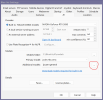
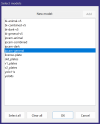
You can select which models to use by clicking of the three dots, then select the models you what to use by clicking on them so they are highlighted. Post your Blue Iris log file so I can see what is happening when you get an alert.

1770740979157.png
1770741056672.png
 
Two different topic, hopefully not confusing, to show that I'm getting those messages, not sure if that is normal
api":"license-plate",
"found":{
"error":"Detection returned invalid result.",
"inferenceMs":0,
"processMs":0,
"analysisRoundTripMs":8,
"success":false,
"moduleName":"Object Detection (YOLO11 .NET)",
"moduleId":"ObjectDetectionYOLO11Net",
"command":"custom",
"requestId":"e3b7b354-c91b-4ebf-830b-c67ef1ffecb7",
"processedBy":"localhost",
"timestampUTC":"Wed,
11 Feb 2026 00:25:25 GMT"}
 

Attachments

  • 2026-02-10 20_26_59-BlueIris AI .png
    2026-02-10 20_26_59-BlueIris AI .png
    377.3 KB · Views: 3
  • AI Analizer.txt
    AI Analizer.txt
    3.3 KB · Views: 1
Yes it does, I forgot to attach the results
 

Attachments

  • AA 2026-02-10 21_56_27.png
    AA 2026-02-10 21_56_27.png
    388.6 KB · Views: 2
  • AA 2026-02-10 21_56_27 1.png
    AA 2026-02-10 21_56_27 1.png
    66.3 KB · Views: 1
Last edited:
Try just using one model, how to select one model shown in the below post. After making the changes reboot CP.AI server, once the CP.AI is up and running reboot the BI server and see if just one model works.

 
Thank you Mike, I will. What model are you suggestion for License plate for one camera and Delivery for the other camera?

Is this error coming from the AI is ok?
"error":"Detection returned invalid result.",


"found":{
"error":"Detection returned invalid result.",
"inferenceMs":0,
"processMs":0,
"analysisRoundTripMs":8,
"success":false,
"moduleName":"Object Detection (YOLO11 .NET)",
"moduleId":"ObjectDetectionYOLO11Net",
"command":"custom",
"requestId":"e3b7b354-c91b-4ebf-830b-c67ef1ffecb7",
"processedBy":"localhost",
"timestampUTC":"Wed,
11 Feb 2026 00:25:25 GMT"}
 
Mike when I go home, do you nee additional info from me?
Did you try this, selecting only one model to see if one model works