Blue Iris Updates (64 bit)

Blue Iris Updates - Official Thread 6.0.2.1

Hmmm. What does "Use a group as a camera source" mean?
From the change log, not sure what it means either!
The ability to use a camera group as a camera video source. This powerful feature enables RTMP webcasting, image posting, and other functions for groups, similar to individual cameras. Set the frame resolution in camera settings as you require, control FPS from group settings.
 
  • Like
Reactions: kc8tmv
From the change log, not sure what it means either!
The ability to use a camera group as a camera video source. This powerful feature enables RTMP webcasting, image posting, and other functions for groups, similar to individual cameras. Set the frame resolution in camera settings as you require, control FPS from group settings.

Would be nice if we could get an explanation with an example.


Sent from my iPhone using Tapatalk
 
OK, I made a new camera and told it to use my front camera group as the source, now I have a single camera that show my three front cameras, I guess I could stream all three cameras now to a single Youtube video, not sure I have a use for this feature but somebody must have asked for it!

EDIT - Well this is an interesting development, I am unable to delete this test group camera, I get a message "Trouble deleting Camera", BI then stops responding and I have to kill it with task manager! Time to dive into the Windows registry and purge the camera the hard way!

EDIT2 - email sent to support!
 
Last edited:
OK, I made a new camera and told it to use my front camera group as the source, now I have a single camera that show my three front cameras, I guess I could stream all three cameras now to a single Youtube video, not sure I have a use for this feature but somebody must have asked for it!

EDIT - Well this is an interesting development, I am unable to delete this test group camera, I get a message "Trouble deleting Camera", BI then stops responding and I have to kill it with task manager! Time to dive into the Windows registry and purge the camera the hard way!

EDIT2 - email sent to support!
Ken got back to me, the problem was the delete button for the camera that is at the bottom of the camera settings page, Ken stated that the button has been problems before and he is just going to eliminate the button, right clicking on the camera and selecting delete from the context menu does work and is the preferred method to delete a camaera!
 
  • Like
Reactions: David L
OK, I made a new camera and told it to use my front camera group as the source, now I have a single camera that show my three front cameras, I guess I could stream all three cameras now to a single Youtube video, not sure I have a use for this feature but somebody must have asked for it!

EDIT - Well this is an interesting development, I am unable to delete this test group camera, I get a message "Trouble deleting Camera", BI then stops responding and I have to kill it with task manager! Time to dive into the Windows registry and purge the camera the hard way!

EDIT2 - email sent to support!
I just tried this, and it's got potential:
  1. At first I was confused (I was petrified. . . )
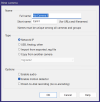
    1. The New Camera dialog doesn't have an option to use a camera group:
    2. 1770568728401.png
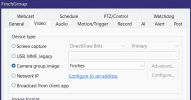
  2. But once you have a new camera, you can then change its source to a group:
    1. 1770568755742.png
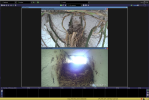
  3. I did not see a way to edit the layout, and right now it's stacked top and bottom, both in the console:
    1. 1770568808095.png
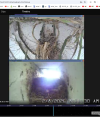
    2. and from ui3:
    3. 1770568835635.png
    4. despite the Group side-by-side in the console:
    5. 1770568868238.png
    6. But then again I'm not sure how much there is to edit with only 2 cameras.
  4. I could not get this to stream to YouTube.
    1. I can get one camera to stream, but as soon as I switch to the "Group" camera, the stream ends with "No data"
    2. I thought it might be the combination of different resolutions and/or frames rates in the group, so I tried new group with two identical cameras with identical settings, and the Group still will not stream.
    3. I even tried a "group" containing only one camera, and that group will not stream, even though that one camera will stream by itself.
I'm sure this feature will get more features as Ken sees how people use it.