What to do if Home Internet is out...

David L

IPCT Contributor
Aug 2, 2019
12,406
33,566
USA
Thanks to @pete_c I found a solution to have a redundant (second) WAN for my pfSense router when the Internet goes out. What I have done in the past is put my phone in Hotspot mode and connect to it via my PC's WiFi NIC, which works, but only for my PC. I was looking at Ethernet Bridging but was not finding a solution to my pfSense box, it does not have a WiFi NIC.

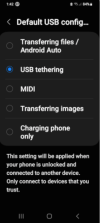
USB tethering, once turned On on my Android phone, you basically connect your phone to an USB port where pfSense sees it as an additional NIC/Interface, which you can setup a second WAN

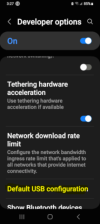
For Android, I don't know how Apple does it, you turn it On in Developer options, that is if you don't have the option in Connections/Mobile Hotspot and Tethering/USB tethering
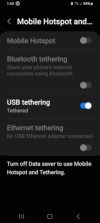
1769289917164.png

This is in Developer options:
1769290332353.png1769289997628.png

NOTE: If you connect your phone like me, to your PC to transfer files, be sure to default to Transferring files / Android Auto when not using Tethering

Once On, you use an USB (Data) cable to your device (router), try it on your PC first. You will see an additional NIC (network Connection) I tested mine by turning off my Ethernet port, and did a What is my IP and saw a T-Mobile IP, I did a speed test also.
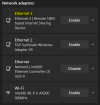
1769289834796.png


Again, thank you @pete_c for your instructional on this subject.
 
Last edited:
  • Like
Reactions: bp2008 and Arjun
Using a Hotspot when your Internet is out.

This is a quick way to connect your PC via it's WiFi NIC (port) to your phone's hotspot.

Just be aware that Cell Services have different rules upon using your phone as a hotspot, most have a data limit when reached they will slow your connection. This is what T-Mobile does on our plan. But in most cases you should be fine until your main Internet service is restored.

On Android, go to Settings/Connections/Mobile Hotspot and Tethering and turn On Mobile Hotspot. Look for the new connection from your PC's WiFi Connections and connect to it. TaDa you now have Internet through your phone.

And yes, you will still receive phone calls on your phone...
 
Last edited:
 
  • Like
Reactions: mat200
This can be done with many routers.

A quirk with the iphone is it won't remember the router, so any reboot, etc. and you have to manually go thru the process to "trust the device" you are connecting to.
 
  • Like
Reactions: Arjun and David L
This can be done with many routers.

A quirk with the iphone is it won't remember the router, so any reboot, etc. and you have to manually go thru the process to "trust the device" you are connecting to.
I have not got that far to see if Android remembers. I will say it does stay connected USB tethering on reboot.

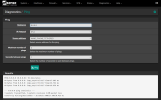
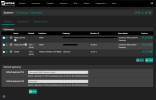
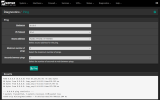
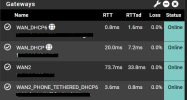
I just added the Interface (WAN2) in pfSense. So far I can ping out the interface to the Internet, which is a good sign.

1769295369855.png
 
  • Like
Reactions: Arjun
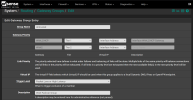
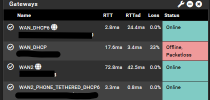
Next, for Auto Fail Over, I set up a Gateway Group with Tier 1 being my main Internet and Tier 2 being my phone

1769296707694.png1769295627905.png
 
Last edited:
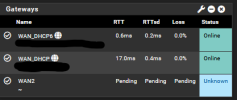
Still not fully Online yet, in theory, when packet loss is 100%, pfSense will switch over to WAN2
1769296615320.png
 
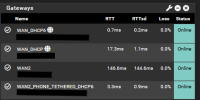
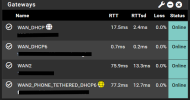
Online now...

1769297610044.png
Yes I know, my Cell service sucks out here in the country...but it will work when main Internet is down....

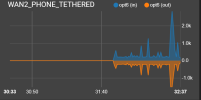
Still going out Phone:
1769297710916.png

Next will be to pull main Internet cable. BUT, can't do it now, wife is watching Netflix, lol
 
1769297956277.png

IPv6 looks good...
 
  • Like
Reactions: pete_c
As I would expect, I get packet loss if I use my phone, well surfing the Internet that is. Have not tried a phone call, should not be much data usage there I would assume...
 
Failover worked but no Internet on PCs, thinking Firewall Rule?

1769301077872.png
 
Getting traffic on both IPv4 and IPv6

1769301194280.png
 
Have to stop now, my wife is watching Netflix again.. :)
 
Last edited:
So Android will remember the connection, but you have to leave USB tethering as the default in Developer options, I found out.

1769344905014.png

Got my IPv6 Fail Over working but even after unplugging my phone and re plugging it back in, it did not go back to main Internet IPv6. Still working on this issue, but IPv4 Fail Over works great.
 
I use Peplink routers for this. Balance 20X in particular. They have sim slots so I insert a TMobile sim and tell it to use it as a failover wan connection. TMobile charges $15/month for 30GB/month. It’s perfect for small outages. A lot of the time I don’t even know the main internet is down since the router fails over automatically. It shoots me an email when this happens.
 
  • Like
  • Love
Reactions: Arjun and David L
I use Peplink routers for this. Balance 20X in particular. They have sim slots so I insert a TMobile sim and tell it to use it as a failover wan connection. TMobile charges $15/month for 30GB/month. It’s perfect for small outages. A lot of the time I don’t even know the main internet is down since the router fails over automatically. It shoots me an email when this happens.
How is the O/S, does it has all the option pfSense has? VLAN, VPN Server, Routing, Firewall Rules, Add-ons, etc.?
 
As an Amazon Associate IPCamTalk earns from qualifying purchases.
Starlink? Standby
Mode is $5 a month
Starlink mini can be had for $110 on marketplace