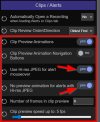
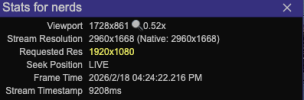
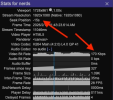
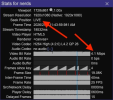
I'm struggling to get my H265 camera going direct-to-wire to UI3 running on my laptop with windows 11 and Iris XE iGPU. I have the BI webserver encoder profile set as H265 and direct-to-wire as checked and the UI3 Video Player set to automatic. Unfortunately, the stream shows up as H264 in UI3 under
tools for nerds. The same camera does however stream as H265 on two other win11 laptops both with NVidia GPUs. Also, successfully on chrome on iOS.
Looking at the UI3 github compatibility table, it suggests that H265 direct-to-wire should work with iGPU but when I browse to "chrome:/gpu" it doesnt list H265 in the supported codec section!
Has anyone managed to get this to work on Iris XE GPU or is the problem likely elsewhere? Thanks.
H.265 support is very complex and tricky. I'll try to explain what is going on.
Every time UI3 requests a video stream from
Blue Iris, UI3 tells Blue Iris these two things:
- which video codec(s) are supported (
H.264, H.265, or both)
- which video codec is preferred by the user (
H.264, H.265, or no preference)
Codec Support Negotiation between the Web Browser, UI3, and Blue Iris
UI3 learns which codecs are supported by using feature detection; in essence, UI3 asks the web browser what it supports. If the browser does not say it supports
H.265, then UI3 will not tell Blue Iris that it supports
H.265, and therefore Blue Iris will not send
H.265. Period. This codec support negotiation takes precedence above everything else.
Most likely what is happening on that laptop is the web browser is telling UI3 it does not support
H.265, and consequentially UI3 is not asking Blue Iris for it.
You can confirm that by looking in UI3's main menu >
About This UI. It should tell you which codecs are supported in which of UI3's video player modules. This list is dynamically generated based on feature detection so it will be different in web browsers that have different codec support.

And in
UI Settings >
Video Player you can see
H.264 and
H.265 here with either a green checkmark or red X for each. And also when you click (learn more) it will give more detail about which video player modules support which codecs.

In summary, the web browser tells UI3 which video codecs are supported. UI3 shows the codec support list in a few different places in its UI. Upon every video request, UI3 shares the list of supported codecs with Blue Iris.
How Blue Iris decides which Video Codec to actually send to UI3
Now it is time to discuess the
codec preference and how it is determined which video format actually gets sent to UI3.
By default, UI3 has no codec preference. If you want to set one, you can do so in UI3's Streaming Profile editor (
but generally I recommend leaving it on "inherit").

The default "Preferred Codec" is "
inherit" which means the codec choice will be inherited from a server-side streaming profile in Blue Iris.
The server-side streaming profiles in Blue Iris by default have
H.264 chosen. You can change it to
H.265, but again
I generally recommend leaving it on "H.264".

There are two reasons I recommend leaving the preferred video codec set to
inherit /
H.264:
- The codec preference/choice only affects which video encoder is selected when encoding/transcoding is needed.
H.265 is more CPU intensive for Blue Iris to encode, less compatible with various client apps like UI3, and does not actually provide a meaningful difference in compression ratio or image quality. Therefore I always recommend leaving it set to use inherit in UI3, and H.264 in Blue Iris.
- The codec preference/choice in UI3 and in Blue Iris has no effect on direct-to-wire streaming. I'll say that again. The "Preferred Codec" choice in UI3 and the Video codec choice in Blue Iris has no effect on direct-to-wire streaming.
How does direct-to-wire factor into this?
All that matters for direct-to-wire streaming is:
- which video codec the IP camera is encoding to natively (
H.264 or H.265). Remember this is determined by the camera, not by Blue Iris.
- whether or not direct-to-wire is enabled for the streaming profile you are using
- whether or not UI3 supports the codec the IP camera is encoding to natively
- direct-to-wire only works with live single camera streams. Not when playing recordings. Not multi-camera streams.
If direct-to-wire is disabled or if UI3 does not support the codec the camera is using, Blue Iris will transcode the video and not use direct-to-wire. Transcoding will happen using the preferred codec if possible but it will fall back to an unpreferred codec (typically
H.264) if necessary based on the result of the "codec support negotiation" that I described closer to the top of this post.