Fine Tune BI6.0 AI OCR

I noticed that BI6 uses the global_mobile_vit_v2_ocr.onnx...... for LPR OCR. Is there a way to fine tune that using the previous model?
global_mobile_vit_v2_ocr Model Config · Issue #75 · ankandrew/fast-plate-ocr Seems like they don't support the old format and only the cct ones. Any guide or help would be appreciated
It would be better if Ken switches to using the cct-s-v1-global-model and/or cct-xs-v1-global-model, it has better accuracy. I have not had a chance to email Ken asking if he will make the switch.

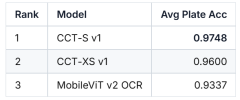
Average plate accuracy (all 66 countries)​

1768619498448.png

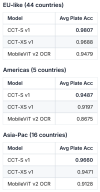
Region‑level averages (plate accuracy)​

I grouped countries into 3 rough regions
  • EU‑like: most European countries in your data (44 countries).
  • Americas: Argentina, Brazil, Canada, Mexico, USA (5).
  • Asia‑Pac: Armenia, Azerbaijan, Bahrain, Cambodia, Georgia, Hong Kong, Indonesia, Israel, Malaysia, Qatar, Singapore, Thailand, Turkey, Vietnam, Australia, New Zealand (16).

1768619544559.png

Summary​

  • CCT‑S v1dominates:
    • Best average plate accuracy in all regions.
    • Wins in ~91% of countries on plate accuracy.
    • CCT‑XS v1 is consistently strong and occasionally ties or exceeds CCT‑S in a few countries.
  • MobileViT v2 OCR generally underperforms both CCT variants, with a few local wins (Iceland, Slovakia).
 
  • Like
Reactions: adventuredphoto
I'm struggling to get LPR working well. How do I enable this model for testing? Thanks!
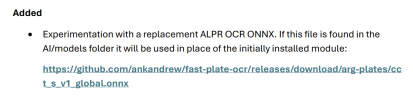
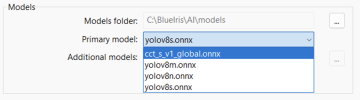
Download the model from the below link, save the model in folder C:\BlueIris\AI\models then restart the Blue Iris service. Also you might want to give the plates.onnx model a try in the below post. Make sure you have Use of main stream images checked


Last edited:
  • Like
Reactions: 105437
Download the model from the below link, save the model in folder C:\BlueIris\AI\models then restart the Blue Iris service. I also you might want to give the license-plate model a try in the below post. Make sure you have Use of main stream images checked


Thanks, I'll give it a try. If I want to test your LPR model, I follow the same steps and remove the cct_s_v1_global.onnx model?
 
You need both models cct_s_v1_global.onnx and plates.onnx. The plates.onnx model detects the plate and the cct_s_v1_global.onnx model does the OCR.
Thanks. So just put those two models in the models folder and no other configuration?