IPCampower Switch Issue Question

botics

Getting comfortable
Feb 9, 2019
260
119
Coral Gables, Florida
I am using ipcampower switches past gen 10/100/1000 mbps PoE+ switches x 2. When I power off my entire or system or just the switches some cameras have no signal. If I reboot the switches the same or other cameras may power on and are viewable and some are not.

If I input the ip address in a browser I time out. At other times they will connect and provide picture/sound. New CAT 6 wire with new connectors toned and checked about two years ago. I’ve had this issue from day one with previous ipcampower switches as well.

Any ideas?
 
Sounds like IP conflicts and one or more camera has the same IP address, OR you are over the wattage capacity of the switch.

What model switch and model cameras connected to it?
 
I actually have two of the following switches: IPCP-24G3G-AT1. Mainly turrets, small ptz's, and a few bullets split up over these two switches. High draw cameras have separate 12/24v power runs. This has been an ongoing issue since using the previous generation of IPCAMPOWER switches as well. Rebooting the switches sometimes brings the cameras back up, and sometimes it doesn't help.
 
And to add to the above comments. I unplugged and reconnected the RJ-45 cables and everything comes back up. Again, this is a common occurrence. I am running everything on a UPS as well, which I just replaced on 1/11/2026.
 
You could probably try a used Cisco Small Business Poe switch, solid unmanaged layer 2 switch. i have this one.
has 12 802.3af poe ports. Anytime I have computer or camera or BI issues The switch has never been the cause of anything except steady stable performance.
$43 bucks is about equal to -2 Quarter Pounder with Cheese #3 orders at Mcdonalds. In other words for the price of lunch you could rule it out.
 
You could probably try a used Cisco Small Business Poe switch, solid unmanaged layer 2 switch. i have this one.
has 12 802.3af poe ports. Anytime I have computer or camera or BI issues The switch has never been the cause of anything except steady stable performance.
$43 bucks is about equal to -2 Quarter Pounder with Cheese #3 orders at Mcdonalds. In other words for the price of lunch you could rule it out.
 
having said that, :) i shopped around for a used PoE+ Cisco that was a few steps up in available POE ports, and available POE+ support. about 3 lunches at Mc Donalds. 1 yr warranty from an IT reseller locally.
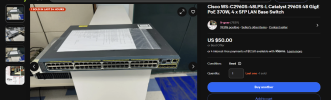
this will allow me to run 1 switch instead of the 2 i have now. I have 1 802.3AT ( POE+) camera. the 802.3AF cisco switch actually ran the camera, but I was afraid causing damage and got a small Netgear POE+ switch.
Now I can condense eveything to 1 switch, and have an extra switch at my BI machine for tinkering around with POE cams in the warmth of the house.
1768193377578.png
View attachment IMG_0483.mov
 
Last edited:
The SG200-26P is a managed switch, but you can ignore that. The bigger question IMO is do you need poe+? This one supports only standard 803.af standard POE. I've got a similar model sitting unused because I bought a camera that needs poe+.
 
  • Like
Reactions: Flintstone61
Yeah it will run unmanaged. I can't remember if that one has a reset switch on it ir not to set everything back to default, but whatever. That and my cisco 3650 L3 switch - just worked as an unmanaged switch also.
I debated with getting the Sg300-52p for vlans ...not sure which is easier to manage the 2960s or the sg300
 
Yeah @botics the 300 series supports Poe+
The 200 series dies not not, thanks @tigerwillow1 for pointing that out.
 
Don't take the 200/300 model split as poe vs. poe+. My paperweight non-POE+ switch is an SF300-24P. Its POE+ replacement is SF-350-24P. Older models don't have POE+. Best thing is to look at the specs before buying.
 
  • Like
Reactions: Flintstone61
Don't take the 200/300 model split as poe vs. poe+. My paperweight non-POE+ switch is an SF300-24P. Its POE+ replacement is SF-350-24P. Older models don't have POE+. Best thing is to look at the specs before buying.
Yeah im going dizzy reading data sheets on Cisco's site,
but it appears that they are no longer hosting the sg200-300 stuff on data sheets from what i can find.
So I'm left with AI and some info from other sites.
I think the Cisco WS-C2960S-48LPS-L
is probably the best set it and forget option for me at this time.
Although VLAN's on the SG series with a web GUI seem more possible for a lightweight like me.
But the other thought is IF I Vlan the Blue Iris Cameras will the girls in the house be able to see them from the NVR on their Amcrest ViewPro App.
Getting English across to them is slow and painful with technology. Simple ends up best.
So then were back to letting the Chinese spies watch " whatDatHonky Up 2 Now" episodes from my driveway.
 
I think the SF series can set up VLANs with the GUI, but it's more like a command line situation than graphical. Not intuitive to a newbie and I've not yet damaged brain cells trying to figure it out.
 
  • Like
Reactions: Flintstone61
I gonna end up with a stack of switches and people hollering " the Internets down again!"
If I keep reading and get bad case of FOMO...and get a SG350-28MP.
I think I when I was at the Condo managing the Cams there, in closed non-internet system, the unmanaged switch was such simplicity,,,it was like Serenity compared to all the options inside the switch.