IVS on 5442

Spooling

Getting the hang of it
Sep 26, 2015
211
55
Hey There;

I've got IVS working in a basic manner on a 5442 running v2.800.000000.10.R Firmware. (Build Date 2019-11-18)

It works with a single rule, however I'm trying to add a second rule and be able to trigger off either.

I've named the rules in the camera's interface however in the .xml that's coming through it appears that the first rule is seen as Rule="000". Should I expect that additional rules would be Rule="001" etc.? I'm having trouble trying to find something to key off of to distinguish the 2nd rule.

I presume the rule numbering vs naming is because I'm running older firmware?

Thanks for any guidance.
 
Last edited:
I can't be sure but IVS rules are shown as named/numbers in order of creation.

I see IVS-1, IVS-2 etc on the live screen, so I would think so
 
OK, thank you. I can trigger on Rule="000" for the first entry, but I can't get anything out of the 2nd rule...

I'm going to need to find a way to debug this. It's difficult to catch the ONVIF messages coming through I find.

I also have no visual indication of the rules firing on the camera live view. I presume they should be visible somehow? I'm running Windows 11 and a chrome browser, so maybe it's some sort of incompatibility.
 
OK, thank you. I can trigger on Rule="000" for the first entry, but I can't get anything out of the 2nd rule...

I'm going to need to find a way to debug this. It's difficult to catch the ONVIF messages coming through I find.

I also have no visual indication of the rules firing on the camera live view. I presume they should be visible somehow? I'm running Windows 11 and a chrome browser, so maybe it's some sort of incompatibility.
You need to use good ole Internet Explorer to view the cams GUI. It's still built in in Win10 and Win11.
In some case's, you can also use Edge in IE mode. But not all cams will respond properly to edge.
You will have to allow the plugin to install, that will most likely solve your issues.

How to enable native Internet Explorer in Windows 10 and 11:
  • Open Notepad:
    • Copy then paste the single line of code below into Notepad:
    • CreateObject("InternetExplorer.Application").Visible=true
    • Save as OpenIE.vbs
  • Make sure the the file name ends in .vbs not .txt, If it ends in .txt you must rename to .vbs
  • Create a shortcut to the above file and double-click it anytime you want native Internet Explorer.
 
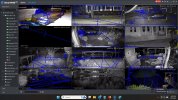
Well I figured I'd give SmartPSS Lite a try. When I bring up the live view of the camera, I don't see any of the rules, boundaries etc. showing on top of the video. I see in the settings that they should show as they have checkmarks next to them.
 
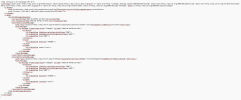
Well, I see both of my rules being fired independently and they appear correct in the IE live view. However I never seem to see the 2nd rule come through via ONVIF. The following is typically what I'm seeing.

<?xml version="1.0" encoding="UTF-8"?>
<s:Envelope xmlns:tns1="" xmlns:wstop="" xmlns:wsa="" xmlns:wsa5="WS-Addressing 1.0 Namespace" xmlns:tev="" xmlns:wsnt="" xmlns:tt="" xmlns:s="" xmlns:sc="">
<s:Header>
<wsa5:Action></wsa5:Action>
<wsa5:To></wsa5:To>
</s:Header>
<s:Body>
<tev:PullMessagesResponse>
<tev:CurrentTime>2026-01-09T00:34:35Z</tev:CurrentTime>
<tev:TerminationTime>2026-01-09T00:42:51Z</tev:TerminationTime>
<wsnt:NotificationMessage>
<wsnt:Topic Dialect="">tns1:RuleEngine/FieldDetector/ObjectsInside</wsnt:Topic>
<wsnt:Message>
<tt:Message PropertyOperation="Changed" UtcTime="2026-01-09T00:34:35Z">
<tt:Source>
<tt:SimpleItem VideoSourceConfigurationToken="000"/>
<tt:SimpleItem VideoAnalyticsConfigurationToken="000"/>
<tt:SimpleItem Rule="000"/>
</tt:Source>
<tt:Key>
<tt:SimpleItem ObjectId="469949"/>
</tt:Key>
<tt:Data>
<tt:SimpleItem IsInside="false"/>
</tt:Data>
</tt:Message>
</wsnt:Message>
</wsnt:NotificationMessage>
</tev:PullMessagesResponse>
</s:Body>
</s:Envelope>


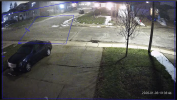
These are my two rule zones for testing.

1767919141735.png
 
So I added a tripwire rule and was able to capture an ONVIF event with information on both the tripwire and an intrusion zone. I can't see anyway to distinguish these from each other sadly.....

1767922286676.png
 
So I added a tripwire rule and was able to capture an ONVIF event with information on both the tripwire and an intrusion zone. I can't see anyway to distinguish these from each other sadly.....

View attachment 236004

You will notice one says "LineDetector/crossed" which would be the tripwire and the other says "FieldDetector/ObjectsInside" which would be the intrusion box and that is what differentiates the two rules.

What program are you trying to do this detection in? Is there anyway to listen for that instead of the rule?

In BI, we can do a listen for that or we can change the IVS1 to a different name and then it appears in the log - have you tried that?
 
I want to have 2 different intrusion zones ideally. I just added the trip wire for testing. With 2 different intrusion zones, I can't see anything that would help me differentiate those triggers.

I'm running the final version of BlueIris v5.

I've tried renaming the rules, but all that ever comes through in the .xml is Rule="000". In the live screenshot above I have one zone named 001 and another named Street.
 
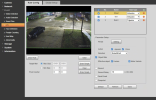
For the last .xml data that I posted above these are my settings on the camera. The tripwire has a name and the 2 intrusion zones have names, but as you can see in the .xml both are listed as "000"

1767926623825.png
 
OK so you are using BI.

Under the ONVIF Triggers comes up all of the camera events it listens to. Each one corresponds to something in the camera - motion detection, SMD, IVS tripwire, IVS intrusion, etc.


1707346290728.png


There is no need to figure out which is what if you are using IVS rules, so you can turn all of those off.

Instead, either keep track of what each IVS rule is named (IVS-1, IVS-2, etc.) or rename each rule in the camera GUI.

Then simply hit the + sign and in the Contains block put in the name of the IVS rule (IVS-1 or if you renamed it something else) and then in the memo you put down what it is for.


1707346729163.png


As they populate, they will show up in the Listen for:


1707346565911.png


Then you go into the alerts tab and the stuff you put in the Memo field can be used for the required AI:
 
  • Like
Reactions: Spooling
Thanks Wittaj. I totally get all that and appreciate you writing all of that. In my case however, the camera spits out Rule="000" for every rule that triggers. None of the names make it into the .xml and neither do any sort of number that helps me identify the rule that was triggered.
 
Go back to the camera setting in BI and hit the find/inspect key again and post what the pop up window shows.

It might give us a clue to the problem or maybe the Find/Inspect will fix the problem, especially if you created the IVS rules after the camera was already in BI.
 
  • Like
Reactions: Spooling
OK! Here's what it spits out....

Opening 192.168.1.108 port 80...
HTTP Get / request...
OK
ONVIF GetSystemDateAndTime
2026-01-09T03:41:21.000Z
Requesting device information...
Manufacturer: General
Model: IP Camera
FirmwareVersion: 2.800.0000000.10.R, Build Date 2019-11-18
GetCapabilities...
Querying services
Has Imaging services: /onvif/imaging_service
Has media services: /onvif/media_service
Has RTP_RTSP_TCP, requesting profiles
profile token MediaProfile000
profile name MediaProfile_Channel1_MainStream
profile source is 000
profile token MediaProfile001
profile name MediaProfile_Channel1_SubStream1
profile source is 000
profile token MediaProfile002
profile name MediaProfile_Channel1_SubStream2
profile source is 000
requesting URI for profile MediaProfile000
RTSP URI: rtsp:/192.168.1.108:554/cam/realmonitor?channel=1&amp;subtype=0&amp;unicast=true&amp;proto=Onvif
requesting URI for profile MediaProfile001
RTSP URI: rtsp:/192.168.1.108:554/cam/realmonitor?channel=1&amp;subtype=1&amp;unicast=true&amp;proto=Onvif
requesting URI for profile MediaProfile002
RTSP URI: rtsp:/192.168.1.108:554/cam/realmonitor?channel=1&amp;subtype=2&amp;unicast=true&amp;proto=Onvif
Has Event services: /onvif/event_service
Has WSPullPointSupport
RelayOutputs: 0
InputConnectors: 0
Has Device IO services: /onvif/deviceIO_service
AudioOutputs: 0
Done