I took the plunge and upgraded today. I can report that it all went as expected with zero surprises and seems to be functioning, with the new native AI, very well.
I'm having a debug problem with identifying cars in my driveway. The model is YOLOv8. Below is the image being analyzed, the AI frame parameters and the status window AI analysis showing "nothing found". To my eye, it is a very simple case with a clear picture. Would someone look at it and tell me what I'm doing wrong (or give me some hints in how to diagnose)? Thank you!
P.S. To narrow my question, I particularly wonder why it is not analyzing 10 frames for 5 seconds (500ms × 10) after the trigger? It does analyze two frames before the trigger.
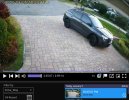
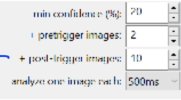
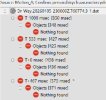
I'm having a debug problem with identifying cars in my driveway. The model is YOLOv8. Below is the image being analyzed, the AI frame parameters and the status window AI analysis showing "nothing found". To my eye, it is a very simple case with a clear picture. Would someone look at it and tell me what I'm doing wrong (or give me some hints in how to diagnose)? Thank you!
P.S. To narrow my question, I particularly wonder why it is not analyzing 10 frames for 5 seconds (500ms × 10) after the trigger? It does analyze two frames before the trigger.
Last edited: