CCTVCam
Known around here
- Sep 25, 2017
- 3,253
- 4,199
I noticed you used "puss" and not "pussy".
I wonder what the AI might have identified if you'd gone with the full version...
I noticed you used "puss" and not "pussy".
I wonder what the AI might have identified if you'd gone with the full version...


I'm curious why 15fps isn't "good enough". What is it you need more fps for? Is something happening in high speed you need to monitor?? Those Xeon processors you are working with were last manufactured in 2011. I don't know who you answer to but if you need top of the line monitoring and storage due to security concerns, you should ask for CPUs made in the last decade.I'm still watching this thread and waiting. I'm not going to switch over to BI 6 before Q1 2026.
My application is not quite mission critical, but I have to answer a lot of questions several times a day if things aren't working right. I have 31 cameras, and 15 fps isn't good enough. My hardware is OK, dual x5690 (old high end Xeons), 288gb RAM, Quadro RTX 4000 8gb, SAS, two GBE networks passing video traffic. I think I would be ok to make the switch and have a couple days to monitor and tweak. However, due to security concerns, I'm going to be adding at least 15 more cameras. My network won't choke on it, but the struggle for storage is real. There are some cameras I can justify not continuously recording, but others are 24/7. I have basic motion detection to trigger some of the cameras now, but several of the new ones are going to be looking outside at traffic, parking lots, and monitoring a tree line. I really would like the integrated AI to work well for me because of financial and bitrate budgets. I'm not going to get a lot of money for top tier cameras, and I'm not getting a higher level LTO storage system. Cameras that watch nature eat more bandwidth and generally stay pegged at CVBR limits.
I know I've asked for advice here recently before, and was a little resistant to some of the suggestions. The constraints I have aren't just me being stubborn. A few months ago someone dropped dead, and there wasn't a camera watching that spot directly. The police were good with all the footage they could see, but there were a lot of questions and suggestions of inadequacy on my part after the fact. More recently there is a transient people problem, and it exists just beyond the trees, and I need to have adequate eyes on them.
The basic question is, is Version 6 totally ready, will take less than a day to get fully up and ready, and will it eat up too many resources for me to handle as I add more cameras? I have done a bit of math and with Version 5 I should be able to handle 64 cameras, although I may need to connect up to a 10gb ethernet port. I'm sure someone out there can relate in hardware, and with greater experience.


COCOso is the built in AI using a custom trained model or a google coco data set??

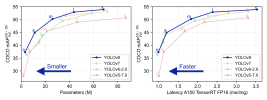
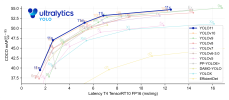
The built-in BI AI is using yolo8 you can see the details here Explore Ultralytics YOLOv8so is the built in AI using a custom trained model or a google coco data set??
I had trouble on 2 of my installs with this. I found its best to completely uninstall CPAI and delete the folders. Then reboot. Also, I had to toggle between "NO GPU" and GPU modes in the BI AI, each time stopping the BI service and restarting it. But I did get it to work on all of my installs eventually.Is there a trick or something that needs to be done to get built in ai to work? No matter what I do I get 'nothing found'. I tried rebooting etc. when I switch back to codeproject it works again....
did you download the ~350mb models? you should have a handful of files at "C:\BlueIris\AI\models\" at the very least you'll need yolov8m.onnx or yolov8s.onnx along with coco.namesIs there a trick or something that needs to be done to get built in ai to work? No matter what I do I get 'nothing found'. I tried rebooting etc. when I switch back to codeproject it works again....
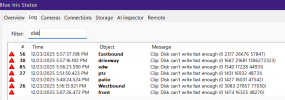
So after running Version 6 for awhile now with AI enabled on 15 cameras I noticed I am getting a lot of "Clip: Disk can't write fast enough" errors in my BI log file. This is only occurring with my Dahua cameras. I've made several changes to try and rectify this to no avail. I contacted BI support and they told me that my old Western Digital Purple running at 5400 rpm was too slow and and there was too much data being written with 15 cameras using AI.
Before I invest in a new Purple Pro, which would run at 7200 rpm, I wanted to see if there is anyone else having the same issue?
View attachment 235066

Are you doing continuous record on all your cameras by an chance?So after running Version 6 for awhile now with AI enabled on 15 cameras I noticed I am getting a lot of "Clip: Disk can't write fast enough" errors in my BI log file. This is only occurring with my Dahua cameras. I've made several changes to try and rectify this to no avail. I contacted BI support and they told me that my old Western Digital Purple running at 5400 rpm was too slow and and there was too much data being written with 15 cameras using AI.
Before I invest in a new Purple Pro, which would run at 7200 rpm, I wanted to see if there is anyone else having the same issue?
View attachment 235066
You also could try to reformat the drive; it may be so defragmented. I have also seen some error like this a long time ago when my WD Black took a crap. I run 3 4TB 5400 purples and have for over 5 yrs with no issues.So after running Version 6 for awhile now with AI enabled on 15 cameras I noticed I am getting a lot of "Clip: Disk can't write fast enough" errors in my BI log file. This is only occurring with my Dahua cameras. I've made several changes to try and rectify this to no avail. I contacted BI support and they told me that my old Western Digital Purple running at 5400 rpm was too slow and and there was too much data being written with 15 cameras using AI.
Before I invest in a new Purple Pro, which would run at 7200 rpm, I wanted to see if there is anyone else having the same issue?
View attachment 235066
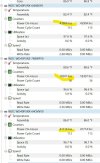
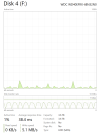
What is your task manger looking like for that drive,
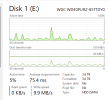
No, continuous sub + Triggered on 11 of the 15 cameras.Are you doing continuous record on all your cameras by an chance?
Maybe it's time...You also could try to reformat the drive; it may be so defragmented.

Try the WD Drive Utilities and see what it is showing the health of you HDMaybe it's time...
 support-en.wd.com
Hmmm... The utilities app doesn't even recognize the drive.Try the WD Drive Utilities and see what it is showing the health of you HD