I have 6 different servers that I will be doing. 2 have had issues and I don't know why. The issue is when I go into camera settings. The font has changed on those 2, and the font is too big for the box that the camera settings opens up to. Sometimes, it is okay, but other times it is not. I have never had an issue like this with BI 4 or BI 5. Is there something I'm doing wrong with the uninstall and install process? I'm a little frustrated with this. Thanks.
What is the best way to install BI 6?
- Thread starter ingeborgdot
- Start date
You are using an out of date browser. It may not display this or other websites correctly.
You should upgrade or use an alternative browser.
You should upgrade or use an alternative browser.

Bruce_H
Getting comfortable
Are you accessing the servers via RDP?
See the link below for some additional info
See the link below for some additional info
Yes, remote over Tailscale. I went to the link. No fix yet though. I just did an install and an uninstall with another server. From the remote PC I'm using now, everything appears to be fine. So, maybe my method of installation works better the way I did this install.
But a previous install on another PC isn't quite working as well. It is too small in scale. They type of install was to uninstall V5 before installing V6 is what someone had told me to do. That install method has caused problems.
The install method that has been working with seemingly no issues, at least not yet, is where I install V6 before I uninstall V5. Maybe just a coincidence but that method of uninstalling V5 first, isn't working properly.
But a previous install on another PC isn't quite working as well. It is too small in scale. They type of install was to uninstall V5 before installing V6 is what someone had told me to do. That install method has caused problems.
The install method that has been working with seemingly no issues, at least not yet, is where I install V6 before I uninstall V5. Maybe just a coincidence but that method of uninstalling V5 first, isn't working properly.
Last edited:
Bruce_H
Getting comfortable
Yes uninstalling BI5 before installing BI6 sounds like a bad idea to me!Yes, remote over Tailscale. I went to the link. No fix yet though. I just did an install and an uninstall with another server. From the remote PC I'm using now, everything appears to be fine. So, maybe my method of installation works better the way I did this install.
But a previous install on another PC isn't quite working as well. It is too small in scale. They type of install was to uninstall V5 before installing V6 is what someone had told me to do. That install method has caused problems.
The install method that has been working with seemingly no issues, at least not yet, is where I install V6 before I uninstall V5. Maybe just a coincidence but that method of uninstalling V5 first, isn't working properly.
Constantin
n3wb
I wouldn't uninstall. Just download the new copy and then it'll take over the old install. Everything seems to fine.
Where I struggle is the maintenance contract update. Perspective software sends me what looks like a link, I try to cut and paste it into my BlueIris as requested and it simply does not work. Frustrating.
Where I struggle is the maintenance contract update. Perspective software sends me what looks like a link, I try to cut and paste it into my BlueIris as requested and it simply does not work. Frustrating.
This is exactly what I got from support.
1. Export settings from Settings > About and write down your license key
2. Uninstall the installed version
3. Download and run install to c:\program files\blue iris
4. Launch the console
That method doesn't work for me.
1. Export settings from Settings > About and write down your license key
2. Uninstall the installed version
3. Download and run install to c:\program files\blue iris
4. Launch the console
That method doesn't work for me.

I upgraded to BI 6 tonight using Remote Desktop protocol, but fully within my home LAN.
I actually followed the instructions from @ingeborgdot in the preceding post.
Biggest issue I had was, I had to re-enable the "Run BI as a Service" option in Settings / Startup.
I actually followed the instructions from @ingeborgdot in the preceding post.
Biggest issue I had was, I had to re-enable the "Run BI as a Service" option in Settings / Startup.
prsmith777
Getting comfortable

Yes, I forgot to mention that, but it was a pretty easy fix to enable it again.I upgraded to BI 6 tonight using Remote Desktop protocol, but fully within my home LAN.
I actually followed the instructions from @ingeborgdot in the preceding post.
Biggest issue I had was, I had to re-enable the "Run BI as a Service" option in Settings / Startup.
I found this guide helpful
That is the procedure that is giving me problems. On the servers I uninstalled BI 5 first, it has messed up the fonts on remote access. If I left BI 5 installed and uninstalled after BI 6 was installed, I haven't had any issues.
prsmith777
Getting comfortable
Sounds like this is bad advice then. It worked for me using headless install and UltraVNCThat is the procedure that is giving me problems. On the servers I uninstalled BI 5 first, it has messed up the fonts on remote access. If I left BI 5 installed and uninstalled after BI 6 was installed, I haven't had any issues.

bob2701
Known around here
Upgraded my system last week without incident. Downloaded version 6 and ran the installer without removing version 5 first. Checked the box for Run as Service and all good.
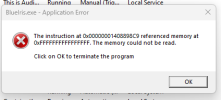
I tried the same thing with my daughter's system today and I get an error "Service and Console version must match". It worked until I clicked on "Run as Windows service".
Not sure where to go from here......
I tried the same thing with my daughter's system today and I get an error "Service and Console version must match". It worked until I clicked on "Run as Windows service".
Not sure where to go from here......
I had the same issue with the service but discovered it was because instead of starting Version 6 I had started version 5 again. Once I stopped that and started Version 6 all was well. Then I uninstalled V5Upgraded my system last week without incident. Downloaded version 6 and ran the installer without removing version 5 first. Checked the box for Run as Service and all good.
I tried the same thing with my daughter's system today and I get an error "Service and Console version must match". It worked until I clicked on "Run as Windows service".
Not sure where to go from here......
Constantin
n3wb
The only thing that didn’t work as intended for me was that one zone now features alerts and alleged recording, etc but when you click on an alert, the recording is not available.
Rebuilt the DB, deleted the DB, etc. to no avail, it must be a bad camera setting that I now have to hunt down. There is also a Christmas tree like assortment of icons that pop up on just this cameras’ alerts.
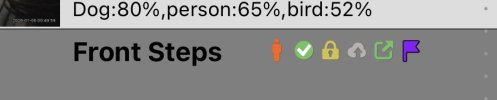
All the other alerts only feature the two leftmost symbols, the yellow lock, grey cloud, green square w/an arrow and the purple flag are exclusive to the front steps camera.
I didn’t change any of those settings so I’m kind of perplexed what’s going on.
Rebuilt the DB, deleted the DB, etc. to no avail, it must be a bad camera setting that I now have to hunt down. There is also a Christmas tree like assortment of icons that pop up on just this cameras’ alerts.
All the other alerts only feature the two leftmost symbols, the yellow lock, grey cloud, green square w/an arrow and the purple flag are exclusive to the front steps camera.
I didn’t change any of those settings so I’m kind of perplexed what’s going on.
Bruce_H
Getting comfortable
I could not find any definitive reference to these icons in the help file so these are my best guess based upon what I did find!
I believe the padlock indicates "Protected"
The cloud symbol with the up arrow may be related to FTP uploads
The purple flag could indicate the clip is "flagged"
I believe the padlock indicates "Protected"
The cloud symbol with the up arrow may be related to FTP uploads
The purple flag could indicate the clip is "flagged"
Bruce_H
Getting comfortable
If you right click on the clip, you will see options to change some of these icons "Un-Flag", "UnProtect","Remove from FTP backup queue", The green check mark indicates you have confirmed the alertThe only thing that didn’t work as intended for me was that one zone now features alerts and alleged recording, etc but when you click on an alert, the recording is not available.
Rebuilt the DB, deleted the DB, etc. to no avail, it must be a bad camera setting that I now have to hunt down. There is also a Christmas tree like assortment of icons that pop up on just this cameras’ alerts.
View attachment 235793
All the other alerts only feature the two leftmost symbols, the yellow lock, grey cloud, green square w/an arrow and the purple flag are exclusive to the front steps camera.
I didn’t change any of those settings so I’m kind of perplexed what’s going on.
Constantin
n3wb
I had to hunt around the camera settings until I finally stumbled across the flag menu.
It’s in the camera menu under AI -> Alert confirmation -> Flag Confirmed. Uncheck the check box and the Christmas tree of symbols next to the alert image disappear and content can once again get played back.
How I could have possibly changed this menu option is a mystery to me. But then again, if this is the only major issue I encounter concurrent with (though not necessarily caused by) the BI upgrade, I consider myself lucky.
It’s in the camera menu under AI -> Alert confirmation -> Flag Confirmed. Uncheck the check box and the Christmas tree of symbols next to the alert image disappear and content can once again get played back.
How I could have possibly changed this menu option is a mystery to me. But then again, if this is the only major issue I encounter concurrent with (though not necessarily caused by) the BI upgrade, I consider myself lucky.
Last edited:
bob2701
Known around here
Thanks, I removed the service and then renamed V5 folder, rebooted, started V6 and service. All good.I had the same issue with the service but discovered it was because instead of starting Version 6 I had started version 5 again. Once I stopped that and started Version 6 all was well. Then I uninstalled V5
Well I thought I waited long enough to update to 6.x, maybe not...?
I followed the general consensus that says backup V5 registry then to install 6.x and run it.
Install seemed to run fine, but did get an error at end, restarted BI 6 and now my cpu is pegged at 110% (normally ran 3-6% under v5)
Only two of my cameras show up the other 13 show no signal.
Not sure what to do at this point; suggestions while I google for answers?
I followed the general consensus that says backup V5 registry then to install 6.x and run it.
Install seemed to run fine, but did get an error at end, restarted BI 6 and now my cpu is pegged at 110% (normally ran 3-6% under v5)
Only two of my cameras show up the other 13 show no signal.
Not sure what to do at this point; suggestions while I google for answers?