Review-SD4A425DB-HNY 1/2.8" CMOS 4MP 25x Starlight Auto-tracking MiniPTZ

I've discovered something strange about mine. It has a 360 degree horizontal field of view. Wasn't expecting ting this first time I saw it. I hope it's by design, if not it will surely self destruct when the wires to the turret break.
I think you mean rotation but, yes, designed that way.
 
As an Amazon Associate IPCamTalk earns from qualifying purchases.
Couple setting questions after scanning all the pages.. getting my SD4A425DB all dialed in.. .

  • Video Detection - What is the "PTZ movement triggers motion detection" option in Video Detection use for exactly?
  • Events - Is there a way to control when day & night switch in this camera?
  • Time Plan Settings - Is this where all the Events and schedules are utilized and what is the recommendations for Day & Night?
Also since this is replacing my SD42212T-HN is the only reason the 422 performs better at night due to the 2MP to 1/2.8" sensor vs. 4MP to 1/2.8" sensor?

1756860174932.png

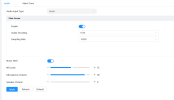
There are the settings I had in the SD42212T-HN where night view was better...
Conditions - Profile (Normal)
---Picture----
Style- Standard
Brightness- 45
Contrast - 53
Saturation - 50
Chroma CNT - 50
Sharpeness 50
Sharpness CNT 50
Gamma 50
Flip 0
---Exposure----
Mode: Auto
Exposure comp: 55
AE Recovery 15min
2D NR - On ... grade 50
3D NR - On ... grade 35
---Backlight----
Mode Off
-- WB ----
Mode Auto
--- Day & Night ---
Type: ICR
Mode: Auto
Sensitivity: Middle
Delay 10s
----Focus Zoom-----
Digital zoom Off
Zoom speed 100
Model Semi Auto
Focus Limit Auto
Senstivity default
----Defog---
Mode; Off

-----------------------------------------------
Video
Encode: H.264H
Smart Code: Off
Res: 1920*1080
FPS 30
Bit Rate Type: CBR
Bit Rate: 8192
IFrame Interval 60
SVC 1(off)

SubStream
H.264H, 704*480 (D1), 30, CBR, 640, 60, 1(off)
------------------------------------------
Audio
G.711A / 16000
AudioIn Type: LIne in
Noise Filter - Disable
Volume - 80
Speaker volumn 0

---PTZ ---
Scan function
Scan left and right limi speed 2

Event----
Video detect .. anti dither sensativty 90 / threshold 2
 
Last edited:
No,it never got resolved. I contacted Andy several times and he said he was escalating this up but after a few months I gave up contacting him and just pulled the camera and got a different brand. It's a shame because of the money but it was just too annoying.
Finally fixed it lol, so didnt realise there was two firmwares.

One for
General_SD4AXXX-HN_MCU_V2.401.0000001.80.R.231020
and one for
DH_SD-Gauss_MultiLang_PN_Stream3_V3.201.0000002.3.R.251014

I updated the DH_SD-Gauss_MultiLang_PN_Stream3_V3.201.0000002.3.R.251014
and now my WEB GUI login is really snappy. The PTZ response is very quick now too.
 
Does anyone know how to set PTZ limits for left and right. My camera is at the front of my house and sometimes it spins back towards a brickwall. I want to stop it from rotating 180 degrees.

The only function I could find was the SCAN function but it means its constantly scanning and moving.
 
Does anyone know how to set PTZ limits for left and right. My camera is at the front of my house and sometimes it spins back towards a brickwall. I want to stop it from rotating 180 degrees.

The only function I could find was the SCAN function but it means its constantly scanning and moving.
Mine only has upper/lower limit option. No Pan options. This would be normal as this PTZ has the ability to continuously move 360 degrees.

Screenshot 2025-12-09 044547.jpg
 
  • Like
Reactions: bigredfish
Does anyone know how to set PTZ limits for left and right. My camera is at the front of my house and sometimes it spins back towards a brickwall. I want to stop it from rotating 180 degrees.

The only function I could find was the SCAN function but it means its constantly scanning and moving.
what you are experiencing is a bug of the ptz part of your camera. It will randomly loose its set start position. I have the same isdue. It started very gradually, one a month, once a week, now I am seeing this once or twice a day. A restart resolves the issue.
As a tracking PTZ the cam is now useless to me, because once the issue occurs the carefully set trigger zones are all in the wrong places.
There is an option to reboot the cam automatically one a day at a set time. Make sure to set to ON.

Gesendet von meinem Pixel 8 Pro mit Tapatalk
 
Is, by chance, your #1 preset aimed at the brick wall?
No. What happens is, that the preset position is "moved" to a new position. In my case it will usually set the #1 preset to +30 degees on the x and +15 degrees on the y axes. In rare cases the position will shift to around +160 degrees, thus facing the wall as OP wrote.
After a reboot presets are reset to the correct positions.

Gesendet von meinem Pixel 8 Pro mit Tapatalk
 
Mine only has upper/lower limit option. No Pan options. This would be normal as this PTZ has the ability to continuously move 360 degrees.

View attachment 234112
Ah yep thought so.


Does anyone know how to make the tracking quicker. I have vehicles enter the camera visual arwa but the camera tries to track but is too slow. The vehicle ends up passing my house and the camera stops tracking it. Most cars are only travelling 30-40km/h too
 
Ah yep thought so.


Does anyone know how to make the tracking quicker. I have vehicles enter the camera visual arwa but the camera tries to track but is too slow. The vehicle ends up passing my house and the camera stops tracking it. Most cars are only travelling 30-40km/h too

Nothing you can do about that unfortunately.

The closer the camera is and the more of the side of the vehicle you get, the harder it is to keep up.

You can try starting with a field of view where you see more front than side of the car, but if the distance is too short between the camera and the shortest distance to the car (that I am guessing is anything shorter than about 70 feet) then it will struggle.
 
  • Like
Reactions: bigredfish
^^^^^
This
Try backing off the zoom in the preset and reducing the tracking size ratio