

I have a Zosi C296 5MP wired camera that works fine except it sometimes freezes on movement. Can anyone tell me if there is any setting in Blue Iris that can fix this issue. I have three other cameras that don't do this. Attached is a video showing what it does. Thank you for any advice.
Camera Freezes
- Thread starter Woody70
- Start date
You are using an out of date browser. It may not display this or other websites correctly.
You should upgrade or use an alternative browser.
You should upgrade or use an alternative browser.

Bruce_H
Getting comfortable

Troubleshooting Streaming Problems
Some people notice their video stream suddenly change quality at a regular interval and describe it as a "pulsing" or "shifting" effect. I have produced a sample video to demonstrate this effect. In this sample, the effect is exaggerated to make it more obvious. In practice, the effect...

Ok after checking it through the web it does do it then too.Can you view the camera directly with your web browser, does it freeze that way also?
Last edited:
I have a Zosi C296 5MP wired camera that works fine except it sometimes freezes on movement. Can anyone tell me if there is any setting in Blue Iris that can fix this issue. I have three other cameras that don't do this. Attached is a video showing what it does. Thank you for any advice.
OK...... I'll figure it out myself!
1) Are the other 3 cameras the same make and model AND are their video settings page configured the same as the problem camera in their respective webGUI's?
2) Can you post a screenshot of the problem camera's video settings page in its webGUI?
They are all different brand cameras, and the other ones are wireless and this one is wired. Here are the video settings of this CameraOK.....
1) Are the other 3 cameras the same make and model AND are their video settings page configured the same as the problem camera in their respective webGUI's?
2) Can you post a screenshot of the problem camera's video settings page in its webGUI?
Attachments

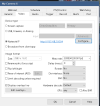
Those are BI settings, I asked for "....a screenshot of the problem camera's video settings page in its webGUI", if you can.They are all different brand cameras, and the other ones are wireless and this one is wired. Here are the video settings of this Camera

It has no video setting in the app if that is what you mean. Here is pics of everything in the app. Also I was wrong, I can't view it from the web I did it with vlc player and it frezzes there also. ODM doesn't even find the camera either. Also I know my setup isn't the best but it is what I have. All cameras are run through my Netgear XR300 Nighthawk Pro Gaming Wi-Fi Router which is an extension from the main internet router which is a TP Link AC1750 Router but it has nothing to do with the cameras.Those are BI settings, I asked for "....a screenshot of the problem camera's video settings page in its webGUI", if you can.
Attachments
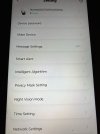
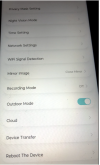
Last edited:
All cameras are run through my Netgear XR300 Nighthawk Pro Gaming Wi-Fi Router .....
Not recommended as the switch portion of most routers is not meant to handle the constant data (video) stream of network cams.
I noticed the "cloud" section in the app......did you have to set up an account before you could stream to BI?
No, it just goes to BI through my router. The only reason I don't have or use a NVR is because all my cameras are different brands and I have never found one that works with different brands. Plus it would be too expensive now to switch to all the same brand. Plus the only time I use BI is night time, I don't have it running during the daytime unless I go somewhere.Not recommended as the switch portion of most routers is not meant to handle the constant data (video) stream of network cams.
I noticed the "cloud" section in the app......did you have to set up an account before you could stream to BI?
Can you run two routers to Bi at the same time with one being not connected to the internet but ethernet connected cameras?

Can you run two routers to Bi at the same time with one being not connected to the internet but ethernet connected cameras?
Yes you can, but unless you are using the wifi capabilities of the router for a wireless camera, the switch of a router is not suited for the demands of these kind of cameras.
I used an old router not connected to the internet as a "switch" and those cameras would freeze or lose signal. As soon as I replaced it with a cheap switch the problem went away.
Thank you for the information. What kind of switch do you mean? I plan to just run one camera via ethernet through it without internet.Yes you can, but unless you are using the wifi capabilities of the router for a wireless camera, the switch of a router is not suited for the demands of these kind of cameras.
I used an old router not connected to the internet as a "switch" and those cameras would freeze or lose signal. As soon as I replaced it with a cheap switch the problem went away.
Just something like a cheap tp-link switch if you don't need POE or or cheap tplink POE switch if you need POE.
But if only one camera, go ahead and try it. Disable the wifi on the router.
But if only one camera, go ahead and try it. Disable the wifi on the router.
Thank you for the help. I will give that a try.Just something like a cheap tp-link switch if you don't need POE or or cheap tplink POE switch if you need POE.
But if only one camera, go ahead and try it. Disable the wifi on the router.
I tried the router and it was a little better but still did the same thing. I bought a tpLink switch and it is better but still does it also.Just something like a cheap tp-link switch if you don't need POE or or cheap tplink POE switch if you need POE.
But if only one camera, go ahead and try it. Disable the wifi on the router.
Attachments
Looks pretty good to me....I tried the router and it was a little better but still did the same thing. I bought a tpLink switch and it is better but still does it also.

Well now this camera keeps losing the signal for some reason and my wireless ones work fine. It makes no sense. I connected the ethernet cable from the main router to the switch, and another cable from the switch to my router, and the camera cable to the switch, and the switch to my NIC. Isn't that correct?
Bruce_H
Getting comfortable
Sounds like you have two cables from the switch to the router is that correct, if true then you have two routes for the camera to use to go to the same place. You should have the camera connected to the switch, the computer connect to the switch and the switch connect to the router, three cables only, no duplicates cables.Well now this camera keeps losing the signal for some reason and my wireless ones work fine. It makes no sense. I connected the ethernet cable from the main router to the switch, and another cable from the switch to my router, and the camera cable to the switch, and the switch to my NIC. Isn't that correct?
Do you also have two routers in the setup now?
Is it possible that the camera is failing?
Last edited: