Firmware update and Preset List from C6F0SoZ3N0PdL2 B8D-WIFI-5MP-5X B8DWIFI5MP5X

I have the C6F0SoZ3N0PdL2 camera (PTZ camera branded SV3C from Amazon, 2 years old or so) and the NVR (GW) never gets the motion detection, despite onvif device manager tool showing it under events.
I updated the firmware to V19.1.61.16.19-20210508 as this thread suggested (formerly ended in 0111 or something like that).
Still no motion.
Also seems like worse night image quality but I may need to play with settings.
 
Hello friends, can you recommend a suitable software for this software Hi16EV300HX_V19.1.11.15.1-20210111(5M) camera brand Zilink?
 

Attachments

  • 12345678.PNG
    12345678.PNG
    77.2 KB · Views: 57
Just got a camera from a company called TPTEK whick looks identical to the ones mentioned in this thread. Using ODM it says it's made by IPCAM and is Model Number C6F0SoZ3N0PlL2.
It's running firmware V24.1.41.16.3-20241105. It was cheap which is why I bought it, along with the spec. Hope it lasts :)
 
Just got a camera from a company called TPTEK whick looks identical to the ones mentioned in this thread. Using ODM it says it's made by IPCAM and is Model Number C6F0SoZ3N0PlL2.
It's running firmware V24.1.41.16.3-20241105. It was cheap which is why I bought it, along with the spec. Hope it lasts :)
The version you have is a good one (24+) and works flawless in my experience.

/ Fredrik
 
  • Like
Reactions: fixit9660
Hello there and maybe bit stupid questions.
I got C6F0SoZ3N0PmL2 camera and installed it on remote site with limited traffic. So i decide to put alarms only on FTP server (locally) and rsync them to DataCenter.
So here is a questions:
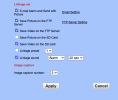
1) I set to record video and put it in FTP folder on alarm trigger. It uploads strange extension files with .256 extension and i got no idea what i shold use to watch it - VLC player won't play it.
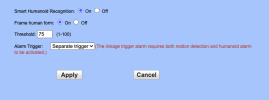
2) There are some thing like leafs on wind near and it trigger record. How to make it less sensetive like only for human? Which thersold should i use?

My current settings are attached, however i got too much spam - too many false positive triggers

Screenshot 2025-06-05 at 13.27.55.png


Screenshot 2025-06-05 at 13.28.06.png
 
Hello everyone,

I’m looking for the original firmware or a full SPI dump for a 5MP 5X PTZ camera based on Ingenic T31HX (38board, white LED, 5X zoom).

My current firmware is T31HX_V21.1.11.16.3-20210427, but it removed autofocus. I need to restore AF functionality.

I’m specifically looking for:
  • T31HX_V19.1.61.16.3-20210111
  • or any T31HX_V20.x.x.16.3 version (202103xx)

If anyone still has the original .pkg file or a 16MB SPI dump from a working camera with autofocus, please share or PM me. I’d be happy to test, verify, and document the results for others.

Thanks in advance!
 
Hello everyone,

I’m looking for the original firmware or a full SPI dump for a 5MP 5X PTZ camera based on Ingenic T31HX (38board, white LED, 5X zoom).

My current firmware is T31HX_V21.1.11.16.3-20210427, but it removed autofocus. I need to restore AF functionality.

I’m specifically looking for:
  • T31HX_V19.1.61.16.3-20210111
  • or any T31HX_V20.x.x.16.3 version (202103xx)

If anyone still has the original .pkg file or a 16MB SPI dump from a working camera with autofocus, please share or PM me. I’d be happy to test, verify, and document the results for others.

Thanks in advance!
Hi!

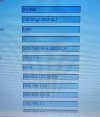
Checkout 108 (Call) function.

You might need to set/Submit 77 accordingly also.

IMG_9021.jpeg
 
Salut!

Thanks for the suggestions!

I tested presets 77, 78, and 108 using both CamHi Pro and HIP2P Client. Unfortunately the camera doesn’t respond to these commands — no autofocus behavior is triggered, and HTTP API calls to hi3510/ptz.cgi return 404 Not Found.

Manual focus still works fine via the app and web interface, but the automatic AF module seems to be removed in this firmware (T31HX_V21.1.11.16.3-20210427).

That’s why I’m still looking for a V19/V20.16.3 firmware or a full 16MB SPI dump from a 5MP 5X PTZ (38board, white LED).