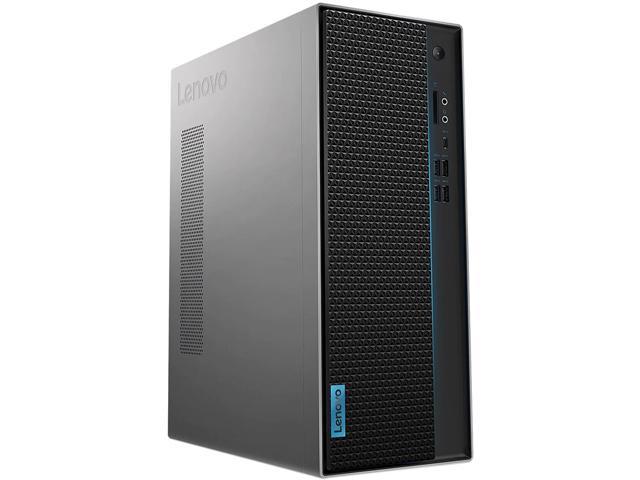
Buy Lenovo IdeaCentre T540 with NVIDIA GTX 1660 Desktop, i7-9700, GeForce GTX 1660 6GB, 16GB, 512GB SSD, Win 10 Home with fast shipping and top-rated customer service. Once you know, you Newegg!
www.newegg.com
My Load might be around 1100-1500mp But again doing sub streams so will be 90 % less anyways .. in terms of mps ..
Buy refurbished. Don't build or buy new. The most cost-effective Blue Iris computers are refurbished business-class systems such as "HP EliteDesk" and "Dell OptiPlex". You can usually get a good deal by searching [URL='http://www.ebay.com/']Ebay[/URL] for specific CPU model numbers, and...
Buy Lenovo IdeaCentre T540 with NVIDIA GTX 1660 Desktop, i7-9700, GeForce GTX 1660 6GB, 16GB, 512GB SSD, Win 10 Home with fast shipping and top-rated customer service. Once you know, you Newegg!
www.newegg.com
My Load might be around 1100-1500mp But again doing sub streams so will be 90 % less anyways .. in terms of mps ..
Buy Lenovo IdeaCentre T540 with NVIDIA GTX 1660 Desktop, i7-9700, GeForce GTX 1660 6GB, 16GB, 512GB SSD, Win 10 Home with fast shipping and top-rated customer service. Once you know, you Newegg!
www.newegg.com
My Load might be around 1100-1500mp But again doing sub streams so will be 90 % less anyways .. in terms of mps ..
Be sure and add a second Network Card too to keep your cameras on a separate network, no Internet access. Also, Windows 10 Pro allows you to remote into your BI machine, mine does not have a keyboard/mouse/monitor attached.
So, being a noob, I recently found out that having a Nvidia Video Card in the BI machine is a plus.
Yeah It does come with windows 10 home But I can get a 10 pro key on the side. Just wanted to get your guys input on the deal if its a good one or decent on what I am gonna do then I will possibly be getting this ordered today
I was about to suggest getting a <$300 eBay PC (I have one that was $250 2 years ago), but 28 or 30 cameras is out of my league. Cost of PC irrelevant compared to cameras.
I don't think the i7-9700 is a laptop CPU... usually those end in -U or -T, and are power saving variants.
I was about to suggest getting a <$300 eBay PC (I have one that was $250 2 years ago), but 28 or 30 cameras is out of my league. Cost of PC irrelevant compared to cameras.
I don't think the i7-9700 is a laptop CPU... usually those end in -U or -T, and are power saving variants.
In making your system more secure this is a great option to eliminate your cameras calling home / connecting to the internet This is a great place to start to setup a bit more secure network and learn more about IP/Subnets etc. before adding dual NICs: Router Security - Subnets and IP addresses...
In making your system more secure this is a great option to eliminate your cameras calling home / connecting to the internet This is a great place to start to setup a bit more secure network and learn more about IP/Subnets etc. before adding dual NICs: Router Security - Subnets and IP addresses...
I do not have dual nic setup but good article. Currently I have put my cameras within my router to something called No internet rule so they cannot go out to the internet at all.
So this is my thought in having a separate NIC, subnet, VLAN (optional), you keep your cameras separate from your private network. Keeping your Cameras off the Internet mainly keeps the cameras from communicating to China or a hacked site with hacked firmware. Hackers can come in through your router and get to your cameras if they reside on the same network. I do the same thing with my IoT devices, they reside outside my Private network. Not sure which router you have but I highly recommend pfSense or OPNsense...I am a fan of Qotom Minis, I have a i5 version. They have 6 NIC versions too, but you really only need 2 NIC (WAN/LAN). Only issue is if you have Gig Internet, I would stay with an i5 or i7 box. Since I got rid of my store bought routers, Asus, Linksys, etc. and added managed switches, my network now Rocks!!! So, so much faster...Make sure your network can handle 30 cameras streaming...



 www.newegg.com