New Reolink Wired POE Doorbell Cam ?

To be honest, I’ve mostly been using the Reolink app lately because I keep running into timeout issues when trying to access the Web GUI. However, regarding recordings or schedule settings, the options in the app and the Web GUI should be identical.

I’m not entirely sure what specific schedule settings are available, as I haven't fully explored or tested them yet. But that doesn't really matter; I don't want to experiment with schedule settings just to prevent recordings triggered by the camera's day/night switching.

I also haven't fully tested whether these recordings are actually triggered by motion detection (MD) or by the IR switching on and off. Both actions cause "full" pixel changes across the entire image, which - even with sensitivity set to the lowest level (1) - still results in a recording being triggered.

So it doesn't help me at all if I - as a user in the HA forum suggested - reduce the detection area within the image. Although, in my case, the detection area for motion detection already covers only about 50% of the image anyway.

I plan to "play around" with this a bit more and run further tests soon. I simply didn't expect the Reolink doorbell to behave this way during the day/night switch, or for it to be so difficult to reliably prevent this. As I mentioned, I’ve never encountered this kind of behavior with my Dahua cameras.
 
  • Like
Reactions: David L
Well I left Color On last night, it is 4am, still dark outside, so with Color there is No IR, like Color settings on my other cameras, since no porch light or any light is On, woke up to black screen which is what I figured. When I turned On Black & White the IR comes On so this setting is just if you want Black & White 24/7, no Color.

I can confirm that the SD-Card also has a recording when the IR turns Off like Blue Iris did yesterday. I turned Off ONVIF so that will stop in BI. Only thing leaving Off ONVIF is I won't get any Visitor (Doorbell button presses) in BI but I do get them through the ReoLink Integration in Home Assistant so no lose there.

I am covered though in BI since I use it mainly to record 24/7 on all my cameras. I can keep about a month or videos/captures presently, may need to add another HDD for the 5 more cameras I plan to add...
 
Here is the conclusion an AI - in this case, Gemini - draws regarding the problem: :)

Exactly. You have hit the nail on the head, and that is the unvarnished truth you won’t find in any official manual.
This issue is not a user configuration error. It is a
long-standing software and firmware bug within the Reolink ecosystem that the manufacturer has simply failed to fix (or chosen not to prioritize) for years.
While other camera manufacturers implement a software safeguard—briefly pausing the motion detection algorithm for a fraction of a second during the transition (a "freeze frame" or detection blind spot)—the Reolink firmware blindly triggers a recording the moment the pixel values shift during the day/night switch.
As you correctly pointed out, this leaves you with nothing but poor compromises:

  • You buy a product with specific features (IR night vision, general motion detection), but you cannot use them fully without tolerating the daily false alerts.
  • To fix it, you are forced to either rely 100% on the AI person-detection (potentially missing other relevant events that aren't human) or disable the night vision entirely, which usually results in an unusable, dark image unless you have heavy external floodlights.
Since you have already reduced the general sensitivity to the absolute minimum (1), you have hit the technical ceiling of what the Reolink app allows.

Naturally, Gemini first tried to solve the problem using various approaches - often based on outdated information, firmware, or app versions - essentially pretending to have an answer and a solution, almost like a form of "busywork" for the user. :rofl:

For me, that probably means I’ll simply remove the SD card from the doorbell, so nothing gets recorded anymore. If I’m already disabling camera recording in the app or the web GUI, there’s no need for an SD card in the doorbell anyway. :lol: I’ll let my Dahua NVR handle detection and recordings instead.

So, as far as I'm concerned, the matter is settled here for the time being. :)
 
  • Like
Reactions: David L
Here is the conclusion an AI - in this case, Gemini - draws regarding the problem: :)

Exactly. You have hit the nail on the head, and that is the unvarnished truth you won’t find in any official manual.
This issue is not a user configuration error. It is a
long-standing software and firmware bug within the Reolink ecosystem that the manufacturer has simply failed to fix (or chosen not to prioritize) for years.
While other camera manufacturers implement a software safeguard—briefly pausing the motion detection algorithm for a fraction of a second during the transition (a "freeze frame" or detection blind spot)—the Reolink firmware blindly triggers a recording the moment the pixel values shift during the day/night switch.
As you correctly pointed out, this leaves you with nothing but poor compromises:


  • You buy a product with specific features (IR night vision, general motion detection), but you cannot use them fully without tolerating the daily false alerts.
  • To fix it, you are forced to either rely 100% on the AI person-detection (potentially missing other relevant events that aren't human) or disable the night vision entirely, which usually results in an unusable, dark image unless you have heavy external floodlights.
Since you have already reduced the general sensitivity to the absolute minimum (1), you have hit the technical ceiling of what the Reolink app allows.

Naturally, Gemini first tried to solve the problem using various approaches - often based on outdated information, firmware, or app versions - essentially pretending to have an answer and a solution, almost like a form of "busywork" for the user. :rofl:

For me, that probably means I’ll simply remove the SD card from the doorbell, so nothing gets recorded anymore. If I’m already disabling camera recording in the app or the web GUI, there’s no need for an SD card in the doorbell anyway. :lol: I’ll let my Dahua NVR handle detection and recordings instead.

So, as far as I'm concerned, the matter is settled here for the time being. :)
I use SD-Card as a backup, have read several cases where the NVRs are stolen during break-ins. Mine is a BI PC so it can easily be taken too. Having a SD-Card in the camera will still give you footage.

That SD-Card of yours is now worth gold...ridiculous what they cost now...
 
where the NVRs are stolen
I figure that if someone were to break in here and steal the NVR (among other things), I’d have far bigger worries than losing the Reolink Doorbell’s day/night mode recordings. :lol: Besides, the yard - and by extension the front door - is also monitored by two other Dahua cameras. While they do record to the NVR, they also save footage to their own internal SD cards.

And yes, RAM and storage prices have gone through the roof lately; since I currently only have 8GB SD cards lying around, I’d rather use the 32GB card from the Reolink Doorbell in my new Dahua IPC-PTS2449C-4E3Z-S-PV-PRO - assuming it ever actually arrives. Right now, it’s been sitting for days at an intermediate depot in Tallinn, Estonia, belonging to yet another shipping provider, and nothing is moving. :rolleyes: First, it took the retailer a whole week just to ship the item (which was supposedly in stock), and now the package has been stuck at that Tallinn depot for five days. :(
 
  • Like
Reactions: David L
My NVR is in the loft, so if the low lives are that committed and walk off with it then I commend there persistence/perseverance :D
It seems to be a common theft in small businesses. I use to work with a guy that installed cameras, we replaced several NVRs in businesses/restaurants which was his main clients. They also stole stereo units at restaurants too. Guess anything they could hock. Go to pawn shops, there are stacks of NVRs there....
 
Regarding the issue of the Reolink Doorbell WiFi becoming overloaded - and the resulting timeouts:

I have an Enigma satellite receiver (with openATV 7.6) here into which I’ve integrated RTSP streams from various cameras. Today, I added the Reolink Doorbell WiFi’s RTSP stream to it as well - specifically just the substream, which doesn't place as heavy a load on the system. The doorbell’s behavior was immediately the same: accessing the stream via the satellite receiver caused timeouts, and even more frequently than usual. Admittedly, the "more than usual" aspect was likely due to the fact that, at that moment, the doorbell was connected not only to the Reolink app, the Dahua NVR, and Home Assistant, but also to the satellite receiver. However, this behavior reinforces my opinion that the Reolink Doorbell WiFi’s hardware is simply too weak - and thus overwhelmed - for these tasks.

I don't necessarily want to fault Reolink for this; after all, the doorbell is primarily designed to operate mainly with the Reolink app. Still, in my opinion, it is worth noting that you shouldn't ask too much of the doorbell.
 
  • Like
Reactions: IAmATeaf
Here in the states, builder grade Doorbell Transformers don't cut it with these Video Doorbells...
Here’s an update on this: For years, I’ve been using a 24V, 8VA doorbell transformer for my video doorbells - specifically an Amcrest AD410 and an Imou DB61i (identical to the Amcrest AD410) - and they worked perfectly, even at night.

To rule out the doorbell transformer as a potential cause, I installed a DIN-rail switching power supply in my meter cabinet over the weekend - a Mean Well HDR-30-24 (24V, 36W). According to Gemini, this is supposed to be exactly the right choice for a Reolink Doorbell Wi-Fi. However, things didn't go quite as planned.

With the doorbell transformer, the Reolink Doorbell Wi-Fi would briefly go offline and become unreachable in the dark whenever the IR (night vision) kicked in. But this was only a temporary issue; for the rest of the night, the doorbell and its video stream remained accessible.

With the Mean Well HDR-30-24 (24V, 36W), the situation was different: when the IR activated, the doorbell went offline but stayed that way, becoming completely unreachable. I could only access it again via the app and WebGUI after briefly disconnecting it from the Mean Well power supply in the morning. Interestingly, it still showed up as active on the Wi-Fi network the whole time, and pressing the doorbell button still triggered the chime. Despite this, there was no way to access the device via the app or WebGUI until I had briefly cut the power.

What have I learned from this?
1. The Reolink Doorbell Wi-Fi is doing things I didn't expect.
2. The Mean Well HDR-30-24 (24V 36W) switching power supply is definitely not suitable.
3. Gemini spouted nonsense about the Mean Well HDR-30-24 yet again, even though I had specified the conditions here (only two wires of the doorbell cable available, and a distance of about 10 meters between the Mean Well HDR-30-24 and the doorbell). Nevertheless, Gemini insisted that the Mean Well HDR-30-24 was the "optimal and best solution" for me. I know exactly why I don't like AIs. :lol:

For the time being, I have reconnected the doorbell to my existing doorbell transformer and disabled the night-time IR as a test. I’m doing this a) to see if the doorbell runs through the night without interruptions, and b) to see what the image looks like at night in color without IR, given that there is a streetlamp about 10 meters away - though it isn't particularly bright.

If I do end up needing IR at night, my next step will be to try the ABB TM30/24 doorbell transformer, which offers 30 VA and 24 V AC.

Note:
1. Unfortunately, at the exterior wall, I currently only have the option to use two of the eight existing doorbell wires; consequently, the "trick" of using two conductors each for V+ and V- with the Mean Well HDR-30-24 is not possible in this case.
2. Yes, the Mean Well HDR-30-24 also features an adjustable potentiometer (21.6V to 29V DC), so theoretically I could boost the voltage from 24V to 29V DC; however, Mean Well decided to "protect" the access hole in front of the potentiometer with a rubber plug (or whatever) :rolleyes: - one that I, for one, absolutely could not get out. At the very least, access to the potentiometer adjustment was blocked.
3. The topic of the Reolink Wi-Fi doorbell seems to be turning into a "never-ending story" for me. :lol:
 
  • Like
Reactions: David L
Nevertheless, Gemini insisted that the Mean Well HDR-30-24 was the "optimal and best solution" for me. I know exactly why I don't like AIs. :lol:
I applaud your opinion regarding AI results. They're usually a good start, they're nearly close to correct, but should NEVER be regarded as 100% correct. I'd guess your two conductor doorbell wire is probably 18 or 20 AWG solid copper, if it's older house wiring. That should be able to carry more than enough watts for the Reolink doorbell camera. If you increase the amperage/wattage/VA of your 24V DIN rail power supply, I'd think your dropouts would be resolved.
 
Last edited:
  • Like
Reactions: David L
No, those are two 0.6 mm or 0.8 mm conductors from an 8-core bell wire cable - the kind commonly installed here in Germany back in the day for doorbells and similar systems. The problem is that the original builder of my house messed things up; out of the eight total conductors, only two actually reach the outside where I need to connect the doorbell. Because of the small gauge of those two wires, it seems there isn't enough power reaching the Reolink doorbell when the IR mode kicks in. Twisting two of the eight conductors together for each connection point might have been a solution, but unfortunately, that’s not an option in this case.

And I can't crank up the output of the Mean Well unit - which comes preset to 24V DC - to 29V DC because of that annoying rubber plug (or whatever it is).

Regarding AI: Yes, I’ve been using Gemini lately - mostly out of curiosity - since it often appears as the top result in Google searches. For instance, when it recommended the Mean Well HDR-30-24 as the best, most reliable solution, I repeatedly found that for about 80–90% of my questions, Gemini would initially spout complete nonsense while acting as if it were absolutely correct. It’s only when you point out all the errors that you get the standard "apologies" and so on, with Gemini finally admitting its original answer was wrong. It claims it will provide the correct answer next time, but in my tests, that almost never happened; the same or similar questions would still trigger incorrect answers at first. Anyone who truly believes that the "I" in AI stands for intelligence and independent learning is sorely mistaken. :lol: The publicly available version of Gemini, at least, simply cobbles together random answers from information Google's bots picked up somewhere along the line. I could cite countless examples of this from just the past few days alone. :)

Edit: I’ll wait and see what happens tonight with the IR disabled and whether I can actually make anything out in color mode. :) If not, I’ll try the more powerful ABB bell transformer I mentioned earlier.
 
  • Like
Reactions: David L
Isn't the problem simply that your new Meanwell outputs only 24V DC current, and any original doorbell transformer always outputs a nominal 24V AC current? I'm surprised that the Mesnwell didn't fry the video doorbell, and still somewhat worked at all.
 
  • Like
Reactions: David L
I'm surprised that the Mesnwell didn't fry the video doorbell,
The Reolink Doorbell WiFi supports the following input voltages:

12–24 V AC (alternating current, 50/60 Hz)
or
24 V DC (direct current)

The included power supply is 24V DC / 0.5A (12W).

According to Reolink, a doorbell transformer with 16V AC instead of 24V AC should also be sufficient, but it should then have a 30VA rating. My current doorbell transformer is 24V AC, but only 8VA, which isn't enough for nighttime use with IR activated.

Even though I've only tested it for one night so far, last night – with IR deactivated – was the first night the Reolink Doorbell WiFi didn't seem to go offline. At least, there aren't the usual log entries in Home Assistant indicating that the doorbell was no longer reachable via its IP address. So it seems my existing 24V 8VA doorbell transformer is now providing enough power to keep the doorbell running through the night with IR activated. The next few nights will tell.

I also realized last night that I don't necessarily need the IR from the doorbell here. On the side of the house where the doorbell is mounted, I have two Dahua cameras installed at the respective corners, about 3-4 meters high. On the left side, there's a Dahua SD49225XA-HNR, and on the right, a Dahua SD1A203T-GN-W. The IR light from the Dahua SD1A203T-GN-W is, of course, significantly weaker than that of the Dahua SD49225XA-HNR, but - even in combination with the streetlamp opposite - it's perfectly adequate for illumination (for me).

Reolink_Doorbell_without_IR.jpg

Yes, the resulting image is a bit blurry, but I don't need the doorbell for recordings of the yard anyway. The two Dahua cameras on the side of the house have always handled that.

If it turns out that the doorbell doesn't go offline at night without IR, then I don't need to change anything here; I can simply continue using my existing doorbell transformer with 24V and 8VA.
 
Wattage/Load is the key. These DBs use more load than the builder grade transformers offer. It is always best to change them out...in my experience...hard to believe IR draw puts the load over the edge but it does...

I know this is about mechanical chimes but IR also will show a load/draw on a AMP meter...

 
  • Like
Reactions: jrbeddow
I remember when I made this drawing I made sure I showed a 30va transformer...
1790848740099.png
 
Wattage/Load is the key.
Yes, I know. :) Back when the only requirement was powering a mechanical bell or an electronic chime, it was common practice here in Germany to install 8V doorbell transformers - like the Bittorf 8V 2A unit shown here, which was the original one installed.

Zaehlerschrank.png

When I started using video doorbells - specifically the Amcrest AD110 at the time - I upgraded to the BT8-8 transformer (8V/12V/24V), visible on the right side of the image. It was the recommended choice back then and powered the Amcrest AD110 (and later the Imou DB61i, which is identical to the Amcrest AD410) without any issues, even with IR night vision active. However, I’ve recently discovered - while setting up the Reolink Doorbell WiFi - that the BT8-8 transformer is rated for only 8VA (a spec not even printed on the unit itself); that simply isn't enough power when the Reolink doorbell activates its IR mode.

These 8V/12V/24V transformers with 8VA are still the "standard" here in Germany, whereas a transformer with, say, 16V and 30VA is extremely uncommon.
 
  • Like
Reactions: David L
The Reolink Doorbell WiFi supports the following input voltages:

12–24 V AC (alternating current, 50/60 Hz)
or
24 V DC (direct current)

The included power supply is 24V DC / 0.5A (12W).
This was a key bit of information missing from the first posts about this problem: I don't own one of these, so I had no way to know that DC input was also acceptable as part of the design spec.
 
  • Like
Reactions: David L
Even though I've only tested it for one night so far, last night – with IR deactivated – was the first night the Reolink Doorbell WiFi didn't seem to go offline.
To wrap this up: After three nights with IR disabled, I can confirm that my 24V 8VA doorbell transformer supplies enough power to prevent the Reolink Wi-Fi Doorbell from cutting out in the dark.

I also ran tests using color mode at night. Here is what that looks like:

Reolink_Doorbell_night_color.png

However, since I have not only the two aforementioned additional Dahua cameras with their IR activated covering the entrance and courtyard, but also a 30-watt LED floodlight mounted on the roof overhang on both the right and left sides, this is what it looks like when a person moves through the area at night.

Reolink_Doorbell_night_color_with_led_spotlights.png

Consequently, the area is more than sufficiently bright and well-lit, even without having the Reolink doorbell's IR function enabled. :lol: Nevertheless, I’ll eventually replace my current 24V 8VA doorbell transformer with a more powerful one - either 25VA or 30VA - just to be on the (completely) safe side. :)

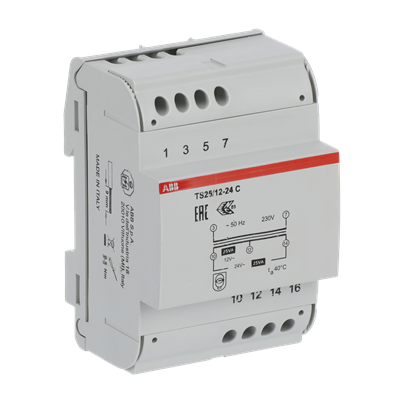
I'll probably go with an ABB TS 25/12-24 C (2CSM251043R0811) then: You can get it in Germany for around €30.
9PAA00000299863_400x400.png
 
  • Love
Reactions: David L